Atlas Is Terraform for Databases

When we shipped atlas schema plan in October 2024, we described Atlas as
"like Terraform, but for databases" and predicted
that declarative migrations would become the default for most teams. Since then, the industry has moved
the same way: in August 2026, for example, Snowflake made DCM Projects, a declarative plan-then-deploy
workflow for Snowflake objects, generally available.
The bigger change is who writes schema changes. Agents now write them in seconds, which makes the Terraform loop matter more, not less. Code is cheap now. Downtime isn't.
In this post, a coding agent is asked to add an email column to a users table. Its first attempt is
one line of valid SQL that would fail on the first deploy, because users already has rows. We'll
follow that change through the Terraform loop in Atlas, from the agent's edit to production, and meet
the rest of what Terraform users rely on along the way: state, policy as code, tests, and actions.
Much of it is new since October 2024: Atlas reached v1.0 in December 2025, and the agent skills, Atlas Scripts, and tests on production-like data in this story all shipped in the four releases after it.
Define, Plan, Apply
Terraform's core workflow has three steps. You define the infrastructure you want in configuration
files, terraform plan compares it with the current state and shows what will change, and
terraform apply runs that plan after a person approves it.
Atlas runs the same three steps on the schema inside your database. You define the desired schema in
SQL, Atlas HCL, or your ORM's models, the role .tf files play in Terraform. atlas schema plan
compares it with the current schema, writes the migration, and analyzes it. atlas schema apply runs it:

As with Terraform, the plan usually runs in the pull request, so the change is reviewed before anything executes. In a database, though, the plan matters more. A Terraform plan shows what will change, and the provider decides how to change it. A database transition, called a migration, can be applied in many ways, and they aren't equally safe: renaming a column results in the same schema as dropping and re-adding it with the new name, but only one keeps the data. An Atlas plan is the migration itself, so you can review it, edit it, and approve the safest way to get there.
If the change was planned in advance, atlas schema apply runs the approved plan as written, like a
saved Terraform plan file. Unlike a plan file, it isn't tied to one run: it's stored in the registry,
and any database in the same starting state can use it. If no approved plan matches the database's
current state, Atlas plans and lints the change at deploy time. Your
review policy decides whether it applies on its own or waits for a
person to approve it, much like terraform apply waits for confirmation.
Whether an engineer or an agent wrote the change, it takes the same path, and a change that fails a check goes back to its author.
One Change, From Define to Apply
The story starts with a PostgreSQL database that Atlas has never seen, created by hand or by another
migration tool. It has a users table with every account the product has, and an identities table
with one row for each way a user signs in, such as Google or GitHub, with the email address that
provider returned. users itself has no email.
Set Up the Agent
Both the setup and the change will be done by a coding agent. The Terraform loop is what makes it
reasonable to let an agent touch infrastructure: the agent edits code, and a plan shows what will change
before anything does. The Atlas agent skills teach an agent the same
loop for the database: edit the desired state, plan the migration, and lint and test it before calling
the work done. They include the atlas skill, a skill for each database engine, such as
atlas-postgres, and atlas-onboard for setting up a project.
Install them for your agent, then start the onboarding skill:
- Claude Code
- OpenAI Codex
- Cursor
- GitHub Copilot
Install the skills from a terminal. It installs the Atlas plugin, with all its skills, for every project on this machine.
claude plugin marketplace add ariga/atlas
claude plugin install atlas@ariga
Then start the onboarding skill in Claude Code. See Claude Code with Atlas for the other ways to use the skills.
/atlas:atlas-onboard
Install the skills from a terminal. Run it from the repository root. It installs every Atlas skill in .agents/skills/.
npx skills add ariga/atlas -a codex -y
Then start the onboarding skill in OpenAI Codex. See OpenAI Codex with Atlas for the other ways to use the skills.
$atlas-onboard
Install the skills from a terminal. Run it from the repository root. It installs every Atlas skill in .agents/skills/.
npx skills add ariga/atlas -a cursor -y
Then start the onboarding skill in Cursor. See Cursor with Atlas for the other ways to use the skills.
/atlas-onboard
Install the skills from a terminal. Run it from the repository root. It installs every Atlas skill in .agents/skills/.
npx skills add ariga/atlas -a github-copilot -y
Then start the onboarding skill in GitHub Copilot. See GitHub Copilot with Atlas for the other ways to use the skills.
/atlas-onboard
The onboarding skill sets Atlas up one stage at a time, from schema as code to production, and ends each stage with a check it shows you. Every change lands as a pull request, and the agent never approves anything or applies to production on its own.
Define: Bring the Database Under Code
In Terraform, terraform import brings existing resources under code. In Atlas, that's
atlas schema inspect. The agent starts with atlas whoami to check you're logged in, since a
logged-out atlas schema inspect skips views, functions, triggers, and other objects. Then it reads the
development database and exports it to SQL, one file per object:
atlas schema inspect --env local --format '{{ sql . | split | write "schema" }}'
And it checks that the code and the database match:
atlas schema apply --env local --dry-run
Schema is synced, no changes to be made
The repository now has a schema directory and an atlas.hcl:
atlas.hcl
schema/
├── main.sql
└── tables/
    ├── identities.sql
    └── users.sql
The export wrote one file per object, grouped by type, plus a main.sql entry point.
atlas:import directives tie them together: main.sql imports
every file, and each file imports what it depends on, so identities.sql imports users.sql, the
table its foreign key references. Atlas loads them as one desired state, in dependency order:
- main.sql
- users.sql
- identities.sql
-- atlas:import tables/users.sql
-- atlas:import tables/identities.sql
-- create "users" table
CREATE TABLE "users" (
  "id" bigint NOT NULL,
  "name" text NOT NULL,
  PRIMARY KEY ("id")
);
-- atlas:import users.sql

-- create "identities" table
CREATE TABLE "identities" (
  "user_id" bigint NOT NULL,
  "provider" text NOT NULL,
  "email" text NOT NULL,
  "created_at" timestamptz NOT NULL DEFAULT now(),
  PRIMARY KEY ("user_id", "provider"),
  CONSTRAINT "identities_user_id_fkey" FOREIGN KEY ("user_id") REFERENCES "users" ("id") ON UPDATE NO ACTION ON DELETE NO ACTION
);
atlas.hcl names the databases and where the desired state lives. The local env points at the
development database the schema was exported from. The prod env points at production, and its repo
is a repository in the Atlas Registry, which stores schema versions and
approved plans the way Terraform keeps state:
atlas {
  cloud {
    org = "acme"
  }
}

locals {
  src = "file://schema"
  # The dev database Atlas plans against: same engine, version, and scope as the targets,
  # so both database URLs set search_path=public too.
  dev = "docker://postgres/18/dev?search_path=public"
}

env "local" {
  url = getenv("LOCAL_DATABASE_URL")
  dev = local.dev
  schema {
    src = local.src
  }
}

env "prod" {
  url = getenv("DATABASE_URL")
  dev = local.dev
  schema {
    src = local.src
    repo {
      name = "app"
    }
  }
}
The dev database is a temporary database of the same engine and version, where Atlas checks the schema and the planned SQL before anything touches production. Onboarding can also set up a staging environment that production is promoted from. To keep the story short, this post deploys from CI straight to production.
Define: Prompt the Agent
Now ask for the change:
Every user needs one email address for notifications. Add an email column to the users table, set
from the user's first sign-in identity.
The agent loads the atlas skill on its own, since the request is a schema change. A few seconds
later, users.sql has a new line:
-- create "users" table
CREATE TABLE "users" (
  "id" bigint NOT NULL,
  "name" text NOT NULL,
  "email" text NOT NULL,
  PRIMARY KEY ("id")
);
It's what was asked for, and it would pass a code review. The agent validates the schema first:
atlas schema validate --env local
atlas schema validate loads the schema into the dev database, so a typo in a type or a reference to a
missing table fails before anything is planned. A valid file isn't the finish line, though: before it
reports the work done, the agent plans the migration.
Plan: Atlas Looks Past the Diff
The agent runs the Atlas counterpart of terraform plan:
atlas schema plan --env prod
  -- add column "email" to table: "users":
    -> ALTER TABLE "users" ADD COLUMN "email" text NOT NULL;

-------------------------------------------

Analyzing planned statements (1 in total):

  -- data dependent changes detected:
    -- L2: Adding a non-nullable "text" column "email" will fail in case table "users"
       is not empty https://atlasgo.io/lint/analyzers#MF103
Atlas compared the desired schema with the last schema version in the registry (the one production runs), wrote the SQL, and then analyzed it. The agent never needed production credentials. Since production has users, this deploy would fail. The analyzer caught it before anyone opened a pull request. The skills tell the agent not to silence a lint check without your approval, so the agent goes back to the schema.
This is where the analogy breaks. Terraform can replace a resource: destroy it, create a new one, move on. You can't do that to a table with 200 million rows. A database holds data, and what a change costs depends on that data, not on the code. That's why a database plan has to look past the diff: besides the SQL, Atlas reports what the SQL does to the rows already in the database, from data loss and statements that would fail on existing rows to locks and table rewrites.
Back to Define: The Safe Version
A default value would make the warning go away and fill every existing row with a placeholder address.
The safe version takes three steps: add email as a nullable column, backfill it from identities, and
then make it NOT NULL.
All three can go in one plan. An Atlas plan is the SQL that will run, and you can
edit it: change the planned ADD COLUMN to a nullable one, and then
add the backfill and a SET NOT NULL after it:
-- Add the column as nullable.
ALTER TABLE "users" ADD COLUMN "email" text;
-- Backfill it from each user's first sign-in identity.
UPDATE "users" SET "email" = first.email
FROM (
  SELECT DISTINCT ON (user_id) user_id, email FROM "identities" ORDER BY user_id, created_at
) AS first
WHERE first.user_id = "users"."id";
-- Then make it NOT NULL.
ALTER TABLE "users" ALTER COLUMN "email" SET NOT NULL;
The statements differ from what Atlas planned, but they end in the same schema. Atlas checks that: an edited plan that doesn't bring the database to the desired state is rejected.
On a small table, this plan would be enough. But users holds every account the product has, and a
single UPDATE over all of it is one long transaction: it locks every row it touches until it commits,
and if it fails near the end, all of it rolls back. A backfill that size needs batches, a pace
production can absorb, and a check that it finished. So the change ships as three pull requests instead:
- Add
emailas a nullable column, which is instant on PostgreSQL, and have the application set it for new users. - Backfill it from
identitiesfor the users who already exist, in batches. - Make it
NOT NULL.

The First Pull Request: Add the Column
A Clean Plan
The agent drops NOT NULL from the email line in users.sql, adds the code that sets email when a
user signs up, and plans again. This time, there's nothing to report:
  -- add column "email" to table: "users":
    -> ALTER TABLE "users" ADD COLUMN "email" text;

-------------------------------------------

Analyzing planned statements (1 in total):

  -- no diagnostics found
On PostgreSQL, adding a nullable column without a default changes only the catalog, so it's instant at any table size. The agent opens the first pull request.
Policy in the Pull Request
Terraform teams review terraform plan in the pull request, often posted there by Atlantis, and gate
it with policy as code. Atlas does both. In CI, the plan step runs atlas schema plan, lints the change,
posts the plan as a comment, and stores it in the registry as pending. Merging approves the plan and
pushes the new schema version, and the deploy job applies it:
# Pull request: plan, lint, and comment on the PR.
- uses: ariga/atlas-action/schema/plan@v1
  with:
    env: prod

# Merge: approve the plan and push the new schema version.
- uses: ariga/atlas-action/schema/plan/approve@v1
  with:
    env: prod
- uses: ariga/atlas-action/schema/push@v1
  with:
    env: prod

# Deploy: apply the approved plan.
- uses: ariga/atlas-action/schema/apply@v1
  with:
    env: prod
Only the deploy step gets DATABASE_URL, from a protected environment. The other steps start from the
last schema version in the registry, so pull request jobs get no database credentials. The
GitHub Actions guide has the full workflow.
Policy runs on the plan, the way Sentinel or OPA checks a Terraform plan. Lint analyzers flag destructive changes, backward-incompatible changes, and statements that lock or rewrite a table. Custom rules enforce your own conventions, an ownership policy blocks a pull request that touches objects its author doesn't own, and a review policy decides which plans need a person.
See the plan on a pull request
The plan step comments on the pull request with the change, its SQL, and the lint results:
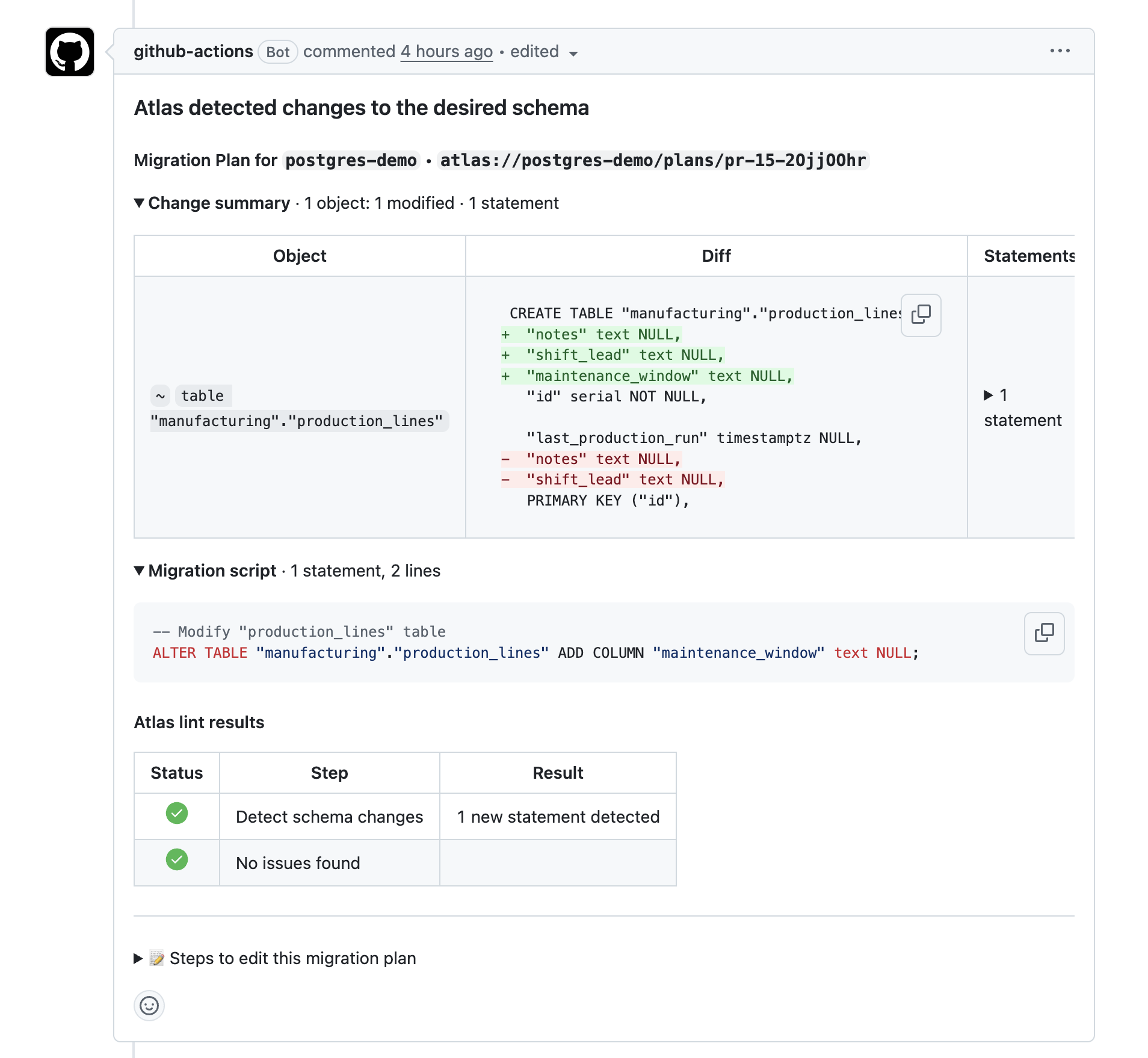
Like Terraform state, the registry can live in storage you run: an S3, GCS, or Azure Blob bucket, or an OCI registry such as your repository's GitHub Container Registry. The GHCR guide runs the whole loop inside GitHub.
Apply as Approved
The deploy job runs the Atlas counterpart of terraform apply:
atlas schema apply --env prod
atlas schema apply finds the approved plan for the move from the database's
current state to the new one and runs it as written. It doesn't regenerate the SQL.
Suppose that between the merge and the deploy, someone added an index to users by hand during an
incident. The database no longer matches the state the plan started from, so Atlas doesn't use the
plan. It plans the change again, and the review policy decides what
happens. By default, the new plan waits for a person, who sees that it would also drop the index from
the incident and adds that index to the schema first.
See a new plan wait for approval
The deploy stops before running the new plan, and the job summary shows its SQL and lint results:
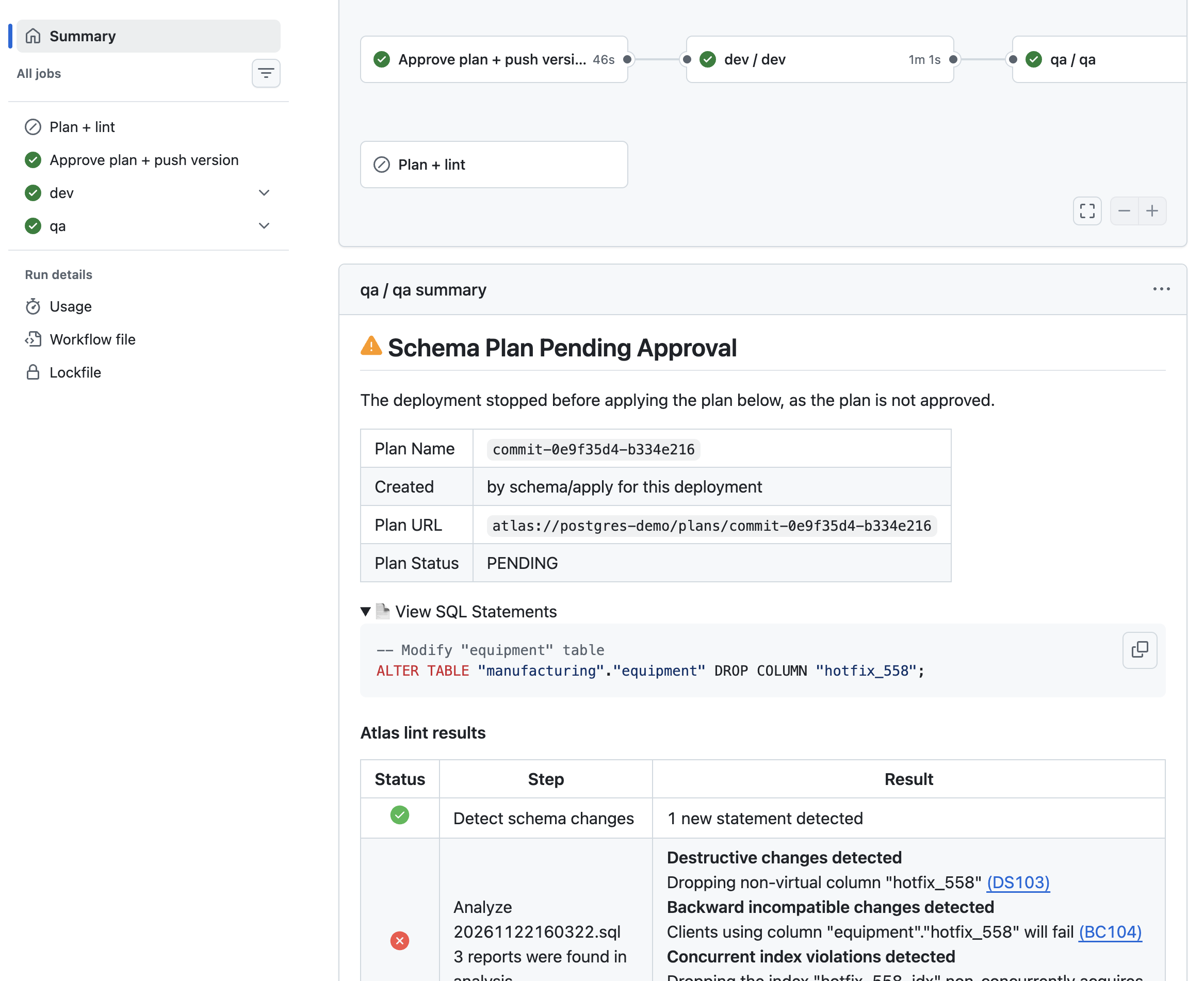
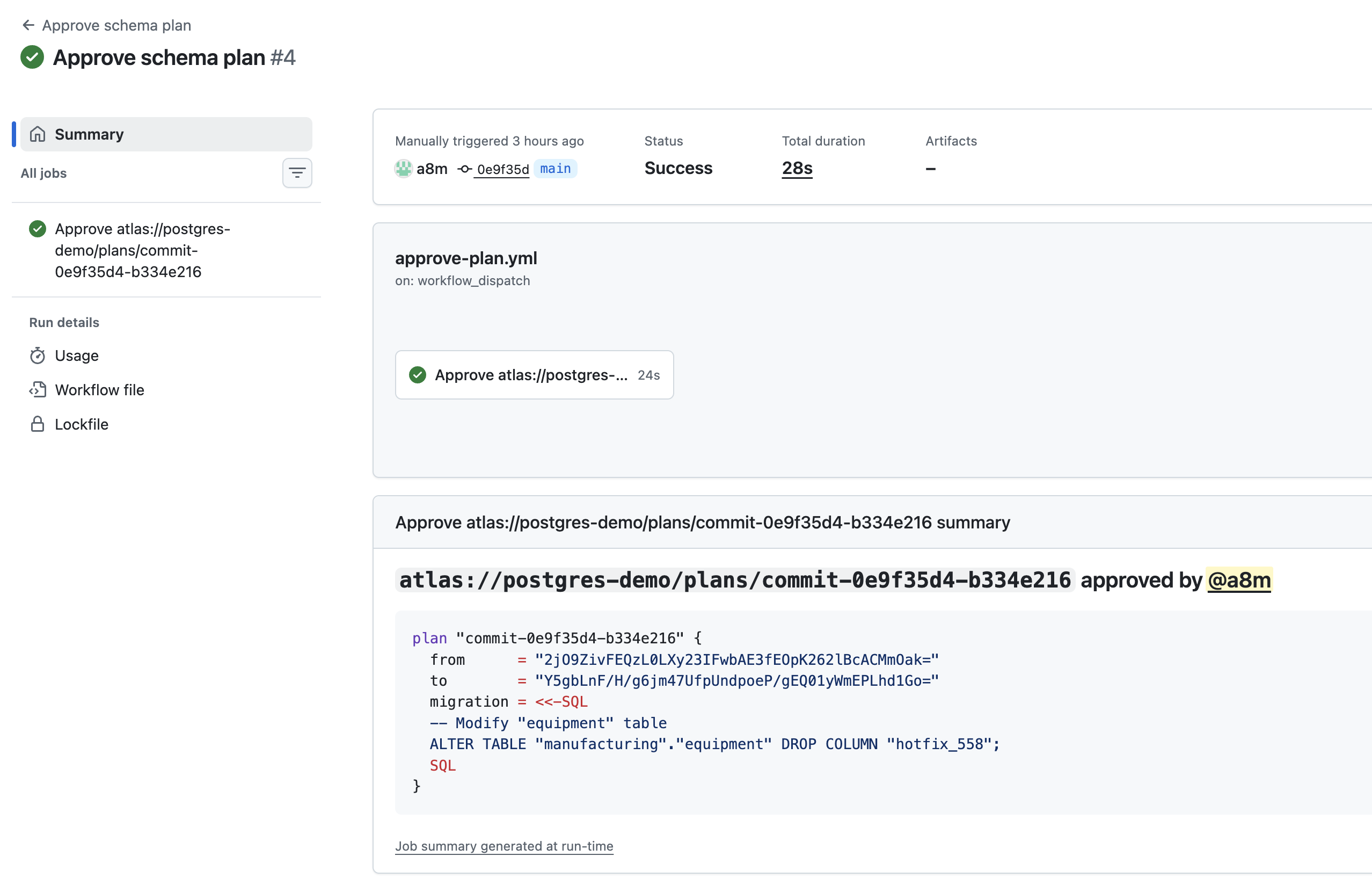
Once a person approves the plan, the deploy applies it. Here, the approval runs from a workflow, as in the GHCR guide:
Terraform finds drift when it refreshes state. Atlas doesn't wait for the next deploy:
schema monitoring compares live databases to their source of truth and
can alert you in Slack when one drifts. In the versioned workflow,
atlas migrate drift checks for drift on a schedule, and a
pre-apply check stops a deployment on a drifted database
before any SQL runs.
With the column in production, the application sets email for every new user. The users who signed up
before it are the second pull request's job.
The Second Pull Request: The Backfill
Actions: A Backfill Script
Terraform has actions for work that isn't a change to a resource. They're declared in the configuration next to the resources, and Terraform runs one when you invoke it, or when a lifecycle event on a resource triggers it. Atlas Scripts are actions for the database: backfills, purges, and reports, written as code, reviewed and tested in a pull request like the schema, and run as their own step, in batches, at a pace you set.
The agent writes a script "loop" that pages through the users who have no email yet,
copies the email of each user's first sign-in identity in one short transaction per batch, and finishes
with an assertion that no user was left without one:
script "loop" "backfill_email" {
  # The source: page the users that still have no email, by id.
  iterator "keyset" {
    cursor {
      id = int
    }
    batch {
      id = int
    }
    init {
      sql = "SELECT id FROM users WHERE email IS NULL ORDER BY id LIMIT ${ramp.size}"
    }
    next {
      sql  = "SELECT id FROM users WHERE email IS NULL AND id > $1 ORDER BY id LIMIT ${ramp.size}"
      args = [cursor.id]
    }
  }

  # The body: one UPDATE per batch, in its own transaction.
  do {
    exec {
      sql = <<-SQL
        UPDATE users SET email = first.email
        FROM (
          -- The email of each user's first sign-in identity.
          SELECT DISTINCT ON (user_id) user_id, email
          FROM identities
          WHERE user_id IN (SELECT value::bigint FROM json_array_elements_text($1::json))
          ORDER BY user_id, created_at
        ) AS first
        WHERE first.user_id = users.id
      SQL
      args = [jsonencode(iterator.keyset.batch[*].id)]
    }
  }

  # Every user has an email before the column becomes NOT NULL.
  assert "none_left" {
    sql = "SELECT count(*) = 0 FROM users WHERE email IS NULL"
  }

  # Start with small batches, then grow.
  policy {
    ramp {
      stage {
        size       = 100
        iterations = 3
      }
      stage { size = 1000 }
    }
  }
}
A user with no sign-in identity keeps a NULL email, so the assertion fails the run, and the third
pull request waits until that's resolved.
The prod env points at the scripts directory:
env "prod" {
  url = getenv("DATABASE_URL")
  dev = local.dev
  schema {
    src = local.src
    repo {
      name = "app"
    }
  }
  script {
    src = "file://scripts"
  }
}
Test: Logic, Privileges, and Cost
Terraform has terraform test. Atlas has atlas schema test and
atlas migrate test, with test files that run against the dev database. The agent
writes one for the backfill, with three cases: its logic, the role it runs under, and its cost.
The logic case gives one user two sign-in identities and checks that the email comes from the older one. The role case runs the backfill under the role the deployment uses, granted only what the script needs, so a missing grant fails the test instead of the production run. The cost case needs rows: on the agent's empty dev database, every statement finishes in milliseconds. A dataset loads production-like rows into the test, here generated from the schema.
All three cases live in one test file, schema.test.hcl:
- Logic
- Privileges
- Cost
# The email comes from the user's first sign-in identity.
test "schema" "backfill_logic" {
  exec {
    sql = <<-SQL
      INSERT INTO users (id, name) VALUES (1, 'ana');
      INSERT INTO identities (user_id, provider, email, created_at) VALUES
        (1, 'google', 'ana@gmail.example', '2024-01-01'),
        (1, 'github', 'ana@github.example', '2025-01-01');
    SQL
  }
  script "loop" {
    file = "scripts/backfill_email.script.hcl"
    run  = "^backfill_email$"
  }
  exec {
    sql    = "SELECT email FROM users WHERE id = 1"
    output = "ana@gmail.example"
  }
}
# The backfill runs under the deployment's role, with only the grants it needs.
test "schema" "backfill_role" {
  exec {
    sql = <<-SQL
      CREATE ROLE backfill;
      GRANT SELECT ON identities TO backfill;
      GRANT SELECT, UPDATE (email) ON users TO backfill;
      INSERT INTO users (id, name) VALUES (1, 'ana');
      INSERT INTO identities (user_id, provider, email) VALUES (1, 'google', 'ana@gmail.example');
    SQL
  }
  # A bare DROP ROLE fails while grants exist.
  cleanup {
    sql = "DROP OWNED BY backfill; DROP ROLE IF EXISTS backfill;"
  }
  script "loop" {
    file = "scripts/backfill_email.script.hcl"
    run  = "^backfill_email$"
    as { role = "backfill" }
  }
}
# Production-like rows: 100,000 users without an email and one identity each,
# measured at the row counts production holds.
dataset "synthetic" "accounts" {
  table "users" {
    rows  = 100000
    total = 50000000
    column "id" {
      value = row.index
    }
    column "email" {
      value = null
    }
  }
  table "identities" {
    rows  = 100000
    total = 60000000
    column "user_id" {
      value = row.index
    }
  }
}

# No table rewrite, and no write blocked for more than a second.
test "schema" "backfill_cost" {
  dataset {
    use = dataset.synthetic.accounts
  }
  script "loop" {
    file = "scripts/backfill_email.script.hcl"
    run  = "^backfill_email$"
    expect "profile" {
      metric "db.table.rewrites" {
        eq = 0
      }
      metric "db.lock.time" {
        blocks = "WRITES"
        le     = "1s"
      }
    }
  }
}
The agent runs the tests with --profile:
atlas schema test --env local --profile schema.test.hcl
Atlas reports each statement's locks and how long it held them, any table rewrites, and the disk, log,
and temporary space it used. The dataset's total sets the rows production holds, so lock times are
reported at production size. Profile expectations turn those
numbers into limits: the test fails if the backfill rewrites a table or blocks writes for more than a
second, and the agent fixes it before a person sees the pull request.
Generated rows are one option. The same test can run on real data: a dataset can load an Amazon RDS snapshot export or a directory of CSV files, sample a slice of each table with its foreign keys intact, and mask sensitive columns, such as emails and names, before they're loaded. Profiling is in preview for a subset of Teams and Enterprise customers.
Approve and Run
The script's pull request has no schema change, so it has no plan. In CI, the
script/test action runs its tests, and a
person reviews the script like any other code.
Merging doesn't run the script. Like invoking an action, running it is its own step, a workflow that a person starts in the same protected environment as the deploy job:
# Started by a person, in the production environment.
- uses: ariga/atlas-action/script/loop@v1
  with:
    env: prod
    match: '^backfill_email$'
The Third Pull Request: Make It NOT NULL
Plan Again: A Lock Warning
The third pull request opens only after the backfill run succeeds. The agent changes email back to
NOT NULL in users.sql. This time, the plan carries a different warning: on
PostgreSQL, SET NOT NULL holds an ACCESS EXCLUSIVE lock while it scans the whole table, and nothing
can read or write users until it finishes. The PG303 analyzer reports it
on the plan.
The application sets email for new users, and the backfill's assertion passed, so the statement won't
fail on a NULL, but how long it holds the lock depends on the size of users. The warning stays on
the plan, so whoever approves it knows the deploy takes that lock. In the versioned workflow, the
not_null diff policy plans this change lock-safe instead.
From there, it's the first pull request again: the plan and its warning go on the pull request, merging approves it, and the deploy job applies it as written.
Terraform, Concept by Concept
The story covered the whole loop. Here it is side by side:
| Terraform | Atlas |
|---|---|
| Configuration, the desired state | The schema as code |
terraform plan and terraform apply | atlas schema plan and atlas schema apply |
| State and backends | The Atlas Registry, or your own S3, GCS, Azure Blob, or OCI registry |
| Policy as code | Lint, ownership, and review policies |
| Tests | Schema and migration tests |
| Actions | Atlas Scripts |
The resemblance goes past the loop, so the rest of Atlas will feel familiar too. The configuration is
HCL, with input variables,
locals, functions, and
data sources that query a database, call an HTTP endpoint, run a
program, or fetch an RDS or Cloud SQL auth token. It's extensible the way providers are:
external_schema loads the desired state from any
program, which is how ORMs plug in, and a
composite schema combines sources the way modules
compose a configuration. env blocks with for_each cover environments and
every tenant database, like workspaces. Policies, tests,
roles and permissions, and reference data are
all code, reviewed in the same pull request as the change.
Prefer migration files? The versioned workflow gets the same treatment:
atlas migrate diff writes the files, and lint and tests run on every pull request.
Deploy From the Pipeline You Already Run
The email change deployed from GitHub Actions. Atlas deploys from the other places Terraform users
ship from, too:
- CI/CD: GitHub Actions, GitLab CI, Bitbucket Pipelines, and Azure DevOps run the same plan, approve, and apply steps. CircleCI runs the versioned workflow.
- Kubernetes: the Atlas Operator, on its own or with Argo CD or Flux.
- Terraform: the Atlas provider, when Terraform ships your releases and not only your infrastructure.
- Anything else: the Atlas CLI runs as a step in any pipeline, such as Octopus Deploy or Jenkins.
With the provider, the schema change goes into the same terraform apply as the database it lives in:
terraform {
  required_providers {
    atlas = {
      source  = "ariga/atlas"
      version = "~> 0.10"
    }
  }
}

provider "atlas" {
  dev_url = "docker://postgres/18/dev?search_path=public"
}

data "atlas_schema" "app" {
  src = file("${path.module}/schema.sql")
}

resource "atlas_schema" "app" {
  url = "postgres://${var.db_user}:${var.db_pass}@${aws_db_instance.app.endpoint}/app?search_path=public"
  hcl = data.atlas_schema.app.hcl
}
Before Terraform applies, it shows the SQL Atlas will run, next to the rest of your infrastructure
changes. atlas_schema covers the declarative workflow, and
atlas_migration covers migration directories. With
review = ERROR, a change that fails lint doesn't apply until someone
approves its plan in the Atlas Registry. By default,
terraform apply exits with an error until then. Set review_timeout, and it waits for the approval
instead.
Wrapping Up
The email change began as one line that would have broken the deploy. It reached production as two
planned schema changes and a backfill script, each reviewed in a pull request, with the backfill
measured on production-like data before it ran.
Two years ago, "Terraform for databases" was a nickname. Today, it's the workflow: desired state as code, a plan for every change, state you can keep in your own storage, drift that blocks the deploy, and policy and tests on every pull request. On top of that, Atlas handles the part Terraform never had to: the data. Whether a person or an agent wrote the change, nothing deploys until you approve.
To try it on your own database, install the skills for your agent and start the onboarding skill, the
same way this story started. To set it up by hand, install Atlas, run
atlas schema inspect against a database you already have, and open a pull request with your first
change.
Questions? Book a demo or message us on Intercom.