Announcing Atlas v1.0: A Milestone in Database Schema Management

We're excited to announce Atlas v1.0 - just in time for the holidays! 🎄
v1.0 is a milestone release. Atlas has been production-ready for a few years now, running at some of the top companies in the industry, and reaching 1.0 is our commitment to long-term stability and compatibility. It reflects what Atlas has become: a schema management product built for real production use that both platform engineers and developers love.
Here's what's in this release:
- Monitoring as Code - Configure Atlas monitoring with HCL, including RDS discovery and cross-account support.
- Schema Statistics - Size breakdowns, largest tables/indexes, fastest-growing objects, and growth trends over time.
- Declarative Migrations UI - A new dashboard for databases, migrations, deployments, and status visibility.
- Database Drivers - Databricks, Snowflake, and Oracle graduate from beta to stable; plus improvements across Postgres, MySQL, Spanner, Redshift, and ClickHouse.
- Deployment Rollout Strategies - Staged rollouts (canaries, parallelism, and error handling) for multi-tenant and fleet deployments.
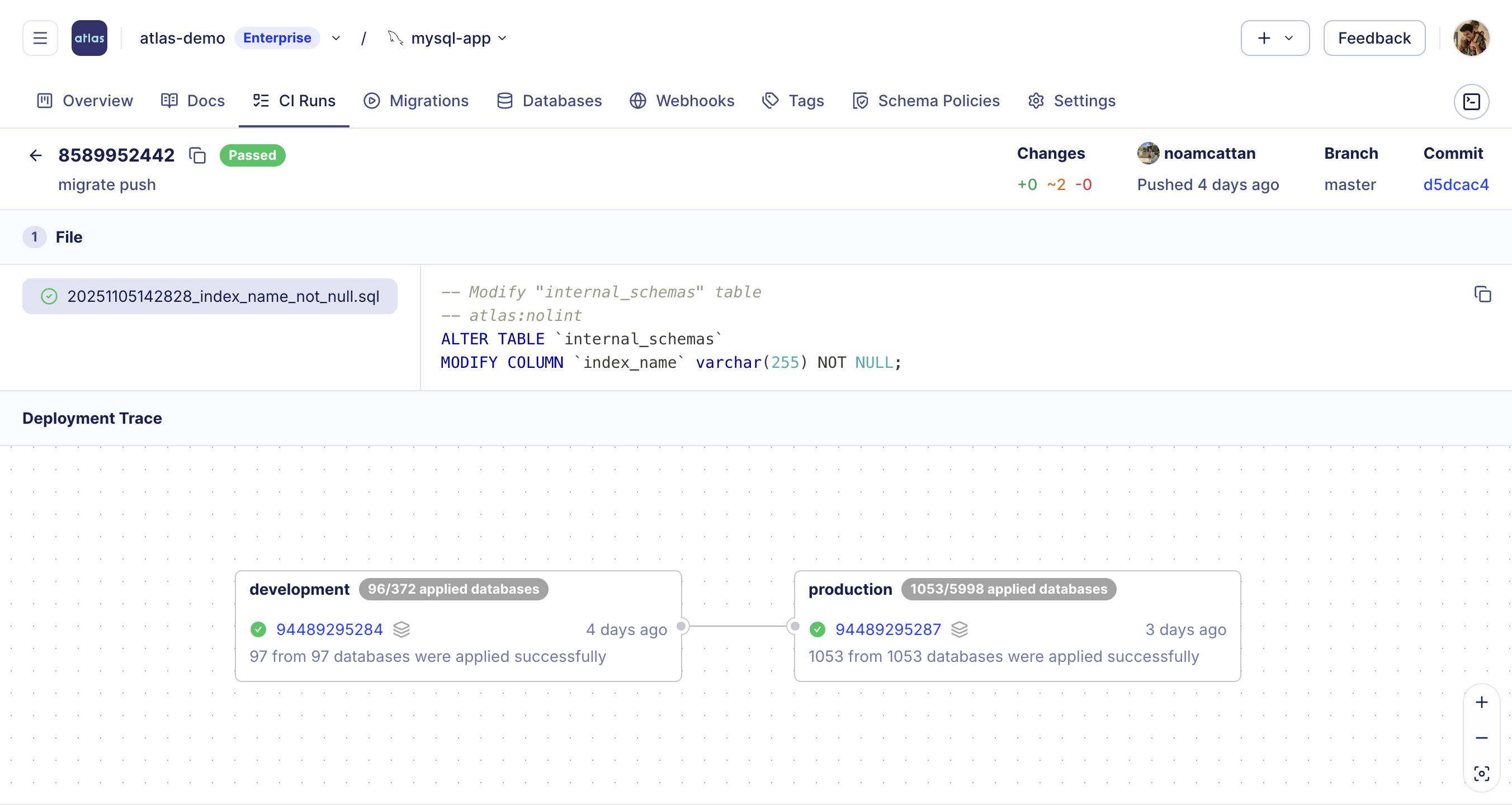
- Deployment Traces - End-to-end traceability for how changes move through environments.
- Multi-Config Files - Layer config files with
-c file://base.hcl,file://app.hcl.
- macOS + Linux
- Homebrew
- Docker
- Windows
- CI
- Manual Installation
To download and install the latest release of the Atlas CLI, simply run the following in your terminal:
curl -sSf https://atlasgo.sh | sh
Get the latest release with Homebrew:
brew install ariga/tap/atlas
To pull the Atlas image and run it as a Docker container:
docker pull arigaio/atlas
docker run --rm arigaio/atlas --help
If the container needs access to the host network or a local directory, use the --net=host flag and mount the desired
directory:
docker run --rm --net=host \
  -v $(pwd)/migrations:/migrations \
  arigaio/atlas migrate apply \
  --url "mysql://root:pass@:3306/test"
Download the latest release and move the atlas binary to a file location on your system PATH.
GitHub Actions
Use the setup-atlas action to install Atlas in your GitHub Actions workflow:
- uses: ariga/setup-atlas@v0
  with:
    cloud-token: ${{ secrets.ATLAS_CLOUD_TOKEN }}
Other CI Platforms
For other CI/CD platforms, use the installation script. See the CI/CD integrations for more details.

Monitoring as Code
Starting with the latest version of Atlas Agent, you can now define your monitoring setup as code using Atlas's HCL configuration language. This keeps monitoring configuration in version control, makes it reviewable like any other change, and avoids "ClickOps" mistakes.
data "rds_discovery" "my_instances" {
  region = "us-east-1"
}

instance {
  for_each = data.rds_discovery.my_instances.instances

  name   = each.value.identifier
  driver = each.value.driver

  connection {
    host = each.value.address
    port = each.value.port
    // ...
  }

  default_monitor "all" {
    snapshot_interval = "1h"
    statistics {
      enabled = true
    }
  }
}
This new setup makes it much easier to run the same setup across many databases:
- Define a
default_monitoronce (scope, interval, stats collection) - Override it for specific databases/schemas when needed
- Automate deployment of the agent with a consistent config
For cloud fleets, you can even discover RDS and GCP instances automatically using data sources.
For a step-by-step example walk-through, watch our tutorial to get started with Monitoring as Code in under 5 minutes:
Schema Statistics and Insights
Atlas Monitoring can now collect statistics during each monitoring run, so you can track schema growth over time. This includes database size breakdowns, the largest and fastest-growing tables/indexes, growth trends across the schema, and more.
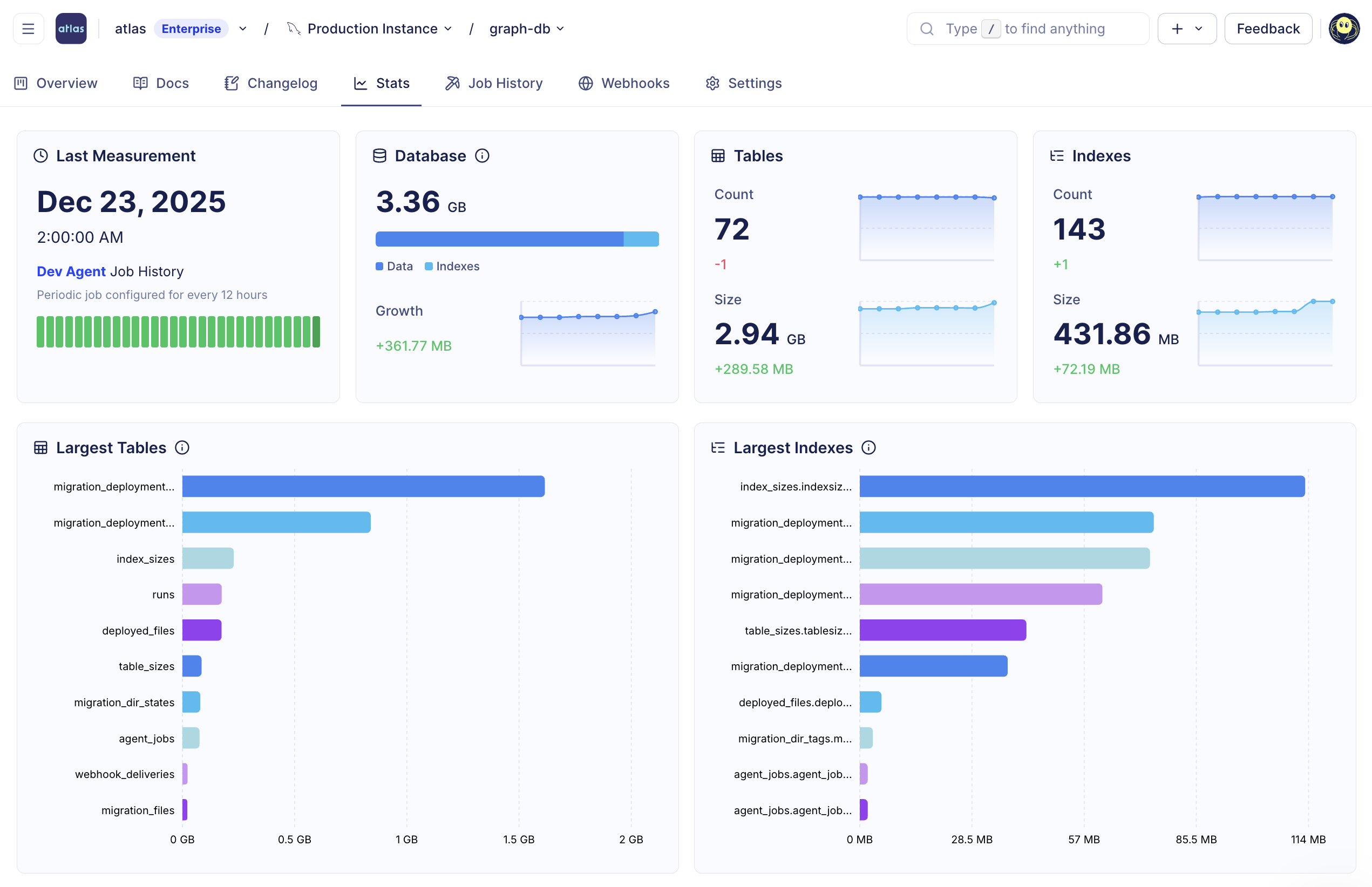
Schema statistics in Atlas Cloud
These statistics also power safer change reviews - for example, flagging risky changes on large objects (like operations that may cause table copies). In practice, this means Atlas can use real schema context during CI and PR review to highlight risk before changes roll out.
Declarative Migrations UI
Atlas Cloud now provides detailed migration logs, deployment status, and database tracking. You can see which databases are up-to-date or have pending migrations, and track rollouts across environments.
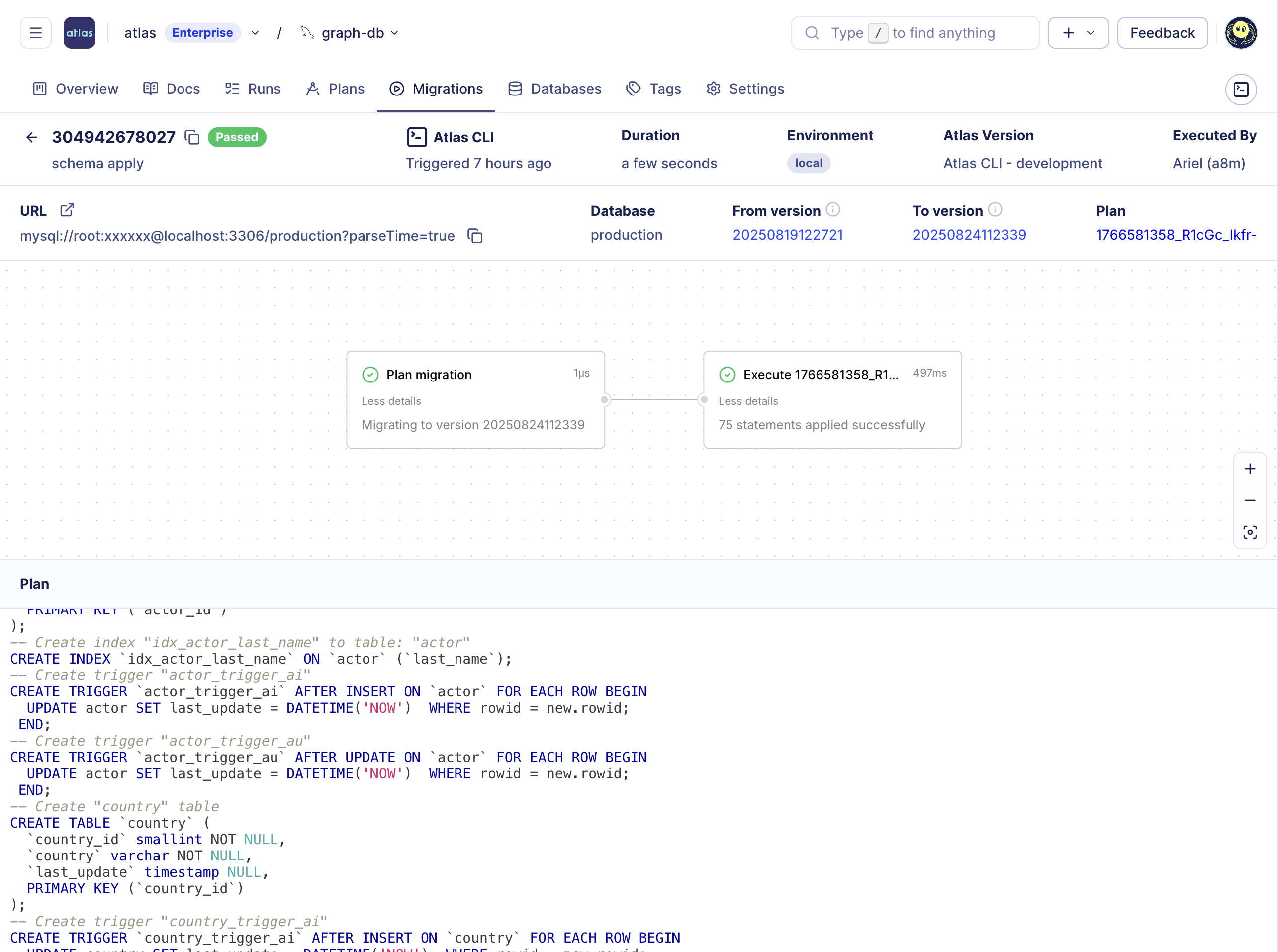
Declarative migrations UI in Atlas Cloud
When enabled, all of this information is reported by Atlas from your CD setup after planning and running migrations. There is no need to connect your databases to Atlas Cloud; they remain isolated in your VPC. To get started, see the CI/CD setup guide.
Deployment Rollout Strategies
When deploying schema migrations to multiple tenant databases, sometimes you need more control than applying migrations
sequentially or all at once. The deployment block gives you fine-grained control over rollouts: canary deployments,
execution order, regional rollouts, parallel execution, and error handling strategies like fail-fast or continue-on-error.
deployment "staged" {
  variable "name" {
    type = string
  }
  // Stage 1: Canary tenants first
  group "canary" {
    match = startswith(var.name, "canary-")
  }
  // Stage 2: Free-tier with high parallelism
  group "free" {
    match      = var.tier == "FREE"
    parallel   = 10
    on_error   = CONTINUE
    depends_on = [group.canary]
  }
  // Stage 3: Paid customers
  group "paid" {
    parallel   = 3
    depends_on = [group.free]
  }
}

env "prod" {
  for_each = toset(var.tenants)
  url      = urlsetpath(var.url, each.value)
  rollout {
    deployment = deployment.staged
    vars = {
      name = each.value
    }
  }
}
To get started with rollout strategies and multi-tenant schema migrations, see the rollout guide.
Deployment Traces
Atlas Registry now provides end-to-end visibility into how migrations progress through your environments. You can track the full journey of each change, from planning and review, through dev and staging, to production with a controlled environment promotion process. Track when and where each version was applied, which databases were affected, and whether executions completed successfully.
Multi-Config Files Support
Atlas now supports passing multiple configuration files, allowing you to maintain a base configuration with organization-wide settings and layer project-specific configurations on top.
atlas migrate apply -c "file://base.hcl,file://app.hcl" --env prod
A common pattern is to keep shared policies in base.hcl, and layer project/environment settings in separate file:
- base.hcl (shared policies)
- app.hcl (project specific)
lint {
  review = ERROR
  destructive {
    error = true
  }
}

diff {
  # Create and drop indexes concurrently.
  concurrent_index {
    add = true
    drop = true
  }
  # Skip destructive changes.
  skip {
    drop_column = true
    drop_table = true
  }
}
data "external_schema" "sqlalchemy" {
  program = [
    "atlas-provider-sqlalchemy",
    "--path", "./models",
    "--dialect", "postgresql",
  ]
}

env "local" {
  src = data.external_schema.sqlalchemy.url
  dev = "docker://postgres/16/dev?search_path=public"
  url = getenv("DATABASE_URL")
  migration {
    dir = "file://migrations"
  }
}
Then run:
atlas migrate diff  -c file://base.hcl,file://app.hcl --env local
atlas migrate apply -c file://base.hcl,file://app.hcl --env local
We're also working on making configs easier to share and reuse across projects using Atlas Registry.
Database Drivers
This release includes significant improvements across our database drivers. Three drivers have graduated from beta to stable: Databricks, Snowflake, and Oracle. We've also added new features to existing drivers:
- MySQL: SRID support for spatial columns
- PostgreSQL: Table storage parameters and schema collation
- Google Spanner: Property graphs support
- Oracle: Functions and procedures
- Redshift: Functions and procedures
- Databricks: Table locations, USING formats, user functions, and procedures
What's Coming Next
Reaching v1.0 is just the beginning. We're focusing on the areas teams keep pushing us on: bringing more of the database lifecycle under version control and tightening the day-2 operational story. Here's what that means in practice:
Database Security as Code
We're bringing the same "as-code" and "manage it declaratively" workflow to database access control: roles, privileges, and users - reviewed in pull requests and deployed via the same pipelines you already use for schema changes.
user "a8m" {
  member_of = [role.dba]
}

role "admin" {
  superuser   = true
  create_db   = true
  create_role = true
  comment     = "Administrator role"
}

permission {
  for_each   = [schema.public, schema.private]
  for        = each.value
  to         = role.dba
  privileges = [SELECT, INSERT, UPDATE, DELETE]
}
Security as Code (SaC) is a paradigm promoted and adopted by leading security firms like Wiz, CrowdStrike, and others. Atlas is now bringing it to databases, completing our coverage of database management as code: from schema, policy, and monitoring - to security and access control.
This feature is currently in beta for enterprise customers and expected to reach GA in the next version.
DBRE and Automation
In upcoming versions, you can expect stronger drift detection and alerting, deeper monitoring that goes beyond schemas to cover performance and operational metrics, and better support for AI-assisted and agentic workflows.
Atlas already maintains authoritative status, which gives agents the context they need to operate safely.
Data Flow and Lineage
This year, we invested heavily in analytical databases like Redshift, Snowflake, ClickHouse, and Databricks. As adoption grew, we welcomed a new persona to our user base: data engineers. With this came a common requested feature - while Atlas Cloud currently displays ERD-style schema overviews, data teams need automatic lineage resolution similar to dbt, Snowflake, and BigQuery.
In upcoming versions, you can expect a dedicated lineage view that automatically loads dependencies for any selected object, showing full upstream and downstream graphs.
Wrapping Up
This year we shipped 9 major releases, brought three drivers to production-ready status, and expanded Atlas from a schema management product into a database reliability platform. Reaching v1.0 reflects the maturity and stability we've built over the past few years.
Thank you to everyone who helped bring Atlas to where it is today. Wishing you all a Merry Christmas and a Happy New Year! 🎄
Want to see how Atlas can help your team? Schedule a demo with us.