Atlas v0.33: Introducing Atlas Copilot and more

Hey everyone!
It's been a couple of months since our last release, but for good reason. Today, I am super excited to tell you about everything we have been up to. Here's what's in store for you in this release, v0.33:
- Atlas Copilot: A new coding assistant that helps you better manage your Atlas projects by leveraging an agentic, LLM-based approach.
- Support for
--include: Atlas Pro users may now use the--includeflag to specify which database objects to query during inspection. migrate/diffin GitHub Actions, GitLab CI, and CircleCI - Atlas now supports themigrate diffcommand in GitHub Actions, GitLab CI, and CircleCI. This allows teams to build CI/CD pipelines that automatically generate migration files based on the current state of the database and the desired state of the schema.- Check-level Lint Policies: Atlas comes pre-packaged with many built in analyzers that can be used to verify the safety of changes to your database. Using Check-level Lint Policies, you can now configure your CI/CD's pipelines sensitivity to these analyzers.
- Support for
sensitiveannotations in migration files: Migration files can sometimes include sensitive or PII values, either passed in as input variables (using template-directories) or embedded directly in SQL statements. To prevent these values from being logged, Atlas provides a directive for marking files or specific statements as sensitive. This directive can be set at either the file or statement level. - Atlas Dashboard UI Revamp: We recently revamped the Atlas dashboard UI. The new design is cleaner and more modern, making it easier to navigate and find the information you need. Congrats to the team for their hard work on this!
- Beta / Feedback Programs: We are launching beta/feedback programs for (signup link below):
- Oracle
- Google Spanner
- Snowflake
- Performance Optimization
Atlas Copilot
The biggest announcement from this release is something we've been quietly working on for the past few months: Atlas Copilot.
Atlas Copilot is a coding assistant that helps you better manage your Atlas projects by leveraging an agentic, LLM-based approach. It can already help you with a variety of tasks, including:
- Answering questions about your Atlas project, such as "What is the current schema of my database?" or "What database objects should I add tests for?"
- Schema test generation - Copilot understands your schema natively and can generate tests for the parts of your schema that contain business logic, such as views, stored procedures, and functions.
- Data migration authoring - The core Atlas engine can already easily generate migrations whenever you modify your schema, but authoring changes that require data migration was a manual process. You can now utilize Copilot to generate data migrations for you.
Should we let AI touch our databases?
Large language models (LLMs) are a transformative technology that can help us automate many tasks, but they are not perfect. Whether it's hallucinations, incorrect code generation, or other issues, LLMs can make mistakes. That's why we believe that at this stage, LLMs should not be allowed free reign over your databases. Instead, they should work in tandem with a formal, deterministic system (like Atlas) to ensure that the generated code is correct, safe, and compliant.
The Atlas world is built around two domains: code and database. Users define their database schema with policies, tests, etc. in a formal language ("code") and Atlas generates the necessary changes, verifies them, and applies them to the database. This is a deterministic process that ensures that the generated code is correct and safe.
This strict separation allows us to cleanly integrate LLMs into the Atlas workflow:
- Users prompt Copilot with a question or request.
- Copilot generates code and uses Atlas to formally verify it.
- Users use Atlas to apply the changes to the database.
By ensuring that Copilot always operates on the code domain directly, and forcing the agent to use Atlas's built-in verification and safety mechanisms, we can ensure that the generated code is correct and safe.
Why not use a general purpose coding assistant?
General purpose coding assistants (like Cursor or GitHub Copilot) are great for interacting with codebases - they can help you write code, find bugs, and even generate tests. However, they are not specialized for working with databases and do not natively possess any tools to verify or assess the generated code.
Things can be somewhat improved by providing these assistants with more detailed instructions (i.e
copilot-instructions.md or .cursorrules files), but this is not a scalable and reliable solution. Ultimately, even
if you tell the assistant in ALL CAPS to NEVER do something, LLMs sometimes get confused and ignore explicit
instructions.
At the time of writing, the state-of-the-art performance in "instruction following" is 59% (see MultiChallenge). This is an extremely impressive result, but rephrasing it: The state of the art is that on one of the industry's widely accepted benchmarks, 41% of the time, the assistant ignores some instructions. Not the kind of accuracy you would expect from something that is supposed to touch critical production systems.
Based on this, we believe that general purpose coding assistants are not (yet) a good fit for directly working with databases. Instead, they should be used in tandem with specialized tools or agents that can deterministically ensure the correctness and safety of the generated code.
At this point, it is not trivial to integrate general purpose coding assistants with Atlas, while we are working on an MCP server to expose some tools for general purpose coding assistants, it is proving difficult to provide a controlled and safe result. We believe that coding assistants will adopt one of the recent protocols (such as Google's A2A) to establish a more structured way of interacting with other agents.
How to use Atlas Copilot
To try Atlas Copilot today, first upgrade to the most recent version of Atlas:
- macOS + Linux
- Homebrew
- Docker
- Windows
- CI
- Manual Installation
To download and install the latest release of the Atlas CLI, simply run the following in your terminal:
curl -sSf https://atlasgo.sh | sh
Get the latest release with Homebrew:
brew install ariga/tap/atlas
To pull the Atlas image and run it as a Docker container:
docker pull arigaio/atlas
docker run --rm arigaio/atlas --help
If the container needs access to the host network or a local directory, use the --net=host flag and mount the desired
directory:
docker run --rm --net=host \
  -v $(pwd)/migrations:/migrations \
  arigaio/atlas migrate apply \
  --url "mysql://root:pass@:3306/test"
Download the latest release and move the atlas binary to a file location on your system PATH.
GitHub Actions
Use the setup-atlas action to install Atlas in your GitHub Actions workflow:
- uses: ariga/setup-atlas@v0
  with:
    cloud-token: ${{ secrets.ATLAS_CLOUD_TOKEN }}
Other CI Platforms
For other CI/CD platforms, use the installation script. See the CI/CD integrations for more details.

As with any first release of an exciting new product, Copilot is still quite clunky. Therefore, we are releasing it in "beta" mode, meaning that you can expect some bugs and issues. Copilot sometimes gets confused and talks nonsense, despite being grounded in the official Atlas documentation.
We are working hard to improve this, and we would love to hear your feedback. Please report any issues you encounter on our GitHub Issue Tracker.
Copilot is an Atlas Pro feature, if you do not yet have an account, you can try it out for free by signing up for a free trial by running:
atlas login
Next, run:
atlas copilot
Atlas Copilot will start and you will be prompted to enter your question or request:
┌──────────────────────────────────────────────────┐
│ ⛁ Welcome to Atlas Copilot (beta version)        │
│                                                  │
│ 1. Ask me anything about Atlas.                  │
│ 2. Type "?" for help.                            │
│ 3. Type "!" for bash mode.                       │
│                                                  │
│ session: aa29e7a3-9888-4593-xxxx-b235386c5aad    │
└──────────────────────────────────────────────────┘

┌─────────────────────────────────────────────────────────────┐
│ Ask Anything                                                │
└─────────────────────────────────────────────────────────────┘
 ? for help
Let's say hi:
user
say hi to our readers!

atlas
Hello to all our readers! If you have any questions or need
help with database schemas, migrations, or Atlas configuration,
I'm here to help—just let me know what you need!
Here's something more elaborate:
What's next for Copilot?
Atlas Copilot is still in its early stages, and we have a lot of exciting features planned for the future, such as:
- Project bootstrapping - initialize projects with Copilot's help
- More accurate code editing - better chat to schema modifications
- Agentic diffing - Copilot will correct and mitigate issues detected with migration plans
- Pull Request Agent - Copilot will run as a participant in your PRs and help you with code reviews, auto-fixing issues, and more.
- and more!
With all the excitement around Copilot, we almost forgot a few other important features that our team has recently delivered:
Support for --include
Atlas Pro users may now use the --include flag to specify which database objects to query during inspection.
For example to inspect only the users table and its columns, you can run:
atlas schema inspect \
  --url <url> \
  --include users
For more details, see this FAQ entry.
Support for migrate/diff in GitHub Actions, GitLab CI, and CircleCI
Atlas now supports the migrate diff command in GitHub Actions, GitLab CI, and CircleCI. This allows teams to build
CI/CD pipelines that automatically generate migration files based on the current state of the database and the desired
state of the schema.
This creates a middle ground between the declarative and versioned migration workflows: developers can simply edit the schema in code and the CI/CD pipeline will automatically generate the migration files for them.
See example.
Check-level Lint Policies
Atlas comes pre-packaged with many built in analyzers that can be used to verify the safety of changes to your database. Using Check-level Lint Policies, you can now configure your CI/CD's pipelines sensitivity to these analyzers. For example:
lint {
  check "PG301" {
    error = true
  }
  check "PG304" {
    skip = true
  }
}
Support for sensitive annotations in migration files
Migration files can sometimes include sensitive or PII values, either passed in as input variables (using template-directories) or embedded directly in SQL statements. To prevent these values from being logged, Atlas provides a directive for marking files or specific statements as sensitive. This directive can be set at either the file or statement level.
By default, Atlas masks SQL string literals with the (sensitive) placeholder. However, the -- atlas:sensitive directive
can be configured with one or more patterns, giving you more control over which parts should be matched and
replaced. Example:
-- atlas:sensitive
SELECT 'hello world';

SELECT 'hello' AS world;

-- atlas:sensitive \d+
SELECT 2025;
Output:
SELECT (sensitive);

SELECT 'hello' AS world;

SELECT (sensitive);
Atlas Dashboard UI Revamp
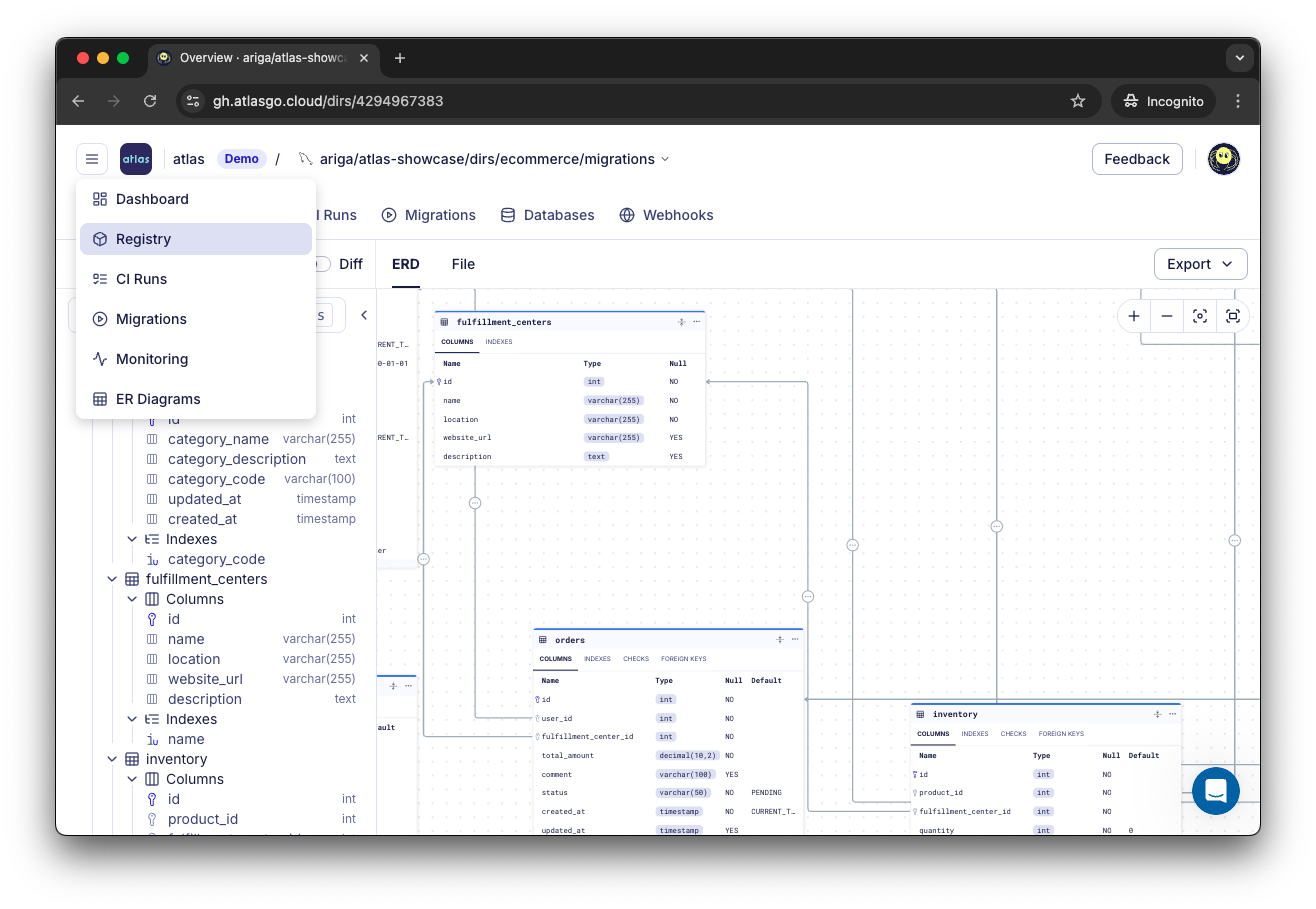
In case you missed it, we recently revamped the Atlas dashboard UI. The new design is cleaner and more modern, making it easier to navigate and find the information you need. Congrats to the team for their hard work on this!
See it live here.
Beta / Feedback Programs
Our team is busy working on a few more exciting features that we plan to release in the coming months. To make sure they are as good as possible, we are looking for individuals and teams to provide feedback and help us test them:
- New Database Drivers for:
- Oracle
- Google Spanner
- Snowflake
- Performance Optimization: Slow queries and overall database performance can be a pain point for many teams. We are looking for users to help us in building a new performance optimization tool that can help you identify and fix performance issues in your database.
If you are interested in taking part, please fill this short form:
Beta Feedback Program
Wrapping Up
We hope you enjoy the new features and improvements. As always, we would love to hear your feedback and suggestions on our Discord server.