Atlas v1.4: Security Scanning, Database Profiler, Agent Skills, Drift Detection, and More

Hey everyone!
We're excited to announce Atlas v1.4. This
release brings security scanning to your databases: the new atlas security scan command reports
the CVEs affecting your database servers and extensions, from the CLI, CI, or Kubernetes. It also
introduces agent skills, a profiler for the Atlas testing framework that works on production-like
data, and drift checks between deployments.
Here is what you can find in this release:
- Security Scanning for Databases -
Vulnerability detection for your database servers and extensions with
atlas security scan, from CI to Kubernetes, and blast-radius checks for roles. - Atlas Agent Skills - Teach Claude Code, Codex, Cursor, and GitHub Copilot to plan, lint, and test schema changes with Atlas.
- Profiler for the Testing Framework - Measure the locks, rewrites, and space of migrations, queries, and database code, over a masked Amazon RDS snapshot, CSV files, or synthetic rows. In preview.
- Drift Detection Between Deployments -
atlas migrate driftreports every object that diverged from your migrations, for one database or every tenant. - Schema Repositories in Your Own Storage - Store schema repositories in your own S3, GCS, or Azure Blob Storage bucket, or an OCI registry, instead of Atlas Cloud.
- Database Driver Improvements - Snowflake governance policies, SQL Server linked servers and filegroups, PostgreSQL temporal keys, Databricks metric views, Redshift datashares, and more.
- Atlas Binaries Are Moving to atlasbinaries.com -
Starting December 2026,
release.ariga.ioredirects toatlasbinaries.com. Direct downloads only need the new hostname.
- macOS + Linux
- Homebrew
- Docker
- Windows
- CI
- Manual Installation
To download and install the latest release of the Atlas CLI, simply run the following in your terminal:
curl -sSf https://atlasgo.sh | sh
Get the latest release with Homebrew:
brew install ariga/tap/atlas
To pull the Atlas image and run it as a Docker container:
docker pull arigaio/atlas
docker run --rm arigaio/atlas --help
If the container needs access to the host network or a local directory, use the --net=host flag and mount the desired
directory:
docker run --rm --net=host \
  -v $(pwd)/migrations:/migrations \
  arigaio/atlas migrate apply \
  --url "mysql://root:pass@:3306/test"
Download the latest release and move the atlas binary to a file location on your system PATH.
GitHub Actions
Use the setup-atlas action to install Atlas in your GitHub Actions workflow:
- uses: ariga/setup-atlas@v0
  with:
    cloud-token: ${{ secrets.ATLAS_CLOUD_TOKEN }}
Other CI Platforms
For other CI/CD platforms, use the installation script. See the CI/CD integrations for more details.

Security Scanning for Databases
Which of your databases run a version with a published CVE? Answering that means querying every database, across staging, production, and every region, for its server and extension versions, then looking each one up in the advisories for its engine and extensions. And it is not a one-time check: new CVEs are regularly published for versions that are already running.
The new atlas security scan command answers this question in one run.
It resolves the server version and the installed extensions of each database against the
Atlas Security Graph, and reports every CVE that affects them, with
its severity and the release that fixes it:
atlas security scan \
  --url "postgres://postgres:pass@localhost:5432/app?sslmode=disable" \
  --url "clickhouse://default:pass@localhost:9000" \
  --url "postgres://postgres:pass@localhost:5433/reporting?sslmode=disable"
Scanning 3 databases for security issues:

  -- postgres://postgres:xxxxx@localhost:5432/app?sslmode=disable (postgres 18.6):
    -- Extension "vector" version "0.8.5" is vulnerable to CVE-2026-103484 (HIGH): pgvector
       buffer overflow in IVFFlat index build. Upgrade extension "vector" to version 0.8.7 or
       later to resolve CVE-2026-103484
    -- Extension "vector" version "0.8.5" is vulnerable to CVE-2026-18022 (HIGH): pgvector
       buffer overflow via integer wraparound in IVFFlat index build on 32-bit systems. Upgrade
       extension "vector" to version 0.8.6 or later to resolve CVE-2026-18022

  -- clickhouse://default:xxxxx@localhost:9000 (clickhouse 23.10.5.20):
    -- Engine "clickhouse" version "23.10.5.20" is vulnerable to CVE-2024-22412 (ELEVATED):
       ClickHouse's Role-based Access Control is bypassed when query caching is enabled. Upgrade
       database engine "clickhouse" to version 23.12.6.19 or later to resolve CVE-2024-22412
    -- Engine "clickhouse" version "23.10.5.20" is vulnerable to CVE-2026-116366 (CRITICAL):
       Unauthenticated RCE vulnerability against ClickHouse Server. Upgrade database engine
       "clickhouse" to version 26.3.62.3 or later to resolve CVE-2026-116366

  -- postgres://postgres:xxxxx@localhost:5433/reporting?sslmode=disable:
    -- postgres: querying system variables: dial tcp [::1]:5433: connect: connection refused

  -------------------------
  -- 1.061387208s
  -- 1 database could not be scanned
  -- 4 issues found: 1 critical, 2 high, 1 elevated
A database that could not be reached is reported with the rest and fails the command, since its state is unknown. For a recent example, see ClickHouse CVEs: Find Vulnerable Servers with Atlas.
The same vulnerability detection runs before a change merges during the lint check, together with an access check that flags roles whose blast radius covers a large share of the database.
Also new with the scan:
- Engine-specific detection: PostgreSQL, MySQL, MariaDB, ClickHouse, and SQL Server. On PostgreSQL, the installed extensions are checked too.
- Gating and notifications: findings fail the command only at
the
fail_onseverity level, and anotifyblock posts the result to Slack. - On a schedule: the
security/scanGitHub Action, and theAtlasSecurityScanresource of the Kubernetes Operator, whoseCompliantcondition works as a deployment gate. - Security Dashboard: every finding across your repositories and monitored databases in one list.
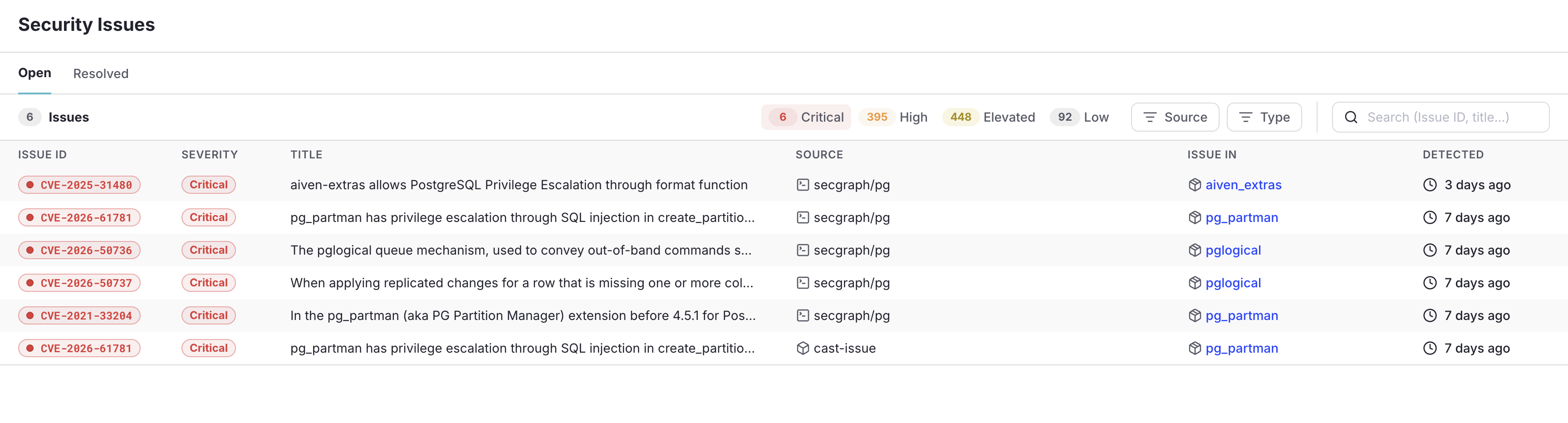
The Security Issues page, filtered to critical findings
Security scanning is part of Atlas Pro and requires the Security Graph in your plan. Run
atlas login to get started.
To learn more, see the security scanning guide.
Atlas Agent Skills
An agent can edit schema files the way it edits code. A migration is different: it needs the dependency order of every object, it has to pass your lint policies, and the same change must produce the same migration regardless of which model generated it.
For this reason, the Atlas agent skills do not teach agents to write migrations. The agent edits the desired state, Atlas plans the migration, and the change is linted and tested before the agent reports it done:
- Claude Code
- OpenAI Codex
- Cursor
- GitHub Copilot
Install the skills from a terminal. It installs the Atlas plugin, with all its skills, for every project on this machine.
claude plugin marketplace add ariga/atlas
claude plugin install atlas@ariga
Then start the onboarding skill in Claude Code. See Claude Code with Atlas for the other ways to use the skills.
/atlas:atlas-onboard
Install the skills from a terminal. Run it from the repository root. It installs every Atlas skill in .agents/skills/.
npx skills add ariga/atlas -a codex -y
Then start the onboarding skill in OpenAI Codex. See OpenAI Codex with Atlas for the other ways to use the skills.
$atlas-onboard
Install the skills from a terminal. Run it from the repository root. It installs every Atlas skill in .agents/skills/.
npx skills add ariga/atlas -a cursor -y
Then start the onboarding skill in Cursor. See Cursor with Atlas for the other ways to use the skills.
/atlas-onboard
Install the skills from a terminal. Run it from the repository root. It installs every Atlas skill in .agents/skills/.
npx skills add ariga/atlas -a github-copilot -y
Then start the onboarding skill in GitHub Copilot. See GitHub Copilot with Atlas for the other ways to use the skills.
/atlas-onboard
The installation includes:
atlas: the core workflow, from inspect and plan to lint, test, and apply.atlas-onboard: guided onboarding, from no Atlas setup to production. It never applies to production: you run the first deployment.- Database skills for PostgreSQL, MySQL, SQL Server, ClickHouse, Snowflake, Databricks, Redshift, Oracle, and Spanner.
atlas-operatorfor Kubernetes, andatlas-actionfor CI/CD.
Checking a change before reporting it done is what Anthropic calls a verification loop, and an example it notes of a check worth capturing is a migration rule: "Reject any migration that drops a column without a backfill step."
With Atlas, you don't need a prompt for this. Lint fails a migration that drops a column unless you allow it explicitly, and the skills do not let an agent skip a lint error without your approval. You can further define project-specific rules as custom lint rules, which Atlas enforces just the same.
To learn more, see the agent skills documentation, and The AI-Native SDLC Playbook Stops at the Database for why an agent should compute a migration plan and not generate one.
Profiler for the Testing Framework
In the agentic SDLC that Anthropic lays out in its AI-native SDLC playbook, Stage 4 has the best rule: "Always give Claude a way to verify its own work, whether tests, a build, or a screenshot diff." The agent iterates until the check passes, before a human sees anything.
What is that check for a database change? A test may pass in CI, but unless it runs over production-like data, there is no way to measure the impact of the change.
As we wrote in our post about the playbook, nearly every dangerous migration run on an empty dev database seems passable. Every lock is short, and there is not much for a statement to scan or rewrite. The cost of a statement depends on the size of the table it runs on, and reading the SQL rarely shows it.
As our initial response to that recommendation, this release adds datasets and a profiler to the Atlas testing framework:
- A
datasetgives a test production-like rows: either loaded, sampled, and masked from an Amazon RDS snapshot or CSV files, or generated from the schema. - The
--profileflag profiles every statement the tests run against that data, in migrations, queries, functions, procedures, and triggers. For each statement, it reports the locks it takes and how long it holds them, the tables it rewrites, and the disk, log, and temporary space it uses.
The profiler and datasets are in preview and open to a subset of Teams and Enterprise customers. To get access, reach out through your Atlas support channel or message us on Intercom.
For example, this migration adds a column to the orders table and fills it in one statement:
ALTER TABLE orders ADD COLUMN digest text;
UPDATE orders SET digest = md5(note);
The test migrates to the version before it, generates 2,000,000 orders, and then applies the new version over them:
dataset "synthetic" "orders" {
  table "public.orders" {
    rows = 2000000
  }
}

test "migrate" "20261104093012" {
  # Migrate to one version before the profiled version.
  migrate {
    to = "20261103101500"
  }
  # Generate the rows.
  dataset {
    use = dataset.synthetic.orders
  }
  # Apply the profiled version over the generated rows.
  migrate {
    to = "20261104093012"
  }
}
Add --profile to the test command, and Atlas prints a profile after the result of each test case.
The output is abridged:
atlas migrate test --dev-url "docker://postgres/18/dev" --profile .
migrate#3 20261104093012                9.84s
  rows     public.orders                2,000,000 updated
  read     public.orders                2,000,000 rows, 1 sequential scan
  size     public.orders                185.3MB -> 432.0MB (+246.7MB)
  log      721.3MB written, 721.3MB while the statements ran
  ! lock public.orders: takes AccessExclusiveLock for 9.842s, 9.806s of it after the statement, blocking reads and writes (20261104093012_add_orders_digest.sql:1)
Lines that start with ! are findings: statements that would block or slow down production. Notice
two things here:
- It points at line 1, the
ALTER, and not at theUPDATE. - Of the 9.842 seconds the lock is held, 9.806 come after that statement is done: PostgreSQL keeps
a lock until the transaction ends, so reads and writes on
ordersstay blocked while theUPDATEfills 2,000,000 rows.
In a diff, these are two statements that look harmless. In the full report, each finding is followed by why it matters and a safer way to write the statement.
This is a verdict an agent can act on inside the session, the same way it acts on a failing test.
The atlas skill already asks for it: for a change that reads or writes a
large table, the agent seeds the test with a dataset, runs it with --profile, and fixes the
statements the report flags before it reports the change done.
The same flag works with atlas schema test, where it profiles the queries, functions, procedures,
and triggers the tests run:
atlas schema test --dev-url "docker://postgres/18/dev" --url "file://schema.hcl" --profile .
Profiling is currently supported on PostgreSQL, MySQL, MariaDB, and SQL Server, and will expand to more databases in upcoming releases.
Test Data: Amazon RDS Snapshots, CSV Files, or Synthetic Rows
A profile measures the rows the test holds. A dataset block defines those rows, and a dataset
command in a test case loads them. Every migration and assertion after the command runs over them.
A dataset reads an Amazon RDS snapshot or a directory of CSV files, or generates rows from the schema, as it did for the 2,000,000 orders above:
- Amazon RDS Snapshot
- CSV Files
- Synthetic Data
An rds_snapshot dataset loads an Amazon RDS snapshot that
was exported to S3:
dataset "rds_snapshot" "prod" {
  src     = "s3://backups/exports/prod-2026-10-13/appdb?region=us-east-1"
  exclude = ["analytics.events*"]
}
Atlas reads the export with your AWS credentials and loads the tables in foreign-key order, keeping
their primary keys, so joins and new inserts behave as they do in production. The exclude pattern
skips the events log and its partitions.
A test rarely needs the whole export. A sampler loads part of each
table, plus every row that part references, so no foreign key is left dangling:
headandtailload the first or last rows of each table.randomloads rows drawn at random.compositepicks a sampler per table.
Here, the events table gets 10,000 random rows, plans loads in full, and every other table gets
its first 100 rows:
sampler "random" "large" {
  rows = 10000
}

sampler "head" "first" {
  rows = 100
}

sampler "composite" "prod" {
  table {
    match = ["analytics.events"]
    use   = sampler.random.large
  }
  table {
    match = ["billing.plans"]
    all   = true
  }
  table {
    match = ["*"]
    use   = sampler.head.first
  }
}
The snapshot holds real customer data, but the test database runs on a CI runner or a laptop.
mask blocks rewrite the columns you select before the dataset writes
them, so raw values never reach the test database. A dataset names the sampler and the masks it
applies:
mask "names" {
  columns = ["billing.users.full_name"]
  method  = HASH
  salt    = var.mask_salt
}

mask "customers" {
  columns   = ["billing.tenants.display_name"]
  method    = PARTIAL
  keep_left = 1
}

mask "tickets" {
  columns  = ["billing.support_tickets.body"]
  entities = [ALL]
}

mask "pii" {
  use = [mask.names, mask.customers, mask.tickets]
}

dataset "rds_snapshot" "masked" {
  src     = "s3://backups/exports/prod-2026-10-13/appdb?region=us-east-1"
  include = ["billing.*"]
  sampler = sampler.composite.prod
  masks   = [mask.pii]
}
nameshashes with a salt, which gives a value the same digest in every table, so masked values stay unique and joinable. The salt is a secret: the project file reads it from the environment and passes it to the test file as an input variable.customerskeeps the first character of each display name and masks the rest.ticketsreplaces the emails, phone numbers, card numbers, and IP addresses found in free text and keeps the rest of the text.piigroups the three, so the dataset applies them with one reference.
With the tickets mask, a ticket that reads
Login fails for ada.lovelace@globex-001.example.com since this morning. is loaded as
Login fails for <EMAIL> since this morning.
A csv dataset loads a directory of CSV files, one per table, named
<table>.csv, <schema>.<table>.csv, or <database>.<schema>.<table>.csv. The first line of each
file names its columns:
id,slug,display_name,tier
1000,qa-team,QA Team,enterprise
dataset "csv" "fixtures" {
  src = "fixtures"
}

test "schema" "tenants" {
  dataset {
    use = dataset.rds_snapshot.prod
  }
  dataset {
    use = dataset.csv.fixtures
  }
  exec {
    sql    = "SELECT count(*) FROM billing.tenants"
    output = "251"
  }
}
This test loads the 250 tenants of the snapshot, then adds one tenant for the tests that the snapshot does not hold.
Like a snapshot, a CSV dataset takes the same samplers and masks. It reads src from a local
directory, relative to the test file, or from a bucket (s3://, gs://, or azblob://).
A synthetic dataset generates rows from the schema,
at any size. Primary keys and unique columns get distinct values, foreign keys reference generated
rows, and column blocks set the values a check or a query plan depends on:
dataset "synthetic" "invoices" {
  table "billing.tenants" {
    rows = 50
    column "slug" {
      value = format("tenant-%d", row.index)
    }
  }
  table "billing.invoices" {
    rows = 200000
    column "due_on" {
      value = random::time(row.issued_on, "2026-12-31")
    }
    column "state" {
      value = random::int(1, 100) <= 5 ? "open" : "paid"
    }
  }
}
In this dataset:
due_onfalls between theissued_onvalue of its row and the end of 2026.stateisopenin about one invoice in twenty, as in production.
Over these rows, a test can assert that the query for a tenant's open invoices reads them through a new index. A hand-written seed cannot test this: on 10 invoices, PostgreSQL scans the table even with the index.
A synthetic dataset reads no production data and needs no credentials, so the Atlas skills use it by default. They load a snapshot only when you ask for production data and name the export.
Which one to use, a snapshot or synthetic rows?
When the cost depends on how many rows a statement touches, such as the time an index build or a backfill holds a lock, generated rows at production scale measure it about as well as real ones. The difference is in the values:
- A synthetic dataset holds the values you thought to write. It runs anywhere without production access, and can hold cases production does not have yet.
- A snapshot holds the values you did not think of: NULLs in a column a migration makes
NOT NULL, duplicates under a new unique index, the skew that decides a query plan, and the row widths that decide how much a rewrite writes.
The two work well together: synthetic data on every pull request, where the job holds no production credentials, and a masked snapshot on a schedule or before a risky change.
A sample is only part of the table. A profile over it measures only the rows it holds, and can miss the one row that breaks a new constraint. When either matters, load the full table.
To learn more, see the profiling and testing with data documentation.
Drift Detection Between Deployments
In v1.3, we added a check that blocks a deployment when the database has drifted from its migrations.
The new atlas migrate drift command runs the same comparison between
deployments, from a cron job or a CI pipeline, and reports every object that diverged:
atlas migrate drift --env prod
Drift Status: DRIFTED
  -- Current Version: 20260423120000
  -- Expected State:  atlas://my-app (registry)
  -- Pending Files:   0
  -- Changes:         3 (1 extra, 1 missing, 1 modified)
  -- Objects:         3 tables
  -- Fingerprint:     28274a91e01d

  --- expected state (version 20260423120000)
  +++ actual state (postgres://localhost:5432/app)
  @@ -1,7 +1,8 @@
   CREATE TABLE "authors" (
     "id" integer NOT NULL,
     "name" text NOT NULL,
     "email" text NULL,
  +  "nickname" text NULL,
     PRIMARY KEY ("id")
   );
  +CREATE INDEX "authors_name" ON "authors" ("name");

The database diverged from the expected state as if the following were executed:

  -- modified table "authors":
    -> ALTER TABLE "authors" ADD COLUMN "nickname" text NULL;
    -> CREATE INDEX "authors_name" ON "authors" ("name");
  -- missing table "logs":
    -> DROP TABLE "logs";
  -- extra table "audit":
    -> CREATE TABLE "audit" ("id" integer NOT NULL, PRIMARY KEY ("id"));
Error: database state does not match expected state at version 20260423120000
The command never changes the database, and exits with status 1 when drift is found, so a scheduled job fails on drift without parsing the output. The same check also runs:
- In one run across an environment with many tenants, each tenant at its own applied version.
- As a GitHub Action.
- In the Kubernetes Operator, as
AtlasDriftCheckandpolicy.drift.
Anthropic's playbook closes its
loop the same way: "A deterministic script watches production and invokes Claude when a control band
is breached." For the database, the metric is drift: the exit status of atlas migrate drift is the
breach, and its report is what the agent starts from.
Drift detection is part of Atlas Pro; run atlas login to get started. To learn more, see the
drift detection documentation.
Self-Hosted Schema Storage
Schema repositories in the Atlas Registry can now be
stored outside Atlas Cloud, in your own blob storage bucket or OCI
registry. Set url in the repo block of a schema, and Atlas pushes schema states and plans there
and resolves atlas:// references against it:
env "prod" {
  url = getenv("DATABASE_URL")
  dev = "sqlite://dev?mode=memory"
  schema {
    src = "file://schema.sql"
    repo {
      name = "app"
      url  = getenv("ATLAS_REGISTRY_URL")
    }
  }
}
The URL points to an AWS S3, Google Cloud Storage, or Azure Blob Storage bucket, or an OCI registry.
Buckets authenticate with the provider's standard credentials. An OCI URL carries its credentials, so
read it from an environment variable or a secret store, never as a literal in atlas.hcl:
atlas schema push --env prod
Schema: app
  -- Atlas URL: atlas://app
  -- Registry URL: oci://ghcr.io/org/atlas-registry
The schema lands in the OCI registry, not in Atlas Cloud. Plans and deployments
work as before: atlas schema plan writes plans to the URL, and atlas schema apply --to atlas://app
runs the approved plan it finds there.
Backup repositories work alongside the URL, and reads
fall back to them when the URL cannot serve them.
Commands that use the repository still require atlas login. To learn more, see
Storing Schemas Outside Atlas Cloud.
Database Driver Improvements
Beyond the headline features, this release includes enhancements across the supported engines:
Snowflake
Snowflake had the busiest cycle. Coverage grew from tables and warehouses to the policies and network objects that govern them:
- Governance Policies
- Tag-Based Masking
- External Access
- Interactive Tables
Masking, projection, aggregation, and join policies join row access policies as first-class resources:
masking_policy "MP_SSN" {
  schema = schema.PUBLIC
  arg "VAL" {
    type = VARCHAR(100)
  }
  return                = VARCHAR(100)
  as                    = "'***'"
  exempt_other_policies = true
}

projection_policy "PP" {
  schema = schema.PUBLIC
  as     = "PROJECTION_CONSTRAINT(ALLOW => FALSE)"
}

aggregation_policy "AP" {
  schema = schema.PUBLIC
  as     = "AGGREGATION_CONSTRAINT(MIN_GROUP_SIZE => 11)"
}

join_policy "JP" {
  schema = schema.PUBLIC
  as     = "JOIN_CONSTRAINT(JOIN_REQUIRED => TRUE)"
}
Attach them to a table or a column with a policy block labeled by kind. Atlas alters a policy in
place where Snowflake allows it, and recreates it where it does not.
With tag-based masking, masking policies are set on a tag, and every column that carries the tag is masked by the policy for its data type:
schema "PUBLIC" {}

masking_policy "MASK_SSN" {
  schema = schema.PUBLIC
  arg "VAL" {
    type = VARCHAR
  }
  return = VARCHAR
  as     = "'***'"
}

tag "PII" {
  schema           = schema.PUBLIC
  masking_policies = [masking_policy.MASK_SSN]
}
Swapping a policy for another of the same data type is planned as a single
SET MASKING POLICY ... FORCE, so tagged columns are never left unmasked.
Network rules and external access integrations declare which hosts a UDF or procedure may reach, and with which secrets:
network_rule "EGRESS_A" {
  schema     = schema.PUBLIC
  type       = HOST_PORT
  mode       = EGRESS
  value_list = ["example.com:443"]
}

external_access_integration "GATEWAY" {
  allowed_network_rules                   = [network_rule.EGRESS_A, "OTHER_DB.PUBLIC.ELSEWHERE"]
  allowed_authentication_secrets          = ["PUBLIC.VENDOR_TOKEN"]
  allowed_api_authentication_integrations = ["API_AUTH"]
  enabled                                 = false
  comment                                 = "gateway"
}
Network rules and secrets are named by a reference or by a qualified string, so an object Atlas does not manage can still be listed. Secret values are redacted from plans and inspection output.
Interactive tables are static, or refreshed on a
target_lag, and are served by the new
interactive warehouses:
# Dynamic interactive table
interactive_table "DAILY_REVENUE_BY_REGION" {
  schema     = schema.PUBLIC
  comment    = "Daily revenue per region, refreshed every 5 minutes"
  cluster_by = ["REGION", "ORDER_DATE"]
  target_lag = "5 minutes"
  warehouse  = "DEMO_WH"
  as         = "SELECT REGION, ORDER_DATE, SUM(AMOUNT) AS REVENUE, COUNT(*) AS ORDER_COUNT FROM ORDERS GROUP BY REGION, ORDER_DATE"
  depends_on = [table.ORDERS]
  column "REGION" {
    comment = "Sales region"
  }
  column "ORDER_DATE" {}
  column "REVENUE" {}
  column "ORDER_COUNT" {}
  tag {
    ref   = tag.DATA_DOMAIN
    value = "sales"
  }
}
Without target_lag, the table is a static snapshot of the query result.
Snowflake also gains:
- Alerts.
- Storage lifecycle policies.
- Data metric functions.
- Wider attribute coverage for warehouses, tables, stages, and functions.
allow_recreatefor column changes Snowflake cannot alter in place.
SQL Server
SQL Server gains the objects that sit around a database, and joins the lineage graph:
- Linked Servers
- Filegroups
- Synonyms
- Lineage
Linked servers and their login mappings are declared as
linked_server blocks. Objects that read through one are created after it and dropped before it:
linked_server "warehouse" {
  provider    = "MSOLEDBSQL"
  data_source = "warehouse-db"
  catalog     = "sales"
  login {
    use_self = true
  }
}
view "order_ids" {
  schema = schema.dbo
  column "id" {
    null = false
    type = int
  }
  as         = "SELECT [id] FROM OPENQUERY([warehouse], 'SELECT id FROM sales.dbo.orders') AS [q]"
  depends_on = [linked_server.warehouse]
}
procedure "count_orders" {
  schema     = schema.dbo
  lang       = SQL
  as         = "EXECUTE ('SELECT COUNT(*) FROM sales.dbo.orders') AT [warehouse];"
  depends_on = [linked_server.warehouse]
}
synonym "orders" {
  schema = schema.dbo
  object = "[warehouse].[sales].[dbo].[orders]"
}
The remote password of a login mapping is write-only: Atlas plans it, but never inspects or compares it.
Filegroups and their files are declared as filegroup blocks,
and partition schemes, indexes, and constraints are placed on them:
filegroup "FG_A" {
  default = true
  file "filegroup_a1" {
    filename = "/var/opt/mssql/data/filegroup_a1.ndf"
    size     = "8MB"
    maxsize  = "UNLIMITED"
    growth   = "64MB"
  }
}
filegroup "FG_R" {
  file "filegroup_r1" {
    filename = "/var/opt/mssql/data/filegroup_r1.ndf"
    size     = "16MB"
    maxsize  = "1GB"
    growth   = "10%"
  }
}
partition_function "PF" {
  input  = int
  range  = RIGHT
  values = ["100"]
}
partition_scheme "PS" {
  partition  = partition_function.PF
  filegroups = ["PRIMARY", filegroup.FG_R]
}
A filegroup gets its files before it becomes the default, and is removed only after the objects stored on it.
A synonym names its base object: a table, view, function, or procedure that Atlas manages, or a multi-part name for one it doesn't, such as a table on a linked server:
synonym "s_remote" {
  schema = schema.dbo
  object = "[srv].[otherdb].[dbo].[t1]"
}
synonym "s_t1" {
  schema = schema.dbo
  object = table.t1
}
SQL Server has no ALTER SYNONYM, so a new base object drops and re-creates the synonym and grants
its permissions again.
The lineage graph now supports SQL Server. It traces each view
column through the T-SQL that defines it, including CTEs, CROSS APPLY and OUTER APPLY, and window
functions:
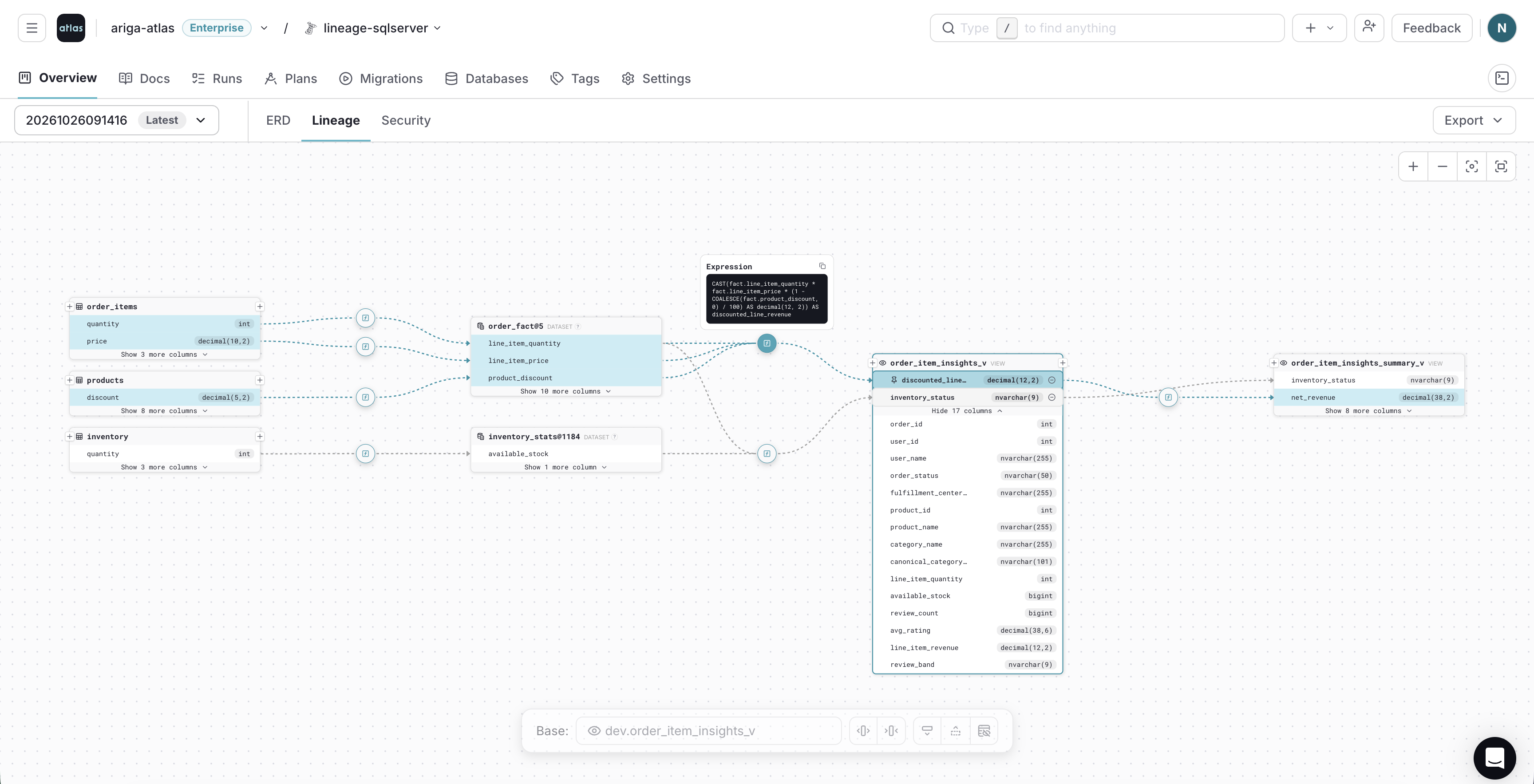
Column lineage of a T-SQL view, with a pinned expression
SQL Server is also covered by the security scan and the profiler. If you are moving a database to PostgreSQL, see the SQL Server to PostgreSQL guide.
PostgreSQL
PostgreSQL gains temporal keys from version 18, and finer control over role memberships and default privileges:
- Temporal Keys
- Membership Options
- Default Privileges
Temporal keys enforce uniqueness and referential
integrity over time ranges: WITHOUT OVERLAPS on primary keys and unique constraints, and PERIOD
on foreign keys:
table "parent" {
  schema = schema.public
  column "id" {
    null = false
    type = int
  }
  column "validity" {
    null = false
    type = tsrange
  }
  primary_key {
    columns          = [column.id, column.validity]
    type             = GIST
    without_overlaps = true
  }
  unique "parent_key" {
    columns          = [column.id, column.validity]
    type             = GIST
    without_overlaps = true
  }
}

table "child" {
  schema = schema.public
  column "parent_id" {
    null = false
    type = int
  }
  column "validity" {
    null = false
    type = tsrange
  }
  foreign_key "child_parent_fkey" {
    columns     = [column.parent_id, column.validity]
    ref_columns = [table.parent.column.id, table.parent.column.validity]
    period      = true
  }
}
A temporal key is always backed by a GiST index, so type = GIST may be omitted when authoring.
A grant like GRANT reader TO vault WITH ADMIN OPTION used to be inspected as a plain membership. A
new membership block declares the options a membership is
granted with:
role "reader" {}
role "writer" {}

user "vault" {
  member_of = [role.reader]
  membership {
    role  = role.writer
    admin = true
  }
}
-- Grant role "reader" to "vault"
GRANT "reader" TO "vault";
-- Grant role "writer" to "vault"
GRANT "writer" TO "vault" WITH ADMIN OPTION;
inherit and set are supported on PostgreSQL 16 and above. admin is also supported on MySQL,
ClickHouse, Redshift, and Oracle.
For schemas whose objects are created by another tool,
default privileges are declared as default_permission
blocks:
default_permission {
  owner      = user.migrations
  schema     = schema.public
  on         = TABLES
  to         = user.app
  privileges = [DELETE, INSERT, SELECT, UPDATE]
}
Atlas plans the ALTER DEFAULT PRIVILEGES statements that make the database match, and reports
drift on them.
Atlas also keeps an explicit index operator class that
PostgreSQL would not pick for the column on its own, such as text_ops on a citext column.
Databricks
Databricks gains metric views and tags, and plans struct changes that used to fail:
- Metric Views
- Tags
- Struct Columns
A metric view is a view block with metrics = true, whose
as attribute holds the YAML definition:
view "revenue_metrics" {
  schema     = schema.retail_analytics
  metrics    = true
  comment    = "Revenue KPIs by region and day"
  as         = <<-SQL
  version: 0.1
  source: retail_analytics.orders
  dimensions:
    - name: region
      expr: region
    - name: order_day
      expr: DATE(placed_on)
  measures:
    - name: total_revenue
      expr: SUM(total_amount)
  SQL
  depends_on = [table.orders]
}
Definition and comment changes are applied in place with ALTER VIEW, so the view keeps its grants.
Tags are key/value pairs in the tags map of the object they label:
schemas, tables, views, materialized views, and their columns:
schema "sales" {
  tags = {
    owner = "crm"
  }
}

table "customers" {
  schema = schema.sales
  column "customer_id" {
    null = false
    type = BIGINT
  }
  column "email" {
    null = true
    type = STRING
    tags = {
      pii_type = "email"
    }
  }
  tags = {
    data_classification = "confidential"
  }
}
A tag is not an object of its own, so there is no tag block. Atlas sets the tags of an object
right after it creates it.
Databricks rejects a type change on a whole struct column, so Atlas now changes struct fields one statement at a time, nested and inside arrays included:
column "payload" {
  type = sql("STRUCT<a:INT, b:STRING, c:INT>")
}
column "items" {
  type = sql("ARRAY<STRUCT<x:INT, y:INT>>")
}
ALTER TABLE `retail_analytics`.`events` ADD COLUMN `payload`.`c` INT;
ALTER TABLE `retail_analytics`.`events` ADD COLUMN `items`.`element`.`y` INT;
Databricks also gains:
- Expanded attribute coverage across tables, views, functions, and procedures.
- A token data source for Lakebase, so the connection URL carries no static password.
Redshift
Redshift gains access control and data sharing as code:
- Roles & Permissions
- Datashares
- Column Rebuilds
Roles, groups, users, and permissions are now managed as code, including the users Redshift creates for IAM identities:
role "app_readonly" {
}

role "app_writer" {
  member_of = [role.app_readonly]
}

// A group is a role carrying the group marker: Redshift keeps
// CREATE GROUP apart from CREATE ROLE.
role "app_analysts" {
  group = true
}

user "app_api" {
  conn_limit = 5
  member_of  = [role.app_writer, role.app_analysts]
}
Atlas writes each grantee the way Redshift requires, and revokes privileges before it drops the role or user that holds them.
A datashare declares the schemas and objects a cluster shares, and the namespaces and accounts allowed to consume them:
datashare "sales_share" {
  // Share a fixed set of objects from a schema.
  schema {
    for     = schema.sales
    objects = [table.orders, view.summary]
  }

  // Share everything in the schema, now and later.
  schema {
    for         = schema.logs
    include_new = true
  }

  // Share everything except the objects listed.
  schema {
    for                = schema.events
    include_new_except = [table.audit]
  }

  namespaces = ["00000000-0000-0000-0000-000000000000"]
}
Redshift applies INCLUDENEW only to objects created after it is set, so Atlas adds the existing
ones explicitly, and the share covers the whole schema from the first apply.
Redshift cannot change a column's NULL setting or default in place. Atlas now
plans these changes by dropping the column and
adding it back, once you allow it:
# In a terminal, Atlas asks first:
$ atlas migrate diff relax_user_agent --env prod
? Column "user_agent" nullability change requires recreating the column:
  ▸ Abort
    Drop and recreate column "user_agent" (data loss)

# In CI, there is nobody to ask, so it stops:
$ atlas migrate diff relax_user_agent --env prod
Error: Column "user_agent" nullability change requires recreating the column.
Set 'allow_recreate' in the 'modify_column' block of the diff policy to plan it
The user block also takes a params map for the settings every session of that user starts with.
Oracle
Oracle gains tablespaces, deferrable keys, and column collations:
- Tablespaces
- Deferrable Keys
- Collations
Tablespaces and physical attributes are declared
in a physical block, on tables and on indexes:
table "T3" {
  schema = schema.APP
  column "A" {
    null = true
    type = NUMBER
  }
  index "I_T3" {
    columns = [column.A]
    physical {
      initrans   = 4
      tablespace = "SYSAUX"
    }
  }
  physical {
    pctfree    = 5
    tablespace = "SYSAUX"
    storage {
      buffer_pool = KEEP
    }
  }
}
Relocations are planned with ALTER TABLE ... MOVE ONLINE, which keeps indexes usable, and a changed
index clause as ALTER INDEX ... REBUILD.
Primary and unique keys can be deferrable, reuse an existing index, and carry constraint state:
index "PARCELS_ID_IDX" {
  unique  = true
  columns = [column.ID]
}
primary_key "PARCELS_PK" {
  columns    = [column.ID]
  index      = index.PARCELS_ID_IDX  # USING INDEX.
  deferrable = INITIALLY_DEFERRED    # or INITIALLY_IMMEDIATE.
}
-- create index "PARCELS_ID_IDX" to table: "PARCELS"
CREATE UNIQUE INDEX "PARCELS_ID_IDX" ON "APP"."PARCELS" ("ID");
-- modify "PARCELS" table
ALTER TABLE "APP"."PARCELS" ADD CONSTRAINT "PARCELS_PK" PRIMARY KEY ("ID")
  USING INDEX "PARCELS_ID_IDX" DEFERRABLE INITIALLY DEFERRED;
Character columns take a collate attribute, and Atlas plans
the MODIFY ... COLLATE statements that add, change, or reset it:
table "USERS" {
  schema = schema.APP
  column "NAME" {
    null    = true
    type    = VARCHAR2(100)
    collate = "BINARY_CI"
  }
  column "CODE" {
    null = true
    type = VARCHAR2(10)
  }
}
MySQL and MariaDB
Six new lint analyzers report changes that copy or rebuild the table, block concurrent writes, or silently forfeit instant DDL. For example, adding a stored generated column:
ALTER TABLE orders ADD COLUMN total INT AS (price * qty) STORED NOT NULL;
    -- blocking table changes detected:
      -- L1: Adding stored generated column "total" on table "orders" requires a table copy and
         blocks concurrent DML https://atlasgo.io/lint/analyzers#MY140
    -- suggested fix:
      -> Define the column as VIRTUAL to add it instantly, unless its value must be stored
ClickHouse
Some ClickHouse changes cannot keep the rows during a rebuild, such as an engine change on a replicated table with a fixed ZooKeeper path.
A run without a terminal used to leave such a change out of the plan. It now fails and names the table, unless the diff policy allows the rebuild:
env "prod" {
  diff "clickhouse" {
    modify_table {
      allow_recreate = true
    }
  }
}
Distributed SQL
CockroachDB, YugabyteDB, Aurora DSQL, and Spanner each gain a missing piece:
- CockroachDB
- YugabyteDB
- Aurora DSQL
- Spanner
Triggers, functions, and procedures are written like their PostgreSQL counterparts:
function "audit_order" {
  schema = schema.public
  lang   = PLpgSQL
  return = trigger
  as     = <<-SQL
  BEGIN
  RETURN new;
  END;
  SQL
}
trigger "audit_orders" {
  on = table.orders
  before {
    insert = true
  }
  for  = ROW
  when = "((new).amount > 100)"
  execute {
    function = function.audit_order
    args     = ["orders"]
  }
}
CockroachDB rejects DROP FUNCTION ... CASCADE, so Atlas orders a trigger drop before the function
it executes.
Atlas manages the attributes that decide how a table is distributed: colocation, tablet pre-splitting, and hash or range sharding:
// High-throughput table: range primary key, pre-split at known boundaries.
table "orders" {
  schema          = schema.public
  colocation      = false
  split_at_values = ["1000000", "2000000", "3000000"]
  column "id" {
    null = false
    type = bigint
  }
  column "customer_id" {
    null = false
    type = bigint
  }
  column "placed_at" {
    null = false
    type = timestamptz
  }
  primary_key {
    on {
      column   = column.id
      sharding = RANGE   // range-sharded: required by split_at_values
    }
  }
}
These attributes are fixed when the object is created, so Atlas plans a recreate when one changes.
Atlas plans constraints on existing tables, identity columns, and columns added with a default, in the statement forms DSQL accepts:
-- Modify "projects" table
ALTER TABLE "projects" ADD CONSTRAINT "projects_name_check" CHECK (name <> ''::text) NOT VALID;
-- Validate constraint "projects_name_check"
ALTER TABLE ASYNC "projects" VALIDATE CONSTRAINT "projects_name_check";
-- Create index "projects_name_key" to table: "projects"
CREATE UNIQUE INDEX ASYNC "projects_name_key" ON "projects" ("tenant_id", "name");
-- Modify "projects" table
ALTER TABLE "projects" ADD CONSTRAINT "projects_name_key" UNIQUE USING INDEX "projects_name_key";
Atlas waits for each async job before it runs the next statement, so a failed index build or validation fails the migration.
A column can declare its own locality group, overriding its table's, so hot and cold data live on different storage inside one table:
locality "hot" {
  storage = "ssd"
}
locality "cold" {
  storage = "hdd"
}
table "Singers" {
  schema         = schema.default
  locality_group = locality.hot
  column "SingerId" {
    null = false
    type = STRING(36)
  }
  column "Bio" {
    null = true
    type = STRING(1024)
    options {
      locality_group = locality.cold
    }
  }
  primary_key {
    columns = [column.SingerId]
  }
}
Also in This Release
Atlas v1.3.5 and later are built with Go 1.26.10, which rejects certificates issued under the compromised eMudhra intermediates.
This release also includes improvements to Atlas Scripts, lint, permissions, CI/CD, the Kubernetes Operator, and Azure, and adds dark mode to Atlas Cloud:
- Atlas Scripts
- Lint
- Permissions
- CI/CD
- Kubernetes Operator
- Azure
- Dark Mode
The atlas script commands run on every target of an environment
defined with for_each, such as a database or a schema per tenant, with each tenant's own URL and
variables:
locals {
  tenants = ["tenant_1", "tenant_2"]
}

env "prod" {
  for_each = toset(local.tenants)
  url      = "sqlite://${each.value}.db"
  tenant   = each.value
  script {
    src = "file://scripts"
  }
}
atlas script query --env prod --run '^user_counts$' --quiet
tenant_1: 4 users, 2 on pro
tenant_2: 3 users, 1 on pro
Scripts pushed with atlas script push also get a page in the Registry,
and run from anywhere by name with an atlas:// URL.
A mask block can also mask entities in free text, such as
emails and phone numbers, and keep the rest of the value.
Lint already reports table and column drops as destructive changes. It now also reports them as backward incompatible, since even an empty column is a breaking change for the code that selects it:
ALTER TABLE users DROP COLUMN name;
DROP TABLE pets;
  -- analyzing version 2
    -- destructive changes detected:
      -- L1: Dropping non-virtual column "name" https://atlasgo.io/lint/analyzers#DS103
      -- L2: Dropping table "pets" https://atlasgo.io/lint/analyzers#DS102
    -- backward incompatible changes detected:
      -- L1: Clients using column "users"."name" will fail https://atlasgo.io/lint/analyzers#BC104
      -- L2: Clients using table "pets" will fail https://atlasgo.io/lint/analyzers#BC103
A complexity policy sets limits for the functions, procedures, and triggers a migration creates or changes, and lint reports the ones above them.
The HCL permission block can grant on schemas, tables, and views
declared outside HCL, such as in a SQL file:
CREATE SCHEMA analytics;
CREATE TABLE analytics.events (id int PRIMARY KEY);
Its for attribute takes a ref() to the object:
role "reader" {}

permission {
  to         = role.reader
  for        = ref("schema.analytics")
  privileges = [USAGE]
}

permission {
  to         = role.reader
  for        = ref("table.analytics.events")
  privileges = [SELECT]
}
Both files are combined in a composite schema.
The schema/plan and migrate/lint GitHub Actions add a
change summary to their pull request comments: one row for
each changed object, with its diff and the statements that change it.
The install script checks the binary it downloads against its published SHA-256 checksum, and stops without installing anything if they don't match:
curl -sSf https://atlasgo.sh | sh
Checksum mismatch for 'atlas-linux-amd64-latest': expected <published>, got <downloaded>.
The GitLab CI components check their binary against a SHA-256 checksum that ships with each component release, so pinning a component by commit SHA also pins the binary it runs.
AtlasSchema and AtlasMigration accept a
devDB.metadata block that sets labels and annotations on
the dev database pod the Operator creates:
apiVersion: db.atlasgo.io/v1alpha1
kind: AtlasSchema
metadata:
  name: myapp
spec:
  urlFrom:
    secretKeyRef:
      key: url
      name: myapp-db
  devDB:
    metadata:
      labels:
        team: platform
      annotations:
        example.com/purpose: schema-analysis
  schema:
    sql: |
      create table users (
        id int not null,
        primary key (id)
      );
See the Operator v0.8 post for the rest of the Operator's updates.
The azure_db_token data source generates a short-lived Microsoft Entra
access token for Azure Database for PostgreSQL and MySQL from inside the project file, so the
connection URL no longer carries a static password:
data "azure_db_token" "db" {}

env "azure" {
  # The Entra user contains "@", so it must be URL-escaped
  # with urluserinfo (or urlescape) rather than interpolated.
  url = urluserinfo(
    "postgres://myserver.postgres.database.azure.com:5432/postgres?sslmode=require",
    "app@contoso.onmicrosoft.com",
    data.azure_db_token.db,
  )
}
Atlas Cloud has a dark mode. Switch to it from the user menu under your avatar, or match your system's theme:
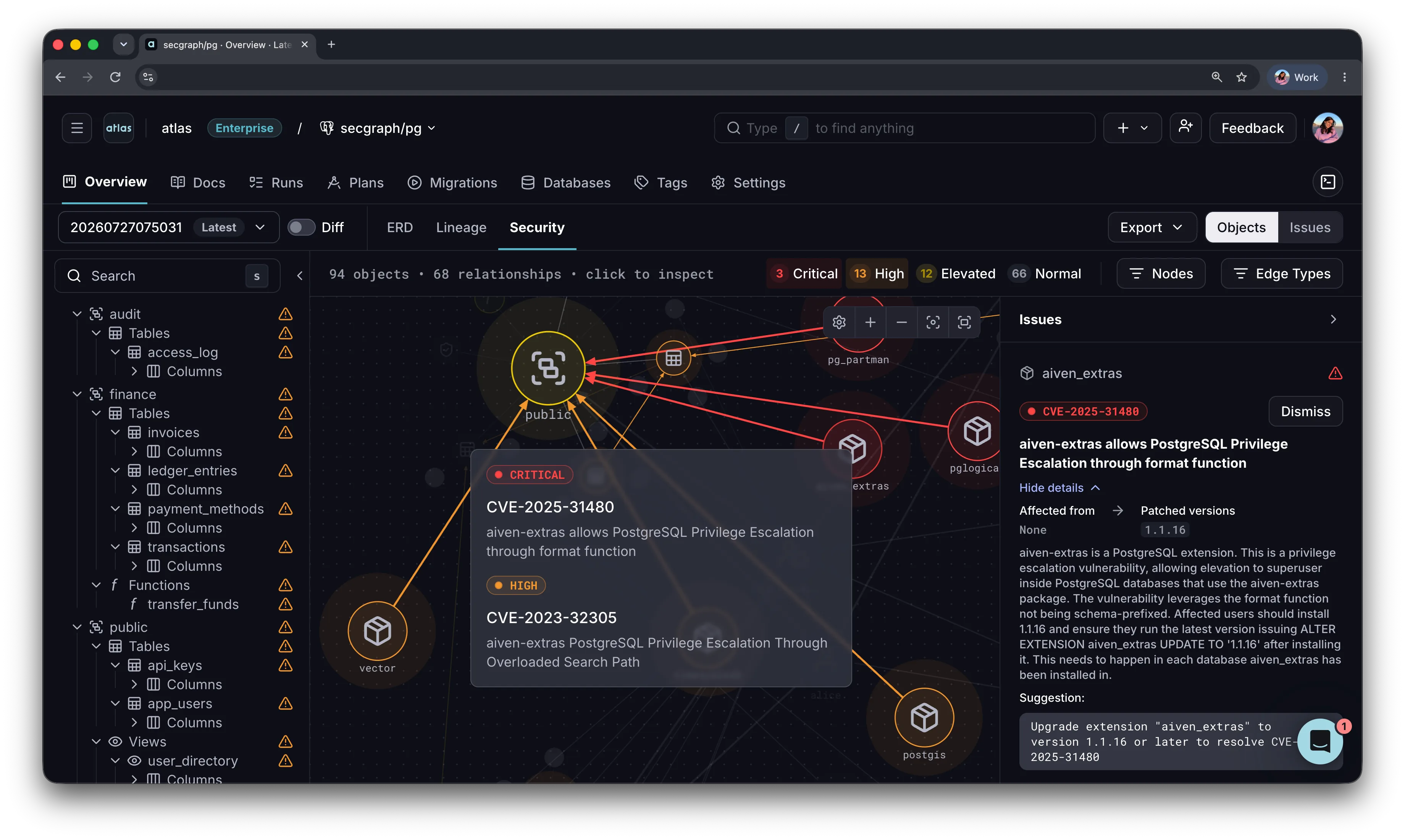
The security graph in dark mode
We ship improvements continuously between releases, so follow the Atlas changelog to stay up to date.
Atlas Binaries Are Moving
Starting December 2026, Atlas CLI binaries are served from https://atlasbinaries.com. Most setups
need no change.
release.ariga.io will no longer serve public downloads directly, and requests to it will redirect
to the same file on atlasbinaries.com. File paths stay the same, and only the hostname changes:
-https://release.ariga.io/atlas/atlas-linux-amd64-latest
+https://atlasbinaries.com/atlas/atlas-linux-amd64-latest
Here is what to check:
- If you use the official install script (
curl -sSf https://atlasgo.sh | sh), there is nothing to do. - If you download binaries directly, in CI pipelines, Dockerfiles, or scripts, replace
release.ariga.iowithatlasbinaries.comin your URLs. - If your firewall or proxy restricts outbound traffic, allow
atlasbinaries.com. - If your download command does not follow redirects, such as
curlwithout-L, turn it on. Otherwise, once the redirect is active, it saves the redirect response instead of the binary.
Questions? Message us on Intercom or ask on our Discord server.
Wrapping Up
Atlas v1.4 brings security scanning to your databases, from a lint check in CI to scheduled scans of production.
It also extends the feedback loop we described in The AI-Native SDLC Playbook Stops at the Database. The first example in that post is a migration that passes every test on a dev database with 40 rows, and then holds a lock on the production table for 90 seconds.
Lint classifies such a change by how it breaks production, and the profiler now measures it over production-like data, before the change merges. Together with the agent skills and the drift checks between deployments, more of that loop now has the database inside it.
We'd love to hear your feedback! Join our Discord server or schedule a demo.