DACPAC for PostgreSQL: Where Atlas Fills the Gap

If you've searched for "DACPAC for PostgreSQL," you already know the answer: there isn't one. DACPAC is a
Microsoft file format, built into SQL Server Data Tools and deployed with SqlPackage, and it has no
equivalent outside the SQL Server ecosystem. What you're actually looking for isn't the file format, it's
the workflow: define the schema once, let the tool diff it against a live database, and deploy the result
without hand-written migration scripts. Atlas gives you that workflow for PostgreSQL.
The Gap in PostgreSQL
Teams that move from SQL Server to PostgreSQL, or run both, hit this quickly. There's no Database Project,
no DACPAC, and no SqlPackage. The common PostgreSQL tools, like Flyway and Liquibase, are migration runners.
They apply scripts in order, but someone still writes every ALTER TABLE by hand and hopes it matches
what's actually in production.
DACPAC let SQL Server teams skip that step. Without it, schema changes go back to being manual: write the migration, review it, keep it in sync with the ORM models, and find out about drift when a deploy fails.
The hard part isn't the simple ADD COLUMN, it's the changes that ripple through dependencies. In PostgreSQL,
you can't change the type of a column that a view uses, and CREATE OR REPLACE VIEW can't drop or retype
columns. A one-line change to a base table or view can mean dropping every downstream view, materialized
view, and function that depends on it, applying the change, and recreating the whole chain in the right
order. Doing that by hand means tracing the dependency graph yourself, and missing one object means a
failed deploy or a silently broken view.
A good planner handles this for you, and it's where most of the real work in a schema diff happens.
SqlPackage does it for SQL Server. PostgreSQL teams have had to do it themselves.
Enter: Atlas
Atlas brings declarative PostgreSQL schema migration to the table. You define the desired schema, Atlas
inspects the target database, computes the diff, including working out the dependency order above, and
plans the migration. It's the same build-diff-deploy loop run by SqlPackage, without Visual Studio or
a compiled package.
That loop, on the SQL Server side, looks like this. A DACPAC (Data-tier Application Package) is the
compiled output of a SQL Server Database Project built in Visual Studio: a zip file containing a model
of every table, view, and procedure in the project, plus any pre-deployment and post-deployment scripts
a developer bolted on for logic the model can't express, like backfills. You never hand-write a
migration; instead you point SqlPackage at the DACPAC and a target database, and it computes the diff
for you:
sqlpackage /Action:Publish \
  /SourceFile:MyDatabase.dacpac \
  /TargetConnectionString:"Server=prod;Database=app;User Id=sa;Password=***;"
SqlPackage inspects the target, compares it to the model baked into the DACPAC, and generates a
deployment script on the fly. Nobody sits down and writes ALTER TABLE ... ADD COLUMN, rather the
tool derives it from the difference between two states. Swap /Action:Publish for /Action:Script
and SqlPackage writes that generated script to a .sql file instead of running it right away,
giving you the chance to first read and review it.
Atlas runs that same loop against PostgreSQL, MySQL, SQL Server, and more databases, starting from schema as code you write yourself, in SQL, Atlas HCL, or your ORM models, and it's not tied to Visual Studio or Windows to do it.
See It in Practice
Atlas works from the same premise as SqlPackage: you define your desired schema and Atlas computes
the SQL needed to get a real database there. The difference is that instead of a Visual Studio project
compiled into a binary artifact, the desired state is defined in code you can read, diff, and review in
a pull request:
CREATE TABLE "users" (
    "id" bigint NOT NULL,
    "name" character varying NOT NULL,
    "balance" integer NOT NULL DEFAULT 0,
    "legacy_id" bigint,
    PRIMARY KEY ("id")
);
Instead of SqlPackage /Action:Publish, you run atlas schema apply, pointing
--to at that file and -u at the database you want to converge:
atlas schema apply \
  -u "postgres://postgres:pass@:5432/myapp?search_path=public&sslmode=disable" \
  --to "file://schema.sql" \
  --dev-url "docker://postgres/16/dev?search_path=public"
Atlas inspects myapp, diffs it against schema.sql, and shows you the plan before touching anything:
Planning migration statements (1 in total):

  -- create "users" table:
    -> CREATE TABLE "users" (
         "id" bigint NOT NULL,
         "name" character varying NOT NULL,
         "balance" integer NOT NULL DEFAULT 0,
         "legacy_id" bigint,
         PRIMARY KEY ("id")
       );

-------------------------------------------

? Approve or abort the plan:
  ▸ Approve and apply
    Abort
In the end, you get the same result: a generated plan, derived from a real diff, that a human approves
before it runs. The --dev-url flag points at an ephemeral dev database that
Atlas runs the generated SQL against before it ever touches myapp, so a statement that's malformed or
invalid for this schema fails on the throwaway copy, not on the target, something SqlPackage doesn't
do on its own.
Where SqlPackage's script action is an opt-in extra step, plan review is the default in Atlas:
schema apply stops and waits for approval unless you pass --auto-approve. Even then, the plan
run is the one printed to your terminal or CI log, not something reconstructed after the fact from
a separate script file.
Atlas Brings More to the Table
The workflow above, define a schema, get a plan, approve it, is the baseline. Everything beyond it, migration analyzers, data migration tests, drift monitoring, is what a DACPAC pipeline has no equivalent for at all.
Ensuring safe migrations
A DACPAC diff tells you what changed. It doesn't tell you whether that change is safe to run against a database with rows in it. Say a team decides to remove a deprecated column:
CREATE TABLE "users" (
    "id" bigint NOT NULL,
    "name" character varying NOT NULL,
    "balance" integer NOT NULL DEFAULT 0,
--  "legacy_id" bigint,
    PRIMARY KEY ("id")
);
Both SqlPackage and Atlas will happily generate ALTER TABLE "users" DROP COLUMN "legacy_id"; and hand
it to you as part of the plan. SqlPackage prints the statement and stops there. Atlas has a linting pass
that runs the same statement against its built-in analyzers before reaching your database:
atlas migrate lint --env local --latest 1
Analyzing changes from version 20260915093000 to 20260917103011 (1 migration in total):

  -- analyzing version 20260917103011
    -- destructive changes detected:
      -- L1: Dropping non-virtual column "legacy_id" https://atlasgo.io/lint/analyzers#DS103
  -- ok (4.238ms)

  -------------------------
  -- 8.211ms
  -- 1 version with errors
  -- 1 schema change
  -- 1 diagnostic
Teams that want a harder gate turn this into a CI failure by adding a few lines in atlas.hcl:
lint {
  destructive {
    error = true
  }
}
That gate isn't limited to CI. Configure a review policy of ERROR
and the same check runs at apply time: atlas schema apply auto-approves a plan only when linting
passes, and falls back to the manual approval prompt from the previous section the moment a destructive
change like this one shows up, even if you ran it with --auto-approve.
Destructive changes are one of several dozen analyzers Atlas ships
with. Renaming a column doesn't drop any data, so destructive won't flag it, but it still breaks any
application instance still running the previous schema version during a rolling deploy:
ALTER TABLE "users" RENAME COLUMN "email_address" TO "email";
  -- analyzing version 20260917113242
    -- backward incompatible changes detected:
      -- L2: Renaming column "email_address" to "email" https://atlasgo.io/lint/analyzers#BC102
PostgreSQL has its own class of problems that show up only once the statement hits a table with rows in it.
SqlPackage hands you the type change and lets the database sort out the cost. Atlas flags the ones that
rewrite the table, which blocks reads and writes for as long as the rewrite takes:
ALTER TABLE "users" ALTER COLUMN "balance" TYPE numeric(12,2);
  -- analyzing version 20260917114203
    -- blocking table changes detected:
      -- L5: Changing column type from "integer" to "numeric(12,2)" requires table rewrite with ACCESS EXCLUSIVE lock https://atlasgo.io/lint/analyzers#PG301
A third class fails depending on data that doesn't exist yet when you write the migration. Adding a unique constraint passes cleanly against an empty dev database and then fails in production the moment two existing rows share a value:
ALTER TABLE "orders" ADD CONSTRAINT "orders_name_key" UNIQUE ("name");
  -- analyzing version 20260917114732
    -- data dependent changes detected:
      -- L1: Adding a unique index "orders_name_key" might fail in case column "name" contains duplicate entries https://atlasgo.io/lint/analyzers#MF101
SqlPackage would generate all three of these statements exactly the same way it generates any other
ALTER TABLE, since nothing in a DACPAC model distinguishes a safe change from a risky one.
See Migration Analyzers for the full set of checks, including those specific to PostgreSQL and MySQL.
Build artifact vs. file directory
A DACPAC is a single, opaque snapshot. It doesn't tell you what changed between last week's deployment and today's; you'd need to diff two DACPACs to find out, and even then you're diffing binary output, not intent. If you want PostgreSQL schema history that lives in git and reads like a changelog, Atlas's versioned workflow gives you that as files, not a build artifact:
atlas migrate diff add_legacy_id_drop \
  --to "file://schema.sql" \
  --dev-url "docker://postgres/16/dev?search_path=public"
migrations/
├── 20260910091200_create_users.sql
├── 20260917103011_add_legacy_id_drop.sql
└── atlas.sum
-- modify "users" table
ALTER TABLE "users" DROP COLUMN "legacy_id";
Each file is a real diff you can read in a code review, checksummed in
atlas.sum to prevent migration conflicts.
atlas migrate apply walks the directory in order, applying only the migration
files that have yet to be applied to the target database.
There's no equivalent artifact to inspect in a DACPAC-based pipeline, because the DACPAC doesn't keep history, it only contains the current model.
Testing migrations
Linting catches statements that are unsafe in general. It won't tell you whether a data migration is
correct for your specific data, and that's what atlas migrate test covers: HCL
test files that seed the dev database at one version, migrate forward, and assert on the result.
test "migrate" "backfill_users" {
  migrate {
    to = "20260910091200"
  }
  exec {
    sql = "INSERT INTO users (id, name, legacy_id) VALUES (1, 'Ada', 42)"
  }
  migrate {
    to = "20260917103011"
  }
  assert {
    sql = "SELECT NOT EXISTS (SELECT 1 FROM users WHERE legacy_id IS NOT NULL)"
  }
}
atlas migrate test --dev-url "docker://postgres/16/dev?search_path=public"
The exec block isn't the only assertion available: catch expects
a statement to fail and can match the error message, and assert
expects a query to return true, so a single test case can seed data, migrate, and check several
conditions in sequence before Atlas tears the dev database down for the next case.
A sibling command, atlas schema test, asserts on schema behavior directly, useful
for check constraints, generated columns, or views, without stepping through migration versions at all.
SqlPackage has no notion of a test for a deployment script; it generates the diff and trusts it.
Watching the Database After the Deployment Ends
A DACPAC is a snapshot. Once SqlPackage finishes, nothing keeps watching the target, so if someone
opens a database console and adds a column, changes a constraint, or drops an index by hand, that change
sits invisible until the next deployment's diff turns up something nobody expected.
Atlas Cloud keeps watching after the deployment ends:
- Schema registry: every version of your schemas and migration directories, with ERD diffs between versions and the CI runs that produced them.
- Schema docs: generated documentation for every table, column, and relationship, updated with each push.
- Lineage graph: how tables, columns, and other resources depend on one another across the schema.
- Security graph: roles, permissions, and grants in one view, with findings for misconfigurations and known CVEs.
- Drift detection: continuous comparison of each live database against its expected state, with a Slack alert when they diverge.
- Deployment history: which version ran against which database and when, including per-tenant status across a fleet.
- Troubleshooting: a report for every failed deployment with the SQL error, the files that were applied, and which tenant database caused the failure.
- Schema Registry
- Schema Docs
- Lineage Graph
- Security Graph
- Drift Detection
- Deployments
- Troubleshooting
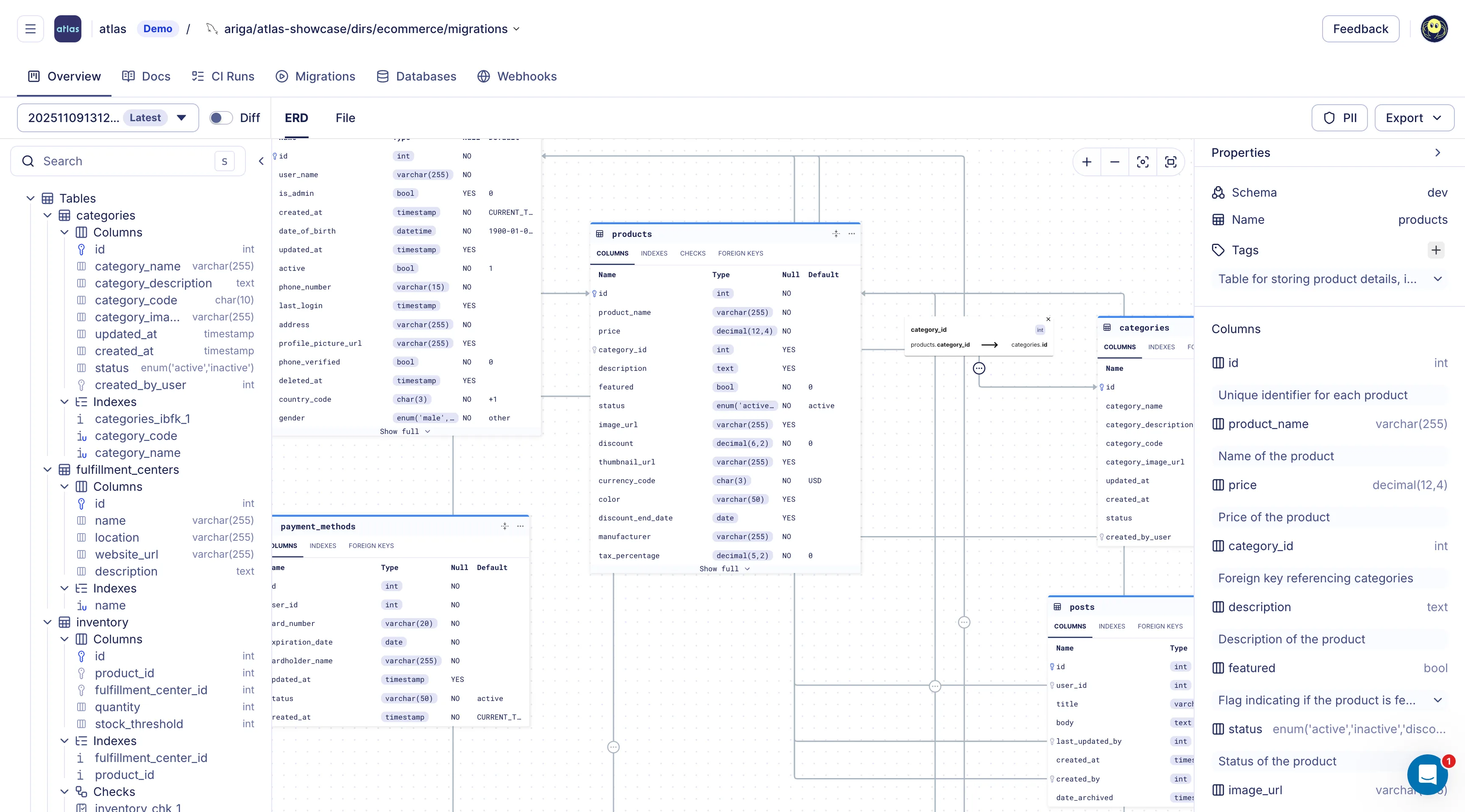
Migration Directory created with atlas migrate push
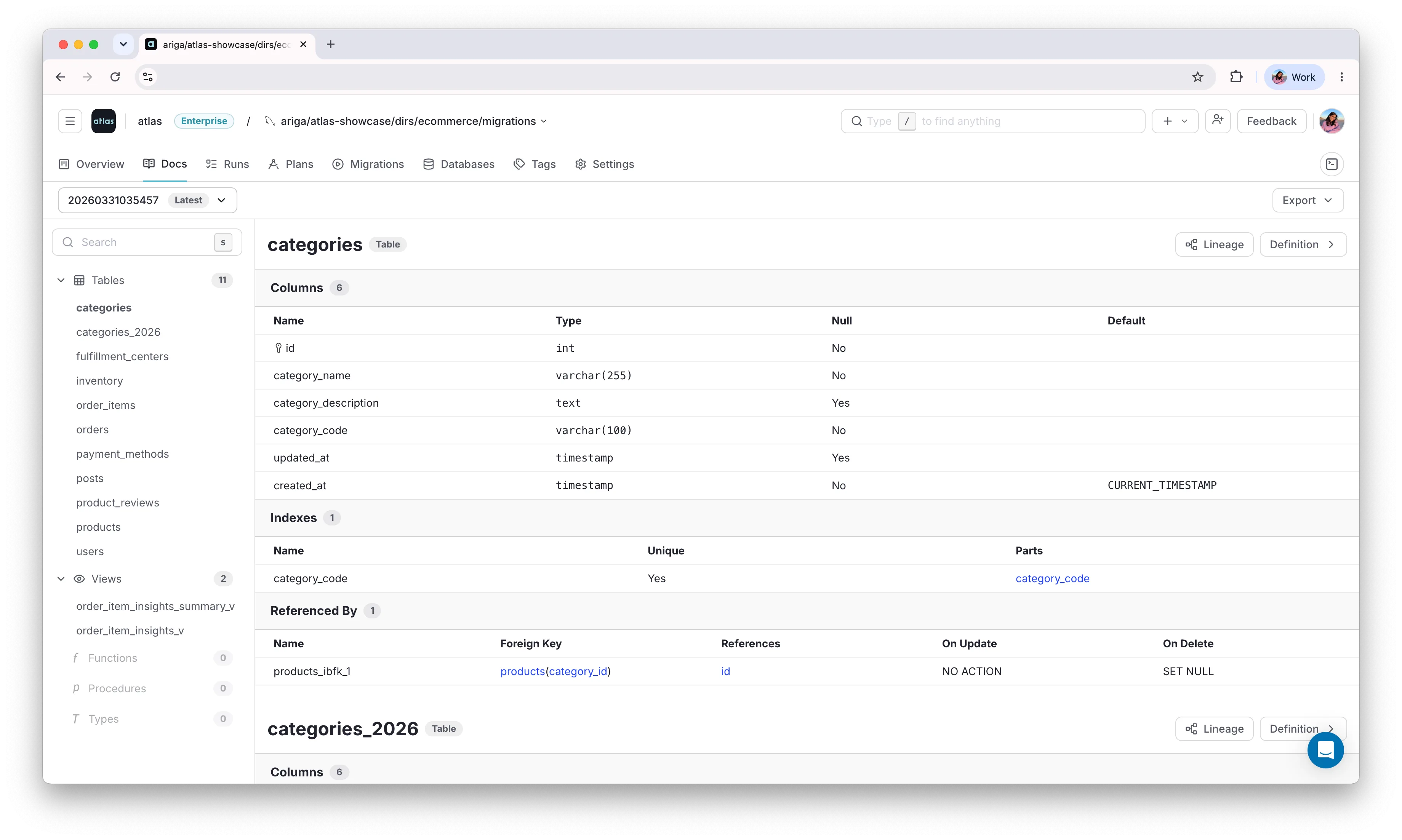
Generated schema documentation in Atlas Cloud
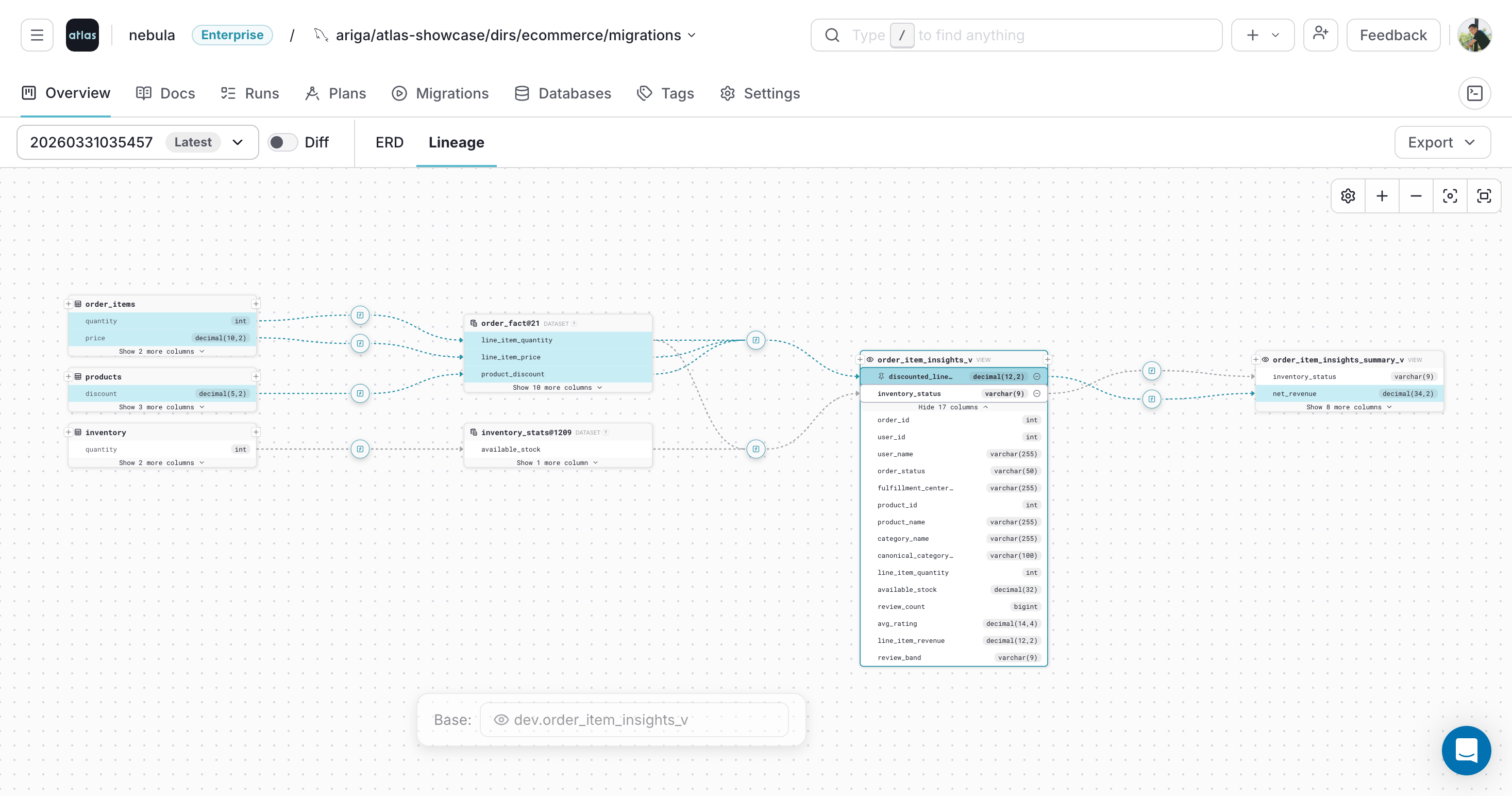
Pinning a selected column in the Atlas Cloud lineage graph
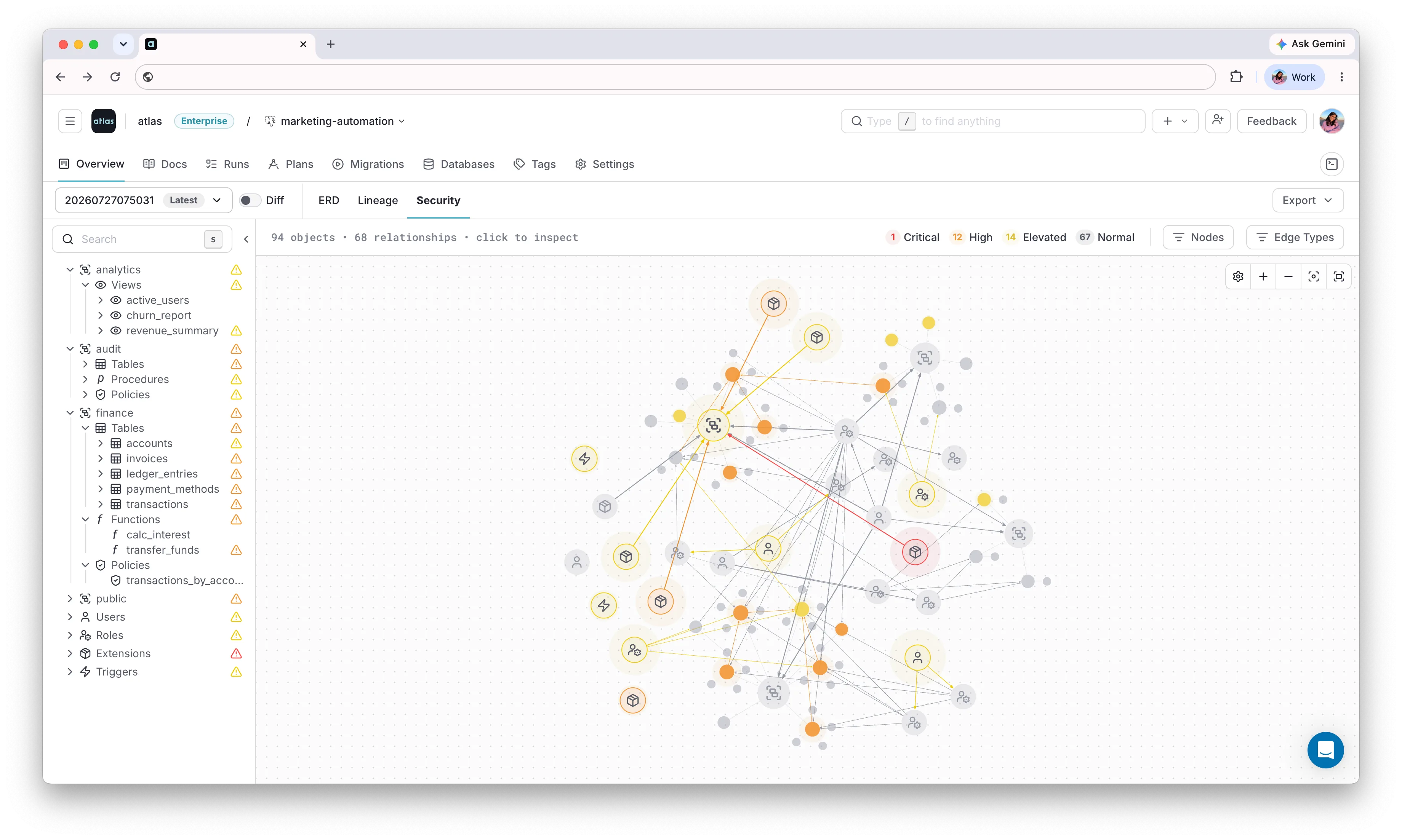
Atlas Cloud overview page with the Security tab selected
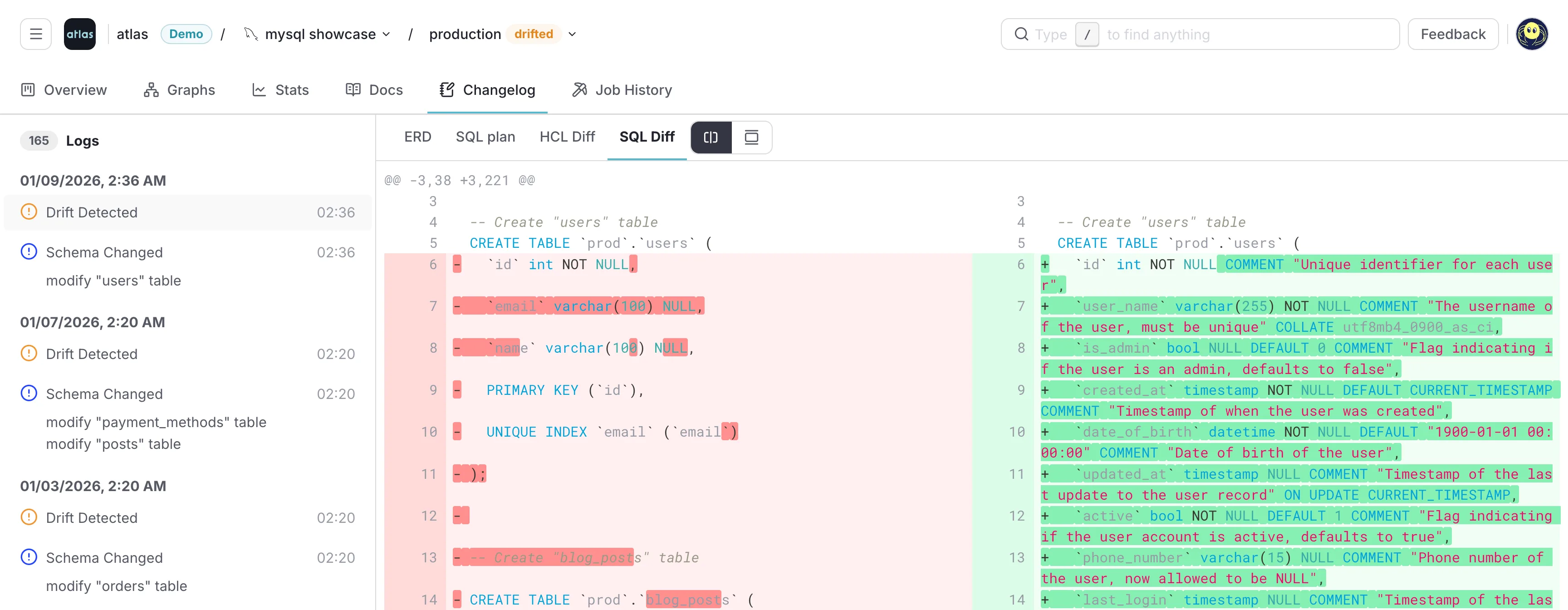
SQL diff view for a detected drift
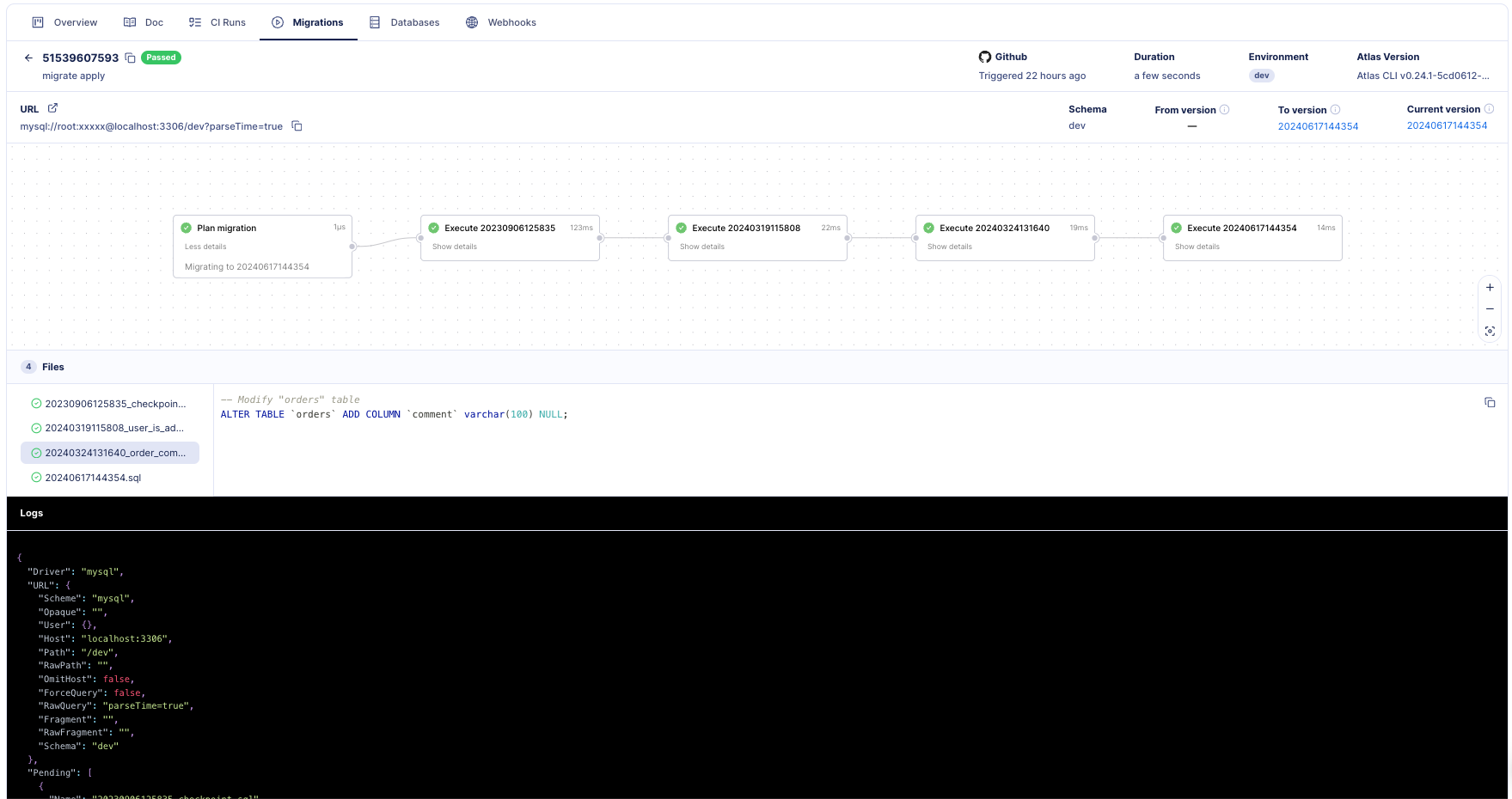
Single deployment report in Atlas Cloud, showing migration status, duration, and applied files
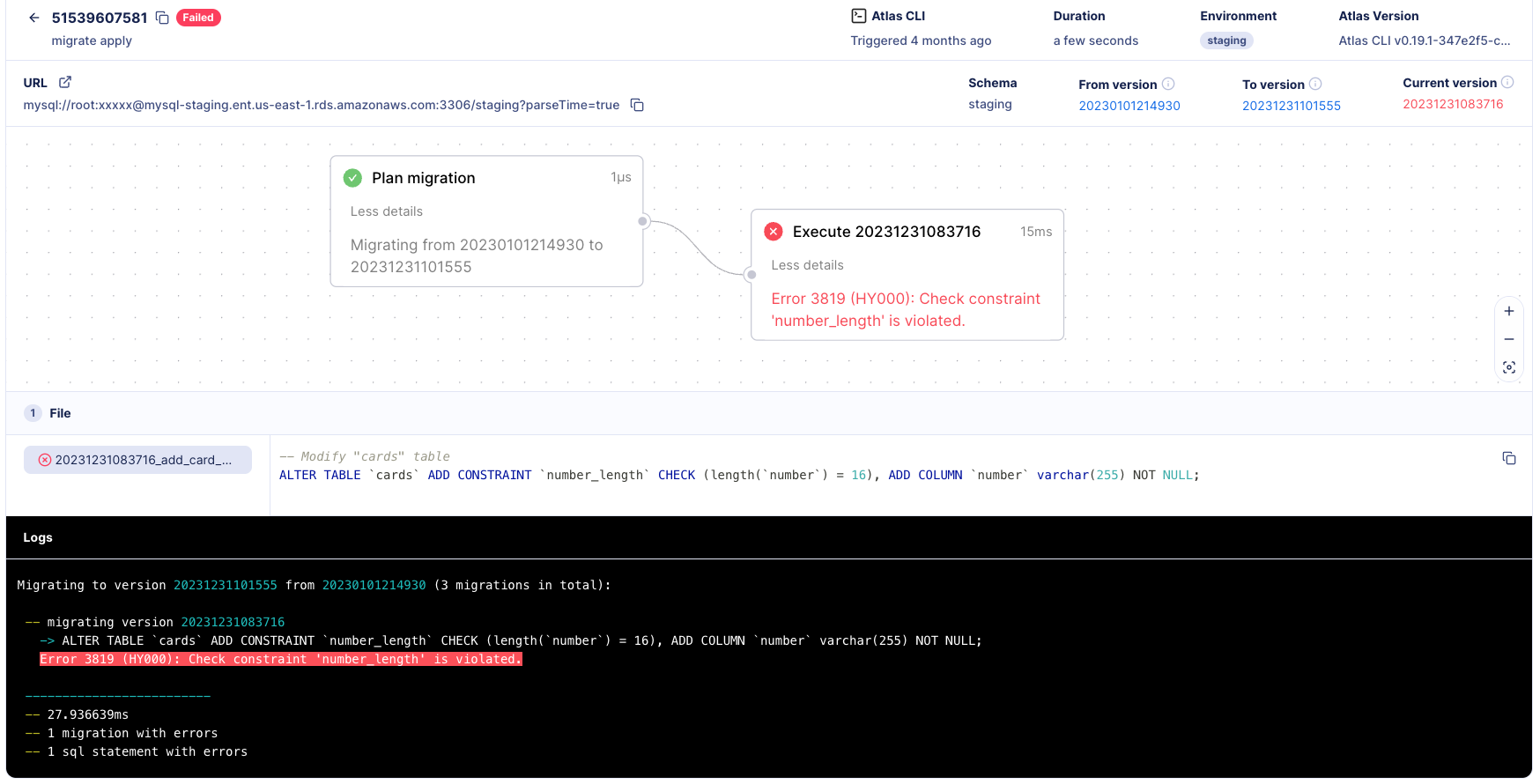
Failed deployment report in Atlas Cloud, showing the SQL error and the migration files that were applied
Coming from SQL Server Entirely
Everything above works whether your target is PostgreSQL, MySQL, SQL Server, or a handful of other engines Atlas supports, since the workflow doesn't change per database. If you're not just missing DACPAC on PostgreSQL but considering moving your whole SSDT setup over, the deeper comparison, including rollback, multi-tenant deployments, and drift detection, is in Atlas vs SSDT.