Atlas vs SSDT (SQL Server Data Tools): Why Modern Teams Choose Atlas
SQL Server Data Tools (SSDT) has been the go-to solution for defining database projects in Visual Studio, building them into DACPAC files, and deploying them via the SqlPackage CLI. For teams deeply embedded in the Microsoft ecosystem, it's familiar and well-integrated.
But SSDT was designed before Infrastructure as Code became standard, before GitOps, before teams began
managing databases alongside Kubernetes and Terraform. Microsoft has been modernizing the toolchain with
SDK-style SQL projects (Microsoft.Build.Sql): the SDK itself reached general availability in 2025, but as
of September 2026, SDK-style projects are still a preview feature in Visual Studio 2022, and Visual Studio
2026 dropped support for them entirely, leaving the original MSBuild-based .sqlproj format as the only
option there.
Atlas approaches database schema management differently. It's cross-platform (Windows, macOS, Linux), supports both declarative and versioned workflows, and was built from the ground up for modern CI/CD pipelines. This document explores the key differences to help you decide which tool fits your team.
This document is maintained by the Atlas team and was last updated in September 2026. It may contain outdated information or mistakes. For SSDT's latest details, please refer to the official Microsoft documentation.
Quick Comparison
| Feature / Capability | Atlas | SSDT (SQL Server Data Tools) |
|---|---|---|
| Workflows | Declarative (state-based) and versioned | State-based only (DACPAC deployment model) |
| Migration Planning | Automatic diff-based planning with policy-awareness and checks | Automatic generation; plan can be scripted for review but lacks policy checks |
| Rollback / Down Migrations | Dynamic, state-aware rollback with safety checks | Not supported |
| Validation & Linting | Analyzers for destructive changes, table locks, naming conventions, and custom rules | Static analysis for T-SQL projects only |
| Testing Framework | Schema and migration tests that run locally and in CI/CD | SQL Server Unit Test projects in Visual Studio; no migration testing |
| Policy Enforcement | Diff policies, schema rules, deployment checks, and custom rules | Not available |
| CI/CD Integration | Native GitHub, GitLab, Azure DevOps, Bitbucket, CircleCI actions | Azure DevOps task; GitHub Actions via community samples; others require scripting |
| Kubernetes Integration | Official Operator with CRDs (AtlasSchema, AtlasMigration), Argo CD and Flux CD compatible | No official operator |
| Terraform Integration | Official provider (atlas_schema, atlas_migration) | No provider |
| Cloud Registry & Docs | Auto-generated schema docs, ERDs, column-level lineage, schema statistics, deployment traces, and PR checks | Not available |
| Multi-tenant Migrations | DB-per-tenant and schema-per-tenant with controlled rollout | Not supported |
| Database Support | PostgreSQL, MySQL/MariaDB, SQL Server, Oracle, ClickHouse, SQLite, CockroachDB, TiDB, Redshift, Spanner, Snowflake, and more | SQL Server and Azure SQL Database only |
| Drift Detection | Pre-apply blocking, on-demand CLI checks, and continuous monitoring with alerts and detailed diffs | One-time DriftReport via SqlPackage CLI |
| ORM Integration | Load schemas from Entity Framework, Hibernate, GORM, Django, SQLAlchemy, and generate migrations | Not available |
| Static/Seed Data | Data migrations with full linting and testing | Post-deploy scripts with MERGE statements (manual maintenance) |
| Database Security as Code | Declarative roles, users, grants, and permissions with automatic diffing, plus a Security Graph mapping access paths, misconfigurations, and CVEs | Included in DACPAC model; no dedicated diffing, drift detection, or policy enforcement |
| Declarative Data Management | Define seed data in desired state; Atlas computes minimal diffs | Post-deploy scripts with MERGE statements; manual, not declarative |
Declarative and Versioned Workflows
SSDT is strictly state-based. Schemas are defined in a Visual Studio project, and during deployment, SSDT compares the target database to that model and generates a deployment plan. The process is automated, but users don't control how the diff is computed - and sometimes the generated SQL can be surprising. Renaming a column? SSDT might drop and recreate the table.
Atlas supports two workflows: declarative and versioned. In declarative mode, you describe your desired
schema in any source format - HCL, SQL, or your ORM - and
Atlas computes a migration plan by diffing against the live database. In versioned mode, you run atlas migrate diff to generate migration files that you can review, edit, and commit to version control.
The key difference: Atlas keeps you informed. Atlas always shows you the planned SQL before execution, so a human can review and approve it. In CI, linting runs automatically to catch destructive changes or table locks before they reach production. If you need to edit a migration, Atlas will detect any drift between your custom plan and the desired state.
ORM Integration
For .NET teams using Entity Framework, Atlas can ensure that your C# models remain the source of truth while Atlas handles migration generation.
atlas migrate diff --env ef
Atlas loads your EF Core model, compares it to the migration directory, and generates the migration files. No need to maintain separate Visual Studio projects. The same works for Hibernate, GORM, Django, SQLAlchemy, Drizzle, and other ORMs.
Read more: ORM Integrations
Importing Existing Schemas
Atlas can inspect existing SQL Server databases and export them to schema files in SQL or HCL format. Once inspected, Atlas can organize the output per schema, per object type, or per object. This enables managing database schemas as real programmatic code.
The result is a structured directory with each object in its own file:
schema/
├── tables
│   ├── profiles.sql
│   └── users.sql
├── functions
│   └── get_user.sql
├── types
└── main.sql
To get started, see the Export Database Schema to Code guide, or run one of the following commands:
# Export to SQL format
atlas schema inspect -u "sqlserver://localhost:1433?database=mydb" --format '{{ sql . | split | write "schema" }}'

# Export to HCL format
atlas schema inspect -u "sqlserver://localhost:1433?database=mydb" --format '{{ hcl . | split | write "schema" }}'
Migration Safety and Linting
When you publish a DACPAC, SSDT generates a deployment script, but it doesn't analyze whether that script
is safe. It won't warn you that an ALTER TABLE will lock the table for minutes, or that dropping a
column will destroy data.
Atlas includes a suite of analyzers that run during linting. These detect destructive changes like dropping tables or columns, operations that acquire long-held locks, naming convention violations, and data-dependent changes that might fail based on existing data.
Atlas policies are configured in atlas.hcl and cover different stages:
- Diff policies: Control how migrations are planned (e.g., require concurrent index creation)
- Schema policies: Enforce rules on the schema itself (e.g., naming conventions, required indexes)
- Lint policies: Catch dangerous patterns in migration files (e.g., destructive changes, table locks)
- Deployment policies: Gate production deployments with approval workflows
diff {
  concurrent_index {
    create = true
  }
}

lint {
  destructive {
    error = true
  }
  naming {
    match   = "^[a-z_]+$"
    message = "Table names must be lowercase with underscores"
  }
}
Read more: Migration Analyzers, Migration Safety
Down Migrations and Rollback
SSDT doesn't support rollback. If a deployment fails or causes issues, reverting requires manual intervention - writing and testing revert scripts by hand.
Atlas takes a fundamentally different approach. Instead of requiring pre-written rollback scripts,
the atlas migrate down command computes rollback plans dynamically based on the actual state of
the database:
- Inspects the current database state
- Determines what migrations were applied (fully or partially)
- Performs drift detection to verify the schema matches the expected state
- Computes the exact SQL statements needed to reach the target version
- Validates the plan with automatic safety checks
# Revert the last 2 migrations
atlas migrate down --env prod 2

# Preview what would be reverted
atlas migrate down --env prod --dry-run

# Revert to a specific version
atlas migrate down --to-version 20240301000000 --env prod
Handling Partial Failures
For databases with transactional DDL (PostgreSQL, SQLite, SQL Server), Atlas wraps the entire rollback in a transaction - either all statements succeed, or none are applied.
For databases without transactional DDL (MySQL, MariaDB), Atlas executes statements one-by-one, recording progress after each successful step. If a failure occurs mid-rollback, re-running Atlas continues from where it stopped.
Pre-Migration Checks
Before executing destructive operations, Atlas runs pre-migration checks. For example, before dropping a table, Atlas verifies it's empty:
-- checks before reverting version 20240305171146
  -> SELECT NOT EXISTS (SELECT 1 FROM `logs`) AS `is_empty`
-- ok (50.472µs)

-- reverting version 20240305171146
  -> DROP TABLE `logs`
-- ok (53.245µs)
If the check fails, the rollback is aborted, preventing unintended data loss.
Read more: Down Migrations, The Myth of Down Migrations
CI/CD and GitOps
Atlas provides first-party integrations across the CI/CD ecosystem, supporting migration planning, linting, applying, and rollback. When a PR is opened, Atlas posts comments with the planned SQL and linting results. The Kubernetes Operator manages schema state as a first-class resource, and the Terraform Provider enables managing schemas alongside infrastructure:
 GitHub Actions
 GitLab CI
 Azure DevOps
 CircleCI
 Bitbucket
 Terraform
 Kubernetes
 Argo CD
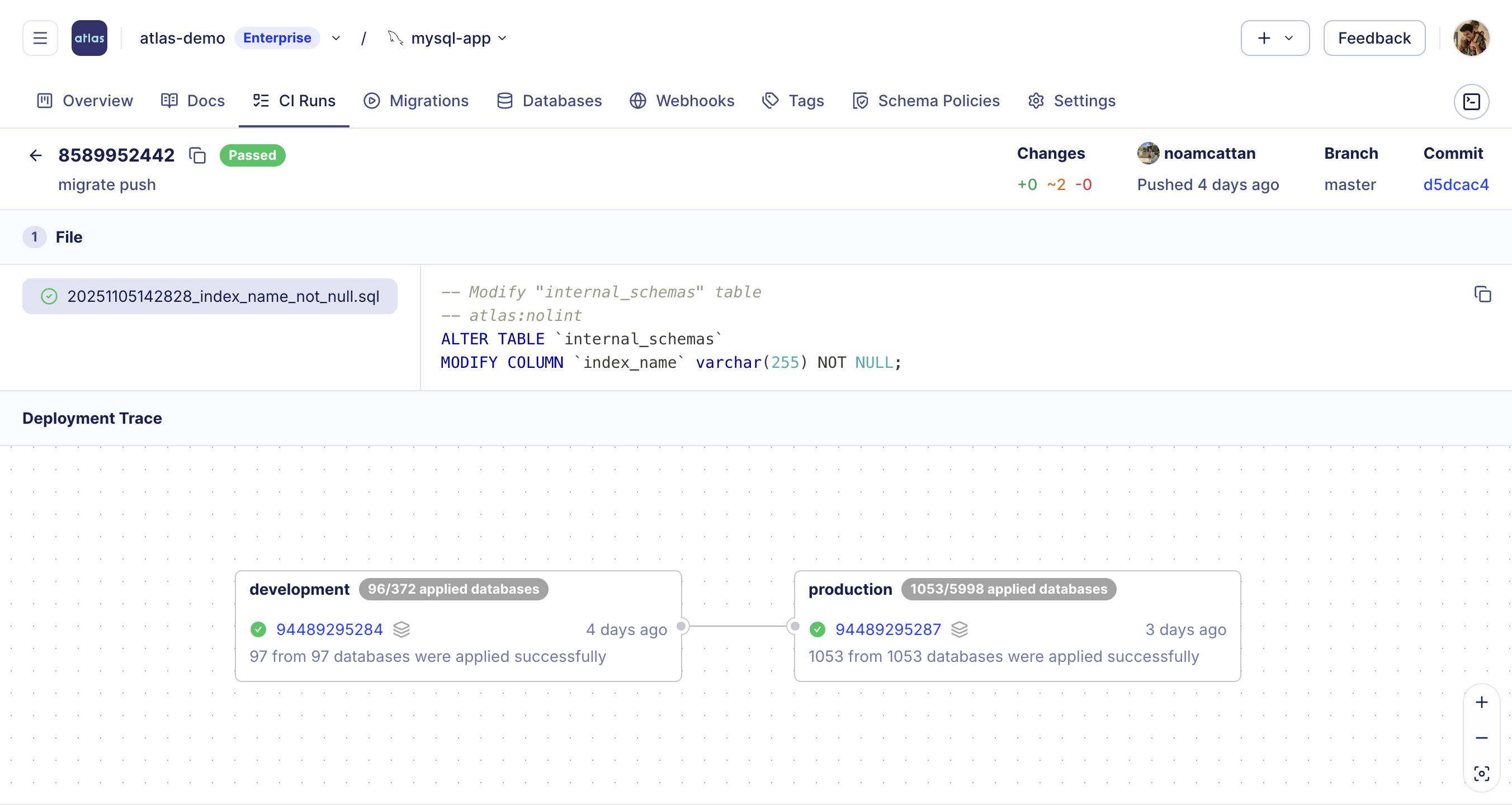
Atlas Cloud provides deployment traces, giving end-to-end visibility into how migrations progress through environments, tracking when and where each version was applied, which databases were affected, and whether executions completed successfully.
Schema Ownership Policy
A GitHub CODEOWNERS file enforces who can modify a file, but not who can modify a schema object, and DDL
statements in one team's migration file can still reach another team's tables. Atlas's
Schema Ownership Policy closes that gap with a lint check that validates each
migration only touches objects the author's team owns, catching cross-boundary changes in CI before a
reviewer has to notice them by hand. SSDT has no comparable check: DACPAC deployments apply whatever the
generated script contains, regardless of which team owns the objects it touches.
Beyond SQL Server
SSDT only works with SQL Server and Azure SQL Database. If your organization uses PostgreSQL for one service and SQL Server for another, you need completely different tooling for each.
Atlas supports all major databases with the same workflows, policies, and CI/CD integrations. To get started, visit the database guides or click on one of the databases below:





Testing Migrations
Atlas provides dedicated testing commands for both schemas and migrations. Tests are defined in HCL files with SQL assertions, run against a dev database, and integrate with CI/CD pipelines.
- Schema Tests
- Migration Tests
Test schema logic like functions, triggers, and constraints:
test "schema" "check_email_format" {
  parallel = true
  assert {
    sql = "SELECT validate_email('user@example.com')"
  }
  catch {
    sql = "SELECT validate_email('invalid')"
    error = "Invalid email format"
  }
}
atlas schema test --env dev
Test data migrations by seeding data and verifying outcomes:
test "migrate" "20240613061102" {
  migrate {
    to = "20240613061046"
  }
  exec {
    sql = "INSERT INTO users (name) VALUES ('Ada Lovelace')"
  }
  migrate {
    to = "20240613061102"
  }
  exec {
    sql = "SELECT first_name, last_name FROM users"
    output = "Ada, Lovelace"
  }
}
atlas migrate test --env dev
Read more: Testing Schemas, Testing Migrations
Multi-Tenant Deployments
SaaS applications often use database-per-tenant or schema-per-tenant architectures. With SSDT, you'd need to deploy to each database individually - hundreds or thousands of separate deployments.
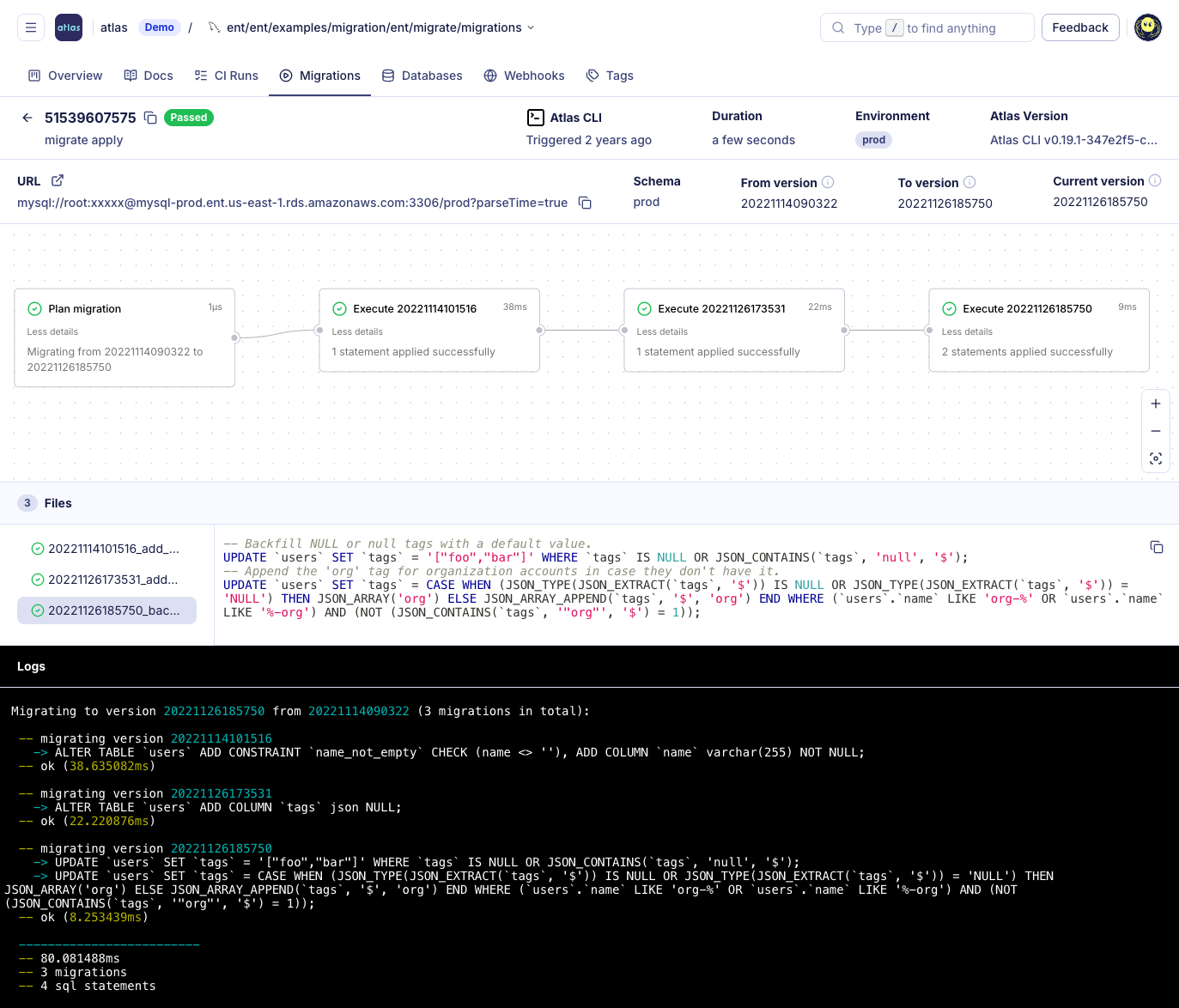
Atlas supports multi-tenant migrations natively. Define tenant groups, and Atlas plans and applies schema changes across all of them in a single operation. Changes can be rolled out gradually, monitored for issues, and paused or rolled back if problems arise.
Read more: Database-per-Tenant Guide
Drift Detection and Schema Monitoring
SqlPackage has a DriftReport action that generates an XML report comparing two schemas. It's a
one-time operation you run manually.
Atlas provides both CLI-based checks and continuous automated monitoring. The CLI check can run in CI with native integrations for GitHub Actions, GitLab CI, CircleCI, Bitbucket Pipelines, and Azure DevOps:
# Check if production matches expected schema
atlas schema diff \
  --from "sqlserver://user:pass@prod:1433?database=app" \
  --to "file://schema.sql" \
  --dev-url "docker://sqlserver"
Pre-Apply Drift Check
For versioned workflows, Atlas can block a deployment outright when it detects drift. The
pre-apply drift check runs at the start of atlas migrate apply: before any
pending migration executes, Atlas compares the live database against the expected schema at the last applied
version and aborts with a diff if they don't match, so drift never gets compounded by a new migration running
on top of it. Configure it in atlas.hcl:
check "migrate_apply" {
  drift {
    on_error = FAIL
  }
}
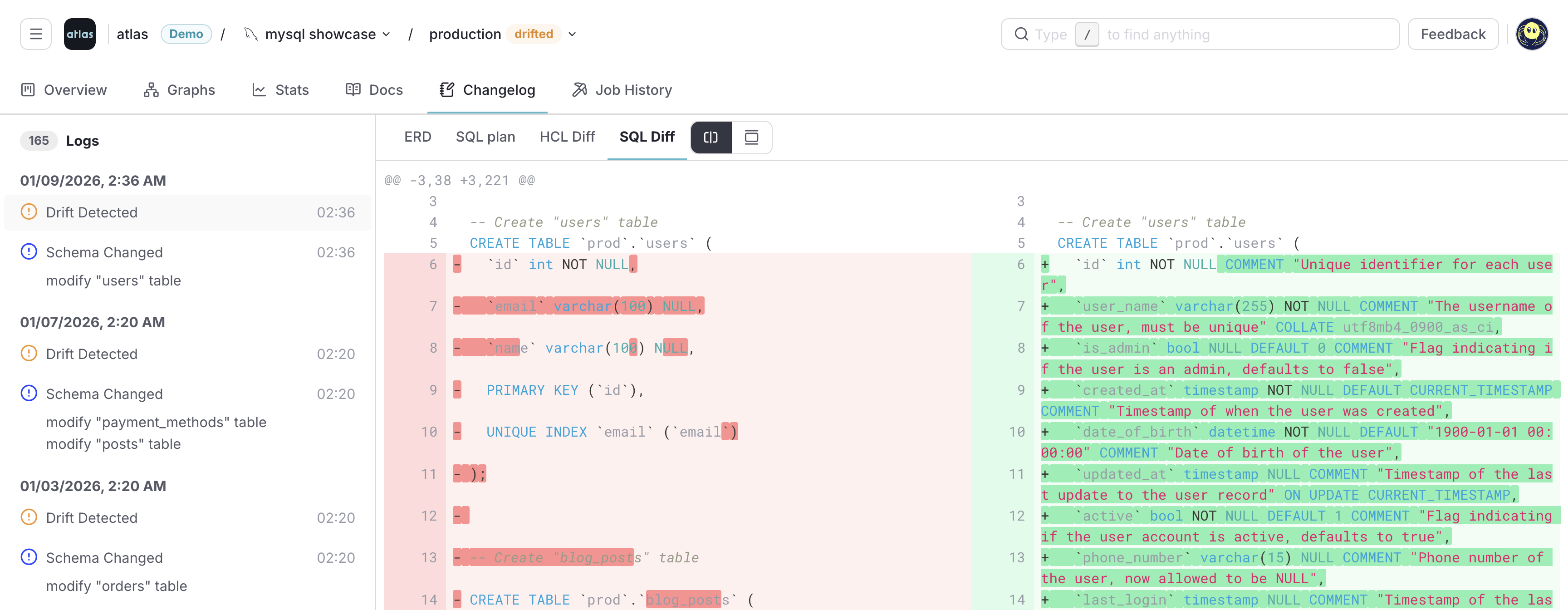
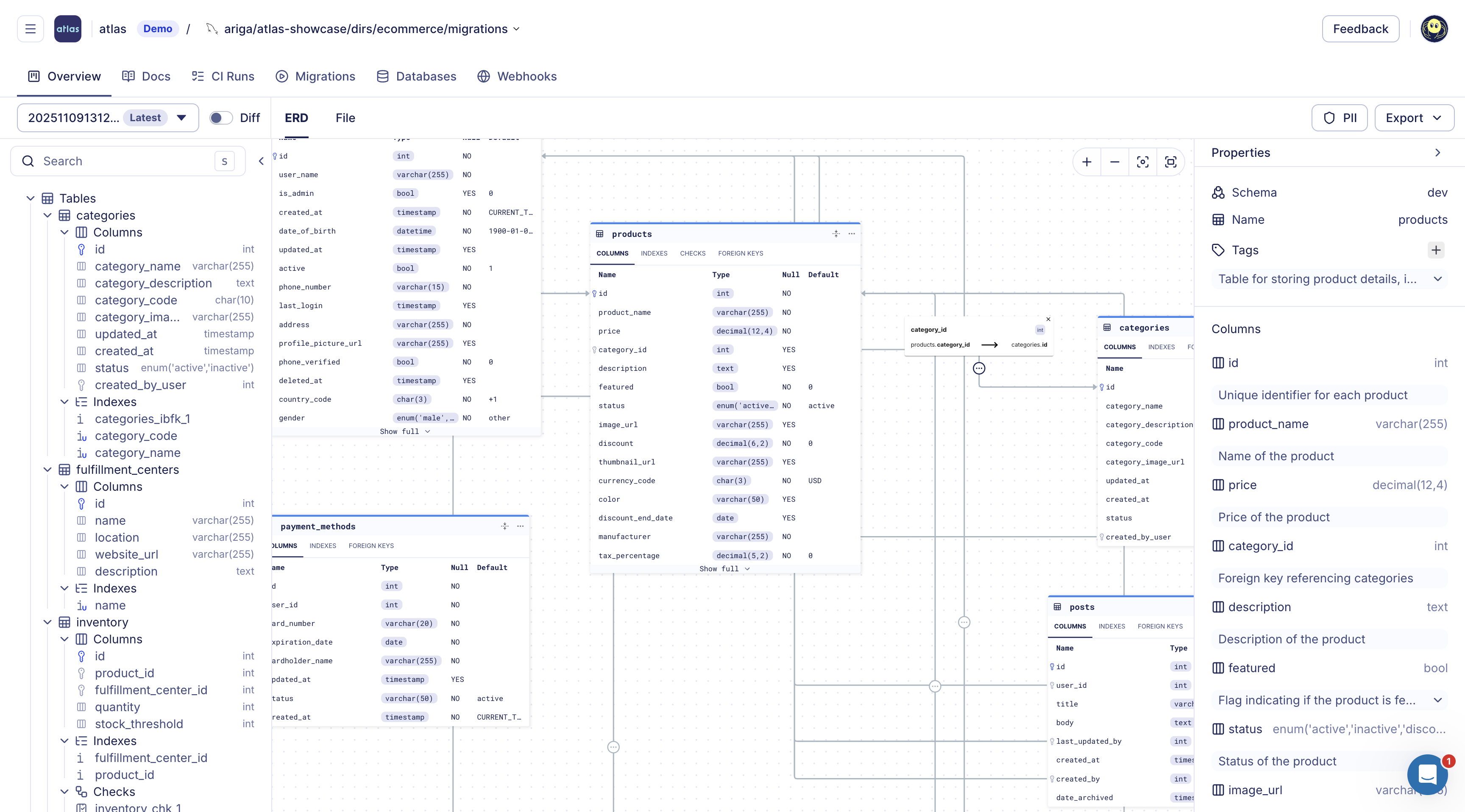
Atlas Schema Monitoring provides continuous, automated drift detection. It compares your database schema with the expected state in real-time with minimal performance impact. When drift is detected, Atlas provides instant alerts via Slack or webhooks, visual ERD diffs showing exactly what changed, and an SQL plan to remediate the drift.
Beyond drift detection, Atlas Schema Monitoring provides:
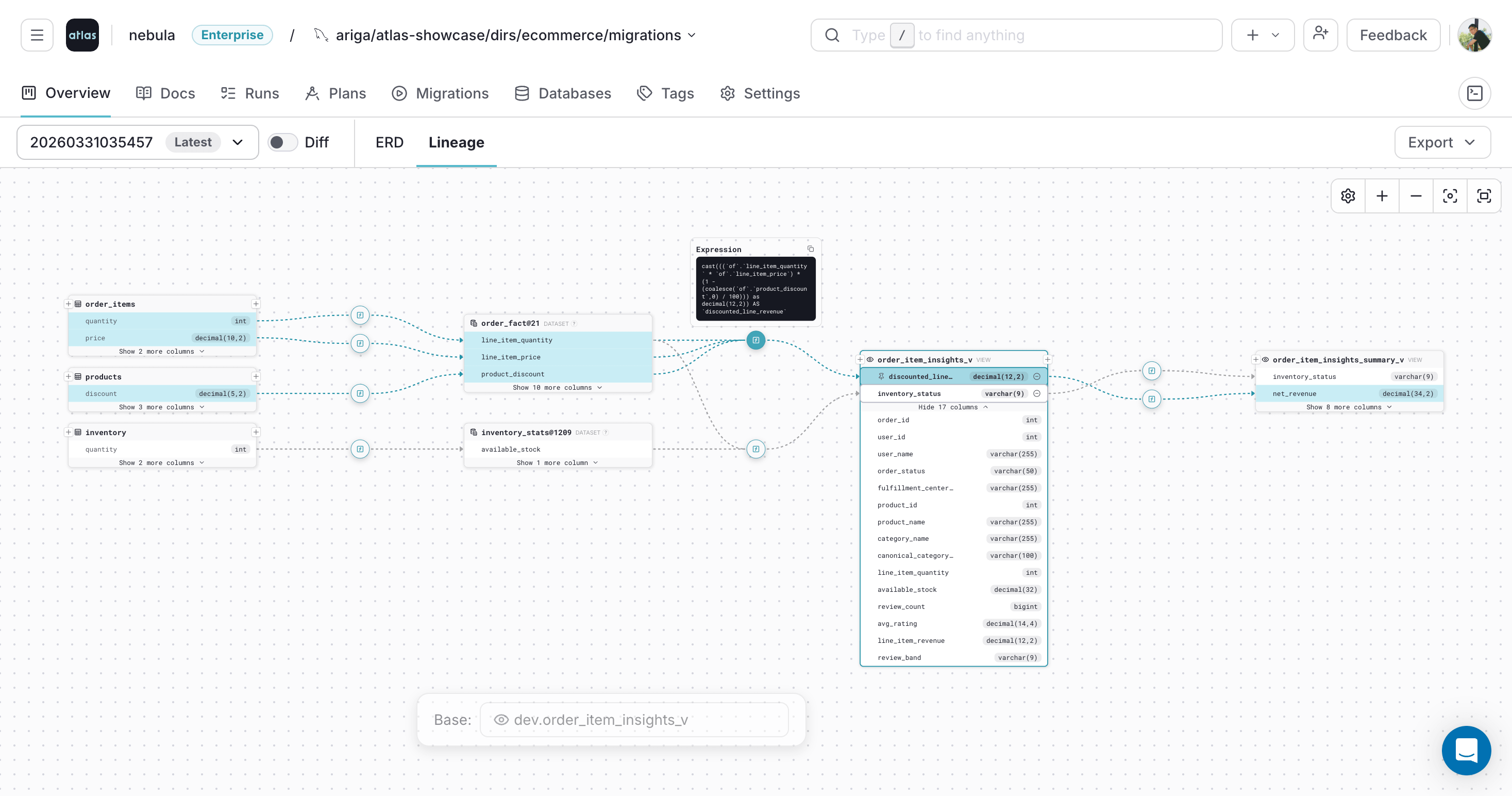
- Live schema visibility with auto-generated ER diagrams, column-level lineage, and documentation
- Schema statistics including table sizes, row counts, and index usage
- Schema changelog tracking all changes over time
- Flexible deployment via agent-less (GitHub Actions, GitLab CI) or agent-based setups
- Monitoring as Code - define your monitoring setup in HCL and deploy via CI/CD
- Column-Level Lineage
- ERD
Read more: Schema Monitoring
Working with AI Tools
AI coding assistants like GitHub Copilot and Cursor are great at writing application code, but database migrations are trickier. The generated SQL needs to be deterministic, respect your policies, and not accidentally drop production data.
Atlas bridges this gap. AI tools can edit your schema files, and Atlas handles the rest: generating safe
migrations, validating them against policies, and running tests. The atlas migrate diff command ensures
that whatever the AI suggests gets translated into a proper, linted migration.
Atlas also includes a built-in chat assistant that can explain migration errors, suggest safer patterns, and generate schema tests.
 GitHub Copilot Instructions
 Cursor Instructions
 Claude Code Instructions
 OpenAI Codex Instructions
Database Security as Code
Managing database access control (roles, users, grants, and permissions) is a critical responsibility, especially in regulated industries.
SSDT includes security objects (users, roles, permissions) in the DACPAC model and can deploy them alongside schema changes. However, there is no dedicated security diffing, drift detection, or policy enforcement. Security objects are treated the same as any other database object - deployed through the same opaque diff process without specialized visibility or governance.
Atlas provides Database Security as Code. Teams define their desired security posture (roles, users, grants, and permissions) declaratively alongside their schema in HCL or SQL. Atlas diffs the current security state against the desired state and plans the required changes automatically. Security changes flow through the same CI/CD pipeline as schema changes - linted, reviewed, and deployed with full audit trails.
- HCL
- SQL
role "app_reader" {
  login = false
}

role "app_writer" {
  login     = true
  member_of = [role.app_reader]
}

permission {
  to         = role.app_reader
  for        = table.users
  privileges = [SELECT]
}

permission {
  to         = role.app_writer
  for        = table.users
  privileges = [SELECT, INSERT, UPDATE]
}
CREATE ROLE app_reader;
CREATE ROLE app_writer;
ALTER ROLE app_reader ADD MEMBER app_writer;

GRANT SELECT ON dbo.users TO app_reader;
GRANT SELECT, INSERT, UPDATE ON dbo.users TO app_writer;
Beyond defining and diffing security state, Atlas lets teams enforce custom security policies using its schema rules engine.
Security Graph
Defining roles and grants as code doesn't answer "who can actually reach this table, and why?" Answering that
usually means cross-referencing GRANT statements, role memberships, and member_of chains scattered across
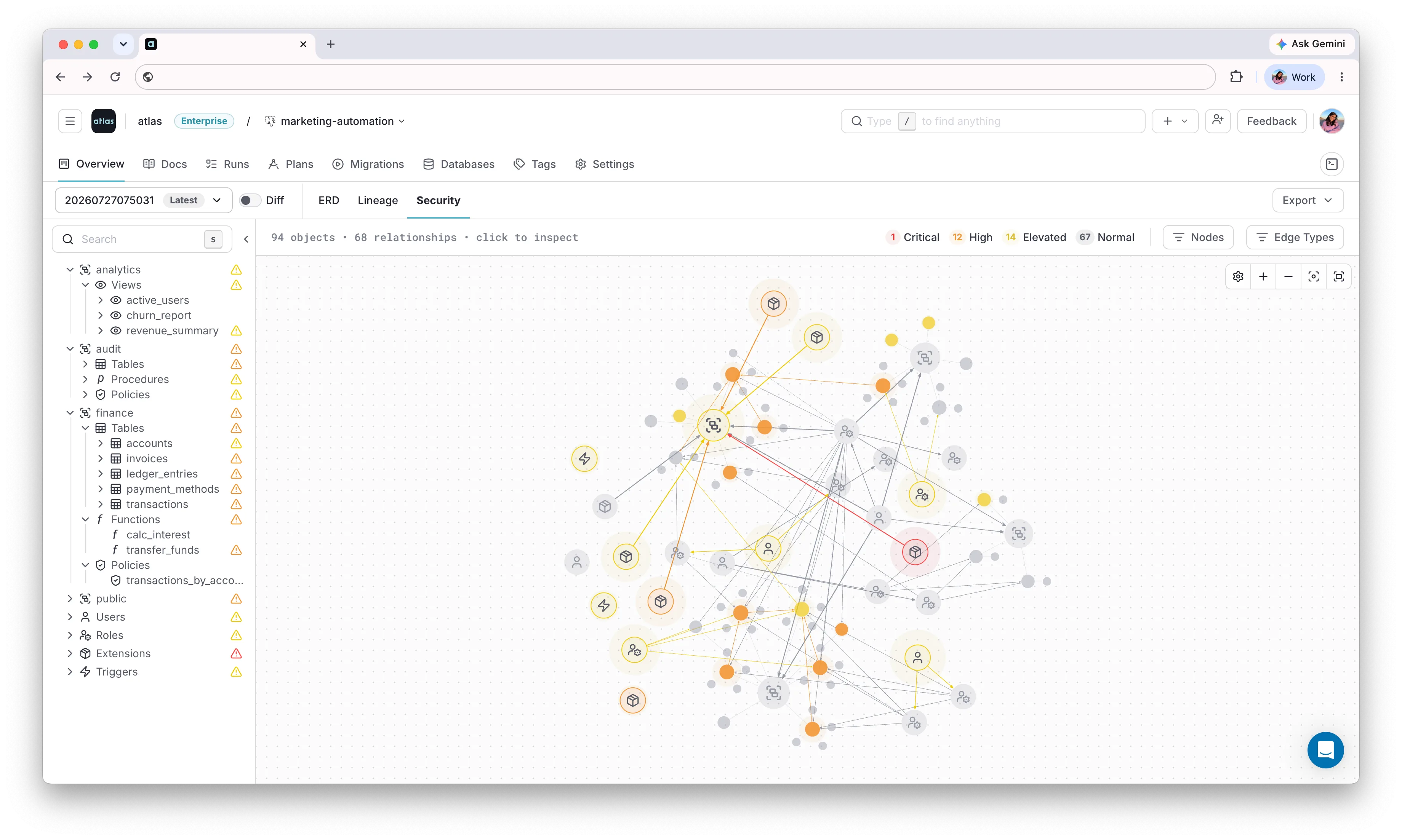
migration files. The Atlas Security Graph plots every object in a repository
or monitored database on one graph, with grants and role inheritance drawn as edges. Analyzers run on every
push and flag CVEs in installed extensions, PUBLIC grants, missing row-level security, and privilege-escalation
paths like SECURITY DEFINER functions, coloring each object by its highest-severity finding. Selecting an
object highlights its blast radius, meaning everything it can reach or be reached by, so a reviewer can see the
consequence of a grant before approving it. SSDT has no equivalent: security objects deploy through the same
opaque DACPAC diff as everything else, with no visibility into the access paths they create.
This completes the security lifecycle: define → diff → enforce → audit. For an overview of how Atlas supports database governance end-to-end, see the Database Governance use case.
Declarative Data Management
Applications often depend on reference data (lookup tables, feature flags, configuration values) that must exist for correct operation.
SSDT handles seed data through post-deployment scripts containing MERGE statements. These scripts are manually maintained, run after every deployment, and have no diffing or upsert logic built in. The developer writes the full MERGE/INSERT logic and is responsible for keeping it in sync with the data model.
Atlas provides Declarative Data Management. Teams define
seed data directly in their desired state file using HCL data blocks
or SQL INSERT statements. Atlas computes the minimal set of INSERT,
UPDATE, or DELETE statements needed to bring the data to the desired
state. Sync modes include UPSERT and REPLACE. Data is versioned alongside
the schema and deployed through the same CI/CD pipeline.
- HCL
- SQL
table "countries" {
  schema = schema.public
  column "id" {
    type = int
  }
  column "code" {
    type = varchar(2)
  }
  column "name" {
    type = varchar(100)
  }
  primary_key {
    columns = [column.id]
  }
}

data {
  table = table.countries
  rows = [
    { id = 1, code = "US", name = "United States" },
    { id = 2, code = "IL", name = "Israel" },
    { id = 3, code = "DE", name = "Germany" },
  ]
}
CREATE TABLE countries (
    id INT PRIMARY KEY,
    code VARCHAR(2) NOT NULL,
    name VARCHAR(100) NOT NULL
);

INSERT INTO countries (id, code, name) VALUES
    (1, 'US', 'United States'),
    (2, 'IL', 'Israel'),
    (3, 'DE', 'Germany');
To learn more, see the HCL or SQL data management docs.
Data Operations Beyond the Schema
SSDT's post-deployment scripts can run arbitrary T-SQL after a DACPAC publishes, but they're unversioned relative to the schema, untested, and re-run in full on every deployment, which is workable for idempotent seed data but risky for one-off operations like a backfill or a GDPR purge.
Atlas Data Scripts give those one-off operations the same code-review and CI treatment as schema changes. Backfills, re-encryption jobs, and reports are defined in HCL, run with built-in transactions and SQL guards, and tested before they touch real data:
script "exec" "purge_inactive_users" {
  assert "not_too_many" {
    sql           = "SELECT count(*) < 10000 FROM users WHERE last_login_at < now() - interval '2 years'"
    error_message = "refusing to purge more than 10000 rows at once"
  }

  exec "purge" {
    sql = "DELETE FROM users WHERE last_login_at < now() - interval '2 years'"
  }
}
atlas script exec --env prod --run purge_inactive_users
The assert aborts the transaction if the row count looks larger than expected, catching a bad WHERE clause
before it deletes more than intended. Unlike a post-deploy script, this runs on demand rather than on every
deployment, and it isn't recorded in the migration history since it doesn't change the schema.
Summary
SSDT has served the SQL Server community well for many years. It's mature, integrated with Visual Studio, and familiar to .NET developers. For teams that live entirely within the Microsoft ecosystem and don't need advanced safety features, it gets the job done.
Atlas offers a more modern approach: schema-as-code with automatic migration planning, linting that catches issues before they hit production, rollback that actually works, and integrations with the tools teams use today - Kubernetes, Terraform, GitHub Actions, and AI assistants. For teams adopting GitOps, managing multiple databases, or looking for stronger safety guarantees, Atlas provides capabilities that SSDT's toolchain doesn't offer.