Liquibase Rollback Alternative in Atlas
Liquibase provides rollback functionality through manually written rollback statements in your changelog files. While this approach works for simple cases, it comes with significant limitations: rollback statements must be written before the migration is applied, they assume the migration succeeded fully, and they're rarely tested in production scenarios.
Atlas takes a fundamentally different approach with its migrate down command. Instead of requiring pre-written
rollback scripts, Atlas computes rollback plans dynamically based on the actual state of your database and produces
the exact SQL statements needed to revert to the target version. This means Atlas can handle partial failures,
work across non-transactional DDL operations, and provide built-in safety checks - all automatically.
Quick Comparison
| Capability | Atlas Migrate Down | Liquibase Rollback |
|---|---|---|
| Rollback generation | ✅ Always computed dynamically | ⚠️ Manual for most operations |
| Output format | ✅ Standard native SQL | ✅ XML/YAML/JSON changelog |
| Partial failure recovery | ✅ Yes, all databases | ❌ No |
| Safety checks | ✅ Linting, simulation, pre-checks, drift detection | ❌ No |
| Rollback targets | ✅ Version, count, tag, Git commit | ✅ Tag, count, date |
| GitOps compatible | ✅ Yes (computed at runtime) | ❌ No (down files in future commits) |
| Production controls | ✅ Approval workflows, environment promotion | ❌ No |
| CI/CD integration | ✅ GitHub Actions, GitLab, Azure DevOps, K8s, Argo CD, Terraform | ⚠️ CLI and plugins only |
This document is maintained by the Atlas team. It may contain outdated information or mistakes. For Liquibase's latest details, please refer to the official Liquibase website.
The Problem with Liquibase Rollback
Limited Auto-Generation
Liquibase can only auto-generate rollback SQL for certain change types like createTable, addColumn, and
renameColumn. For many common operations – including dropTable, raw SQL statements, and complex data
migrations – you must write rollback logic manually:
<changeSet id="1" author="dev">
    <dropTable tableName="legacy_users"/>
    <rollback>
        <!-- You must manually recreate the entire table structure -->
        <createTable tableName="legacy_users">
            <column name="id" type="int"/>
            <column name="name" type="varchar(255)"/>
            <!-- What columns existed? What constraints? -->
        </createTable>
    </rollback>
</changeSet>
They Assume Perfect Success
Rollback statements are written before you know whether the migration will succeed. Consider this scenario:
<changeSet id="2" author="dev">
    <addColumn tableName="users">
        <column name="email" type="varchar(255)"/>
    </addColumn>
    <addColumn tableName="users">
        <column name="phone" type="varchar(50)"/>
    </addColumn>
    <rollback>
        <dropColumn tableName="users" columnName="phone"/>
        <dropColumn tableName="users" columnName="email"/>
    </rollback>
</changeSet>
What if the changeset fails after adding email but before adding phone? Running the rollback will fail
because phone doesn't exist. Your database is now in an unknown state, requiring manual intervention.
Production Usage Limitations
Rollback statements are rarely used in production as written. Teams maintain them "just in case", but when failures occur, these rollbacks either don't work (due to partial application) or cause data loss that teams aren't willing to accept.
As detailed in our blog post The Myth of Down Migrations, even teams at large companies rarely use pre-written down migrations in production environments.
Incompatible with GitOps and Cloud-Native Deployments
Pre-written down migrations have a fundamental architectural problem with modern deployment practices like GitOps, Kubernetes, and Continuous Delivery.
Consider this scenario: You're running version 2 (v2) of your application and need to roll back to version 1 (v1).
In GitOps/CD, rolling back is simple-you deploy the artifacts from the v1 commit. But here's the problem: the v1 commit doesn't contain the down files needed to revert v2's database changes. Those down files were only created in v2!
v1 commit: Contains migrations 1, 2, 3
v2 commit: Contains migrations 1, 2, 3, 4 + down file for migration 4

To roll back from v2 → v1:
- Deploy v1 artifacts ✓
- But v1 doesn't have the down file for migration 4!
This means database rollbacks in GitOps environments require manual intervention – going against the automation that modern deployment practices advocate for.
Atlas solves this by computing rollback plans dynamically at runtime based on the current database state. When you roll back to v1, Atlas inspects the database, determines what needs to be reverted, and generates the SQL statements on the fly – no pre-written down files required.
How Atlas Migrate Down Works
Atlas's migrate down command computes rollback plans based on your database's actual current state and produces
standard SQL statements to revert to the target version:
State-Aware Planning
Instead of pre-written scripts, Atlas:
- Inspects your current database state
- Determines what migrations were applied (fully or partially)
- Performs drift detection to verify the schema matches expected state
- Computes the exact SQL statements needed to reach the target version
- Validates the plan with automatic safety checks
Multi-Layered Protection
Atlas provides multiple layers of protection to ensure safe rollbacks:
1. Migration Linting (Pre-Merge)
Before migrations even reach production, atlas migrate lint analyzes changes for potential issues such as destructive
operations, breaking schema changes, table locks, table rewrites, and much more. In addition, Atlas
enforces any custom policies defined in your project to ensure migrations comply with your organization's
standards.
atlas migrate lint --dev-url "docker://mysql/8/dev" -w
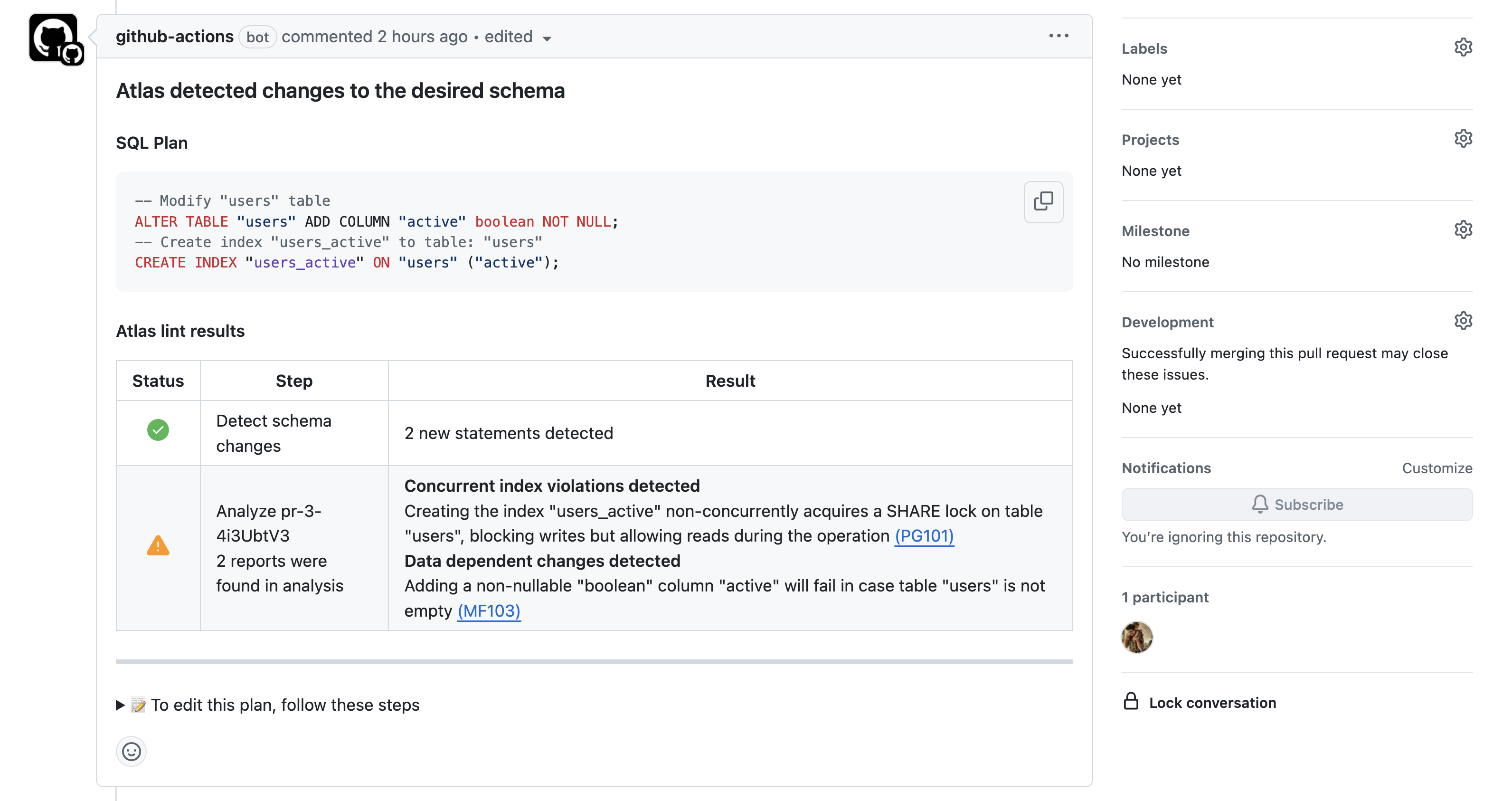
Atlas migration linting integrated with GitHub Actions
2. Simulation on Dev Database
Atlas uses a dev database to simulate rollback operations before executing them on target databases. This catches SQL syntax errors, constraint violations, and other issues before they affect production. Atlas also runs semantic checks to ensure the schema is valid (e.g., no missing references, broken constraints). If you provide custom edits to the generated plan, Atlas verifies there's no drift between the edited plan and the desired state – ensuring your plan actually brings the database to the correct schema.
3. Pre-Migration Checks (Runtime Assertions)
Atlas runs pre-migration checks before executing any rollback. For example, before dropping a table, Atlas verifies that it's empty:
-- checks before reverting version 20240305171146
  -> SELECT NOT EXISTS (SELECT 1 FROM `logs`) AS `is_empty`
-- ok (50.472µs)

-- reverting version 20240305171146
  -> DROP TABLE `logs`
-- ok (53.245µs)
If the check fails, the rollback is aborted, preventing unintended data loss.
Atomic Operations & Non-Transactional DDL Handling
Transactional DDL databases (PostgreSQL, SQLite, SQL Server, CockroachDB): Atlas wraps the entire rollback in a transaction, ensuring atomic execution – either all statements succeed, or none are applied. This provides true rollback safety with no partial states.
Non-transactional DDL databases (MySQL, MariaDB, ClickHouse):
These databases don't support transactional DDL, meaning each ALTER TABLE or DROP TABLE commits immediately. Atlas handles this by:
- Executing statements one-by-one
- Recording progress in the revisions table after each successful statement
- If a failure occurs mid-rollback, simply re-run Atlas to continue from where it stopped
This approach ensures recoverability even on databases that can't provide atomicity for schema changes.
Production Safety Features
Dry Run Mode
Preview the exact SQL statements Atlas will execute without making changes:
atlas migrate down --dry-run \
  --dir "file://migrations" \
  --url "mysql://root:pass@localhost:3306/example" \
  --dev-url "docker://mysql/8/dev"
Users connected to Atlas Cloud can review dry-run reports and pre-migration check results directly in their dashboard.
Drift Detection
Before executing any rollback, Atlas automatically compares the current database state with the expected state defined by the target version. If a mismatch is detected, execution stops and the drift is reported - preventing rollbacks from running against an unexpected schema state.
Approval Workflows
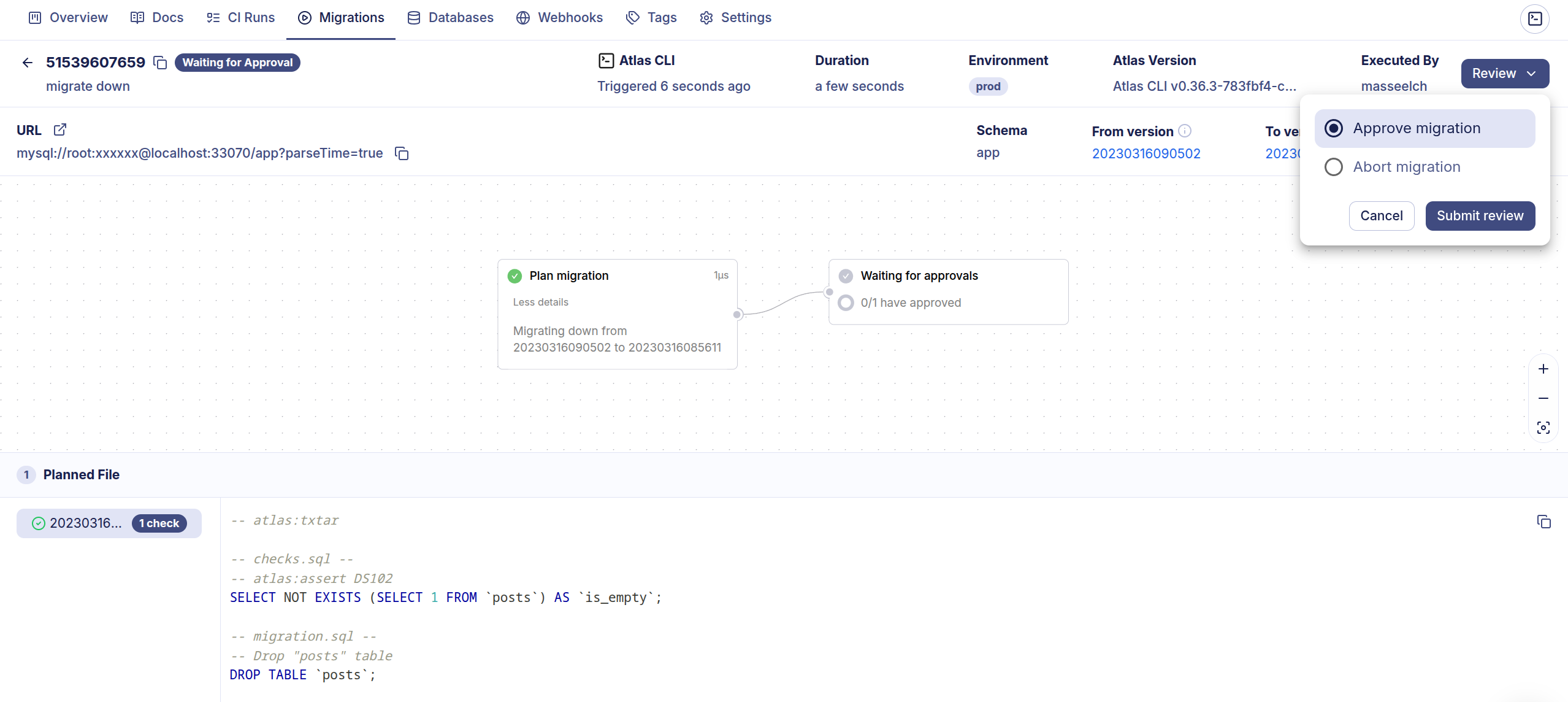
For production environments, Atlas Cloud supports approval workflows. Rollback operations can be configured to wait for approval from designated reviewers before execution:
atlas migrate down --env prod
# To approve the plan visit: https://your-org.atlasgo.cloud/deployments/...
Environment Promotion
Atlas supports environment promotion workflows that add another layer of protection. As a SOC 2 Type II certified product, Atlas provides built-in capabilities for enforcing controlled promotion:
- Progressive deployment - Production can only be promoted to versions that were first deployed and verified in lower environments (Dev → Staging → Prod)
- Automatic version constraints - Use the
cloud_databasesdata source to constrain production to versions deployed in lower environments - Pre-execution checks - Block operations if the target version hasn't been validated in lower environments
- Complete audit trail - Every migration is tracked with full traceability: who authored, reviewed, approved, and deployed each change
- Compliance ready - Meet SOC 2, ISO 27002, PCI DSS, NIST requirements for controlled change management
data "cloud_databases" "staging" {
  repo = "my-app"
  env  = "staging"
}

env "production" {
  migration {
    dir = "atlas://my-app"
    # Production can only target versions deployed in staging
    to_version = data.cloud_databases.staging.targets[0].current_version
  }
}
Atlas provides end-to-end visibility into how migrations progress through your environments with Deployment Traces. You can track the full journey of each change – from planning and review, through dev and staging, to production:
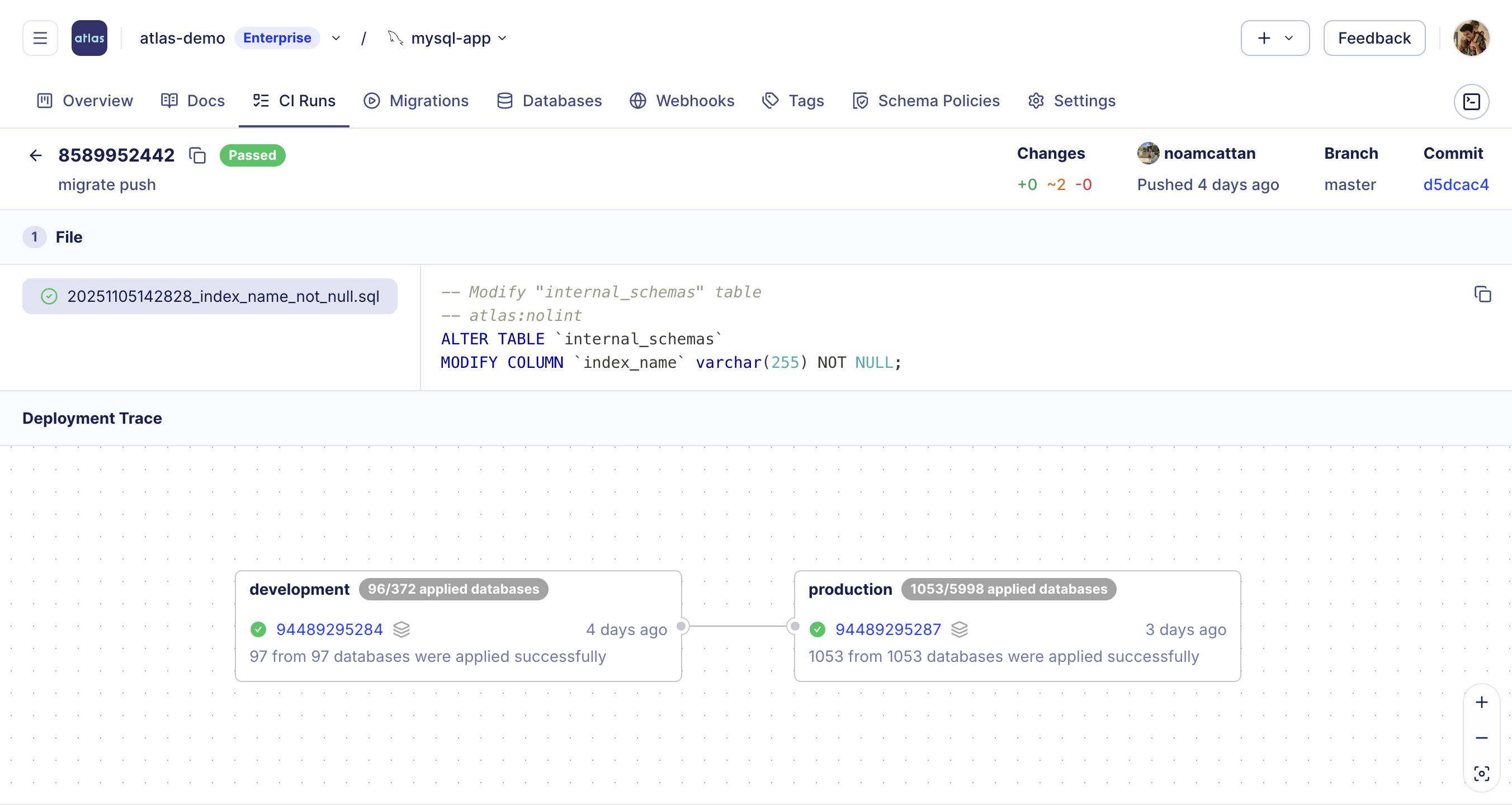
This prevents operations on untested versions and ensures all database changes follow your organization's promotion workflow.
Pre-Planned Down Migrations
While Atlas computes rollback plans dynamically by default, teams can optionally define manual down migrations for operations that require explicit control (e.g., data migrations, stored procedures). These use the txtar format that includes both up and down statements in a single file:
-- atlas:txtar

-- checks.sql --
-- The assertion below must evaluate to true before applying.
SELECT NOT EXISTS(SELECT * FROM users WHERE id = 1);

-- migration.sql --
-- Executed only if the assertion above succeeds.
INSERT INTO users (id, name) VALUES (1, 'Alice');

-- down.sql --
-- Used to revert the migration.
DELETE FROM users WHERE id = 1;
When a migration includes a down.sql section, Atlas uses it instead of computing a plan dynamically. Atlas still performs
drift detection before executing, ensuring the manually defined statements align with the expected schema transitions.
Use atlas copilot to start an interactive AI session that can help generate down migrations
for complex data migrations. You can also use external AI agents like GitHub Copilot, Cursor, and Claude Code.
Once generated, Atlas's data migration testing framework lets you automatically test them –
seed data, run the migration, make assertions, and catch errors before they reach production.
Wrapping Up
Atlas takes a fundamentally different approach to database rollbacks. Instead of requiring you to write down files before knowing if your migration will even succeed, Atlas computes rollback plans dynamically based on the actual state of your database. This means rollbacks work correctly even after partial failures, in GitOps workflows where Git serves as the single source of truth and previous commits don't contain future down files, and across databases that don't support transactional DDL.
The result is a rollback system that's actually usable in production: standard SQL output you can review, multi-layered safety checks that catch issues before they happen, flexible targeting by version, tag, or Git commit, and native integration with the CI/CD tools your team already uses.
Read More
- Down Migrations in Atlas - Complete guide to Atlas's migrate down command
- The Myth of Down Migrations - Why pre-written down migrations rarely work in practice
- Atlas vs Liquibase - Full comparison of Atlas and Liquibase capabilities
- Pre-migration Checks - Learn about Atlas's safety checks