Schema Ownership Policy: Control Who Can Modify Database Objects
The Problem
GitHub CODEOWNERS enforces who can modify files, but it has a blind spot: it cannot enforce who can modify
schema objects. DDL statements in one file can reference objects owned by another team's schema.
Consider a project where the backend team owns the core tables (public.users, public.orders) and the
logistics team owns the inventory schema. A developer with access to the inventory/ schema folder
could alter the schema files to include a change to public.users:
ALTER TABLE public.users ADD COLUMN tracking_id text;
This triggers a migration that crosses schema boundaries. CODEOWNERS won't catch it because the file
lives in inventory/. The change passes code review by the logistics team, who may not realize it touches
a core table. This is especially relevant now that AI coding assistants generate schema changes that can
inadvertently cross these boundaries.
Atlas solves this with the ownership policy: a lint check that validates migration changes only touch resources the author is authorized to modify.
The ownership policy is available only to Atlas Pro users. To use this feature, run:
atlas login
Configuration
Add an ownership block inside your lint configuration. Use allow and deny blocks to define
which GitHub users or teams can modify matched schema objects:
env "ci" {
  src = "file://schema.sql"
  dev = "docker://postgres/18/dev"
  migration {
    dir = "file://migrations"
  }
  lint {
    ownership "github" {
      allow "core-tables" {
        match = "public.*[type=table]"
        teams = ["backend"]
        users = ["a8m"]
      }
      allow "inventory" {
        match = "inventory.*"
        teams = ["logistics"]
      }
      deny "contractors" {
        match = "*"
        users = ["contractor-x"]
      }
    }
  }
}
Rules
Each allow or deny block has a name, a match pattern, and lists of users and/or teams.
Rules are evaluated in order. The first matching rule determines access.
matchaccepts patterns like"public.*[type=table]","inventory.*", or"*[type=view]".denyrules take precedence overallowrules for the same resource.- Changes that don't match any rule are denied by default. Set
default = ALLOWon theownershipblock to invert this behavior.
GitHub Teams
When you specify teams in a rule, Atlas calls the GitHub Teams API to check membership. This requires
a GITHUB_TOKEN with the correct permissions. See GitHub's fine-grained personal access tokens documentation for details.
In GitHub Actions, the actor is resolved automatically from the GITHUB_ACTOR environment variable and the
organization from GITHUB_REPOSITORY_OWNER.
GitHub Actions Setup
The ownership policy runs as part of migration planning and linting. To set it up in GitHub Actions, a few things are required:
GITHUB_TOKENmust be set as an environment variable. Atlas uses it to resolve team membership via the GitHub API. The built-ingithub.tokenworks for public and internal repositories.fetch-depth: 0on the checkout step, so Atlas can diff the migration directory against the base branch.- The
envparameter on the lint action must point to the environment inatlas.hclthat contains theownershipblock.
name: Atlas Lint
on:
  pull_request:
    paths:
      - 'migrations/**'
      - 'atlas.hcl'

permissions:
  contents: read
  pull-requests: write

jobs:
  lint:
    runs-on: ubuntu-latest
    env:
      GITHUB_TOKEN: ${{ github.token }}
    steps:
      - uses: actions/checkout@v4
        with:
          fetch-depth: 0
      - uses: ariga/setup-atlas@v0
        with:
          cloud-token: ${{ secrets.ATLAS_CLOUD_TOKEN }}
      - uses: ariga/atlas-action/migrate/lint@v1
        with:
          dir: 'file://migrations'
          dir-name: 'my-app'
          dev-url: 'docker://postgres/18/dev'
          env: 'ci'
No additional steps are needed. Atlas resolves the actor from GITHUB_ACTOR and the organization
from GITHUB_REPOSITORY_OWNER, both set automatically by GitHub Actions.
When a violation is detected, Atlas posts a comment on the pull request with the details:
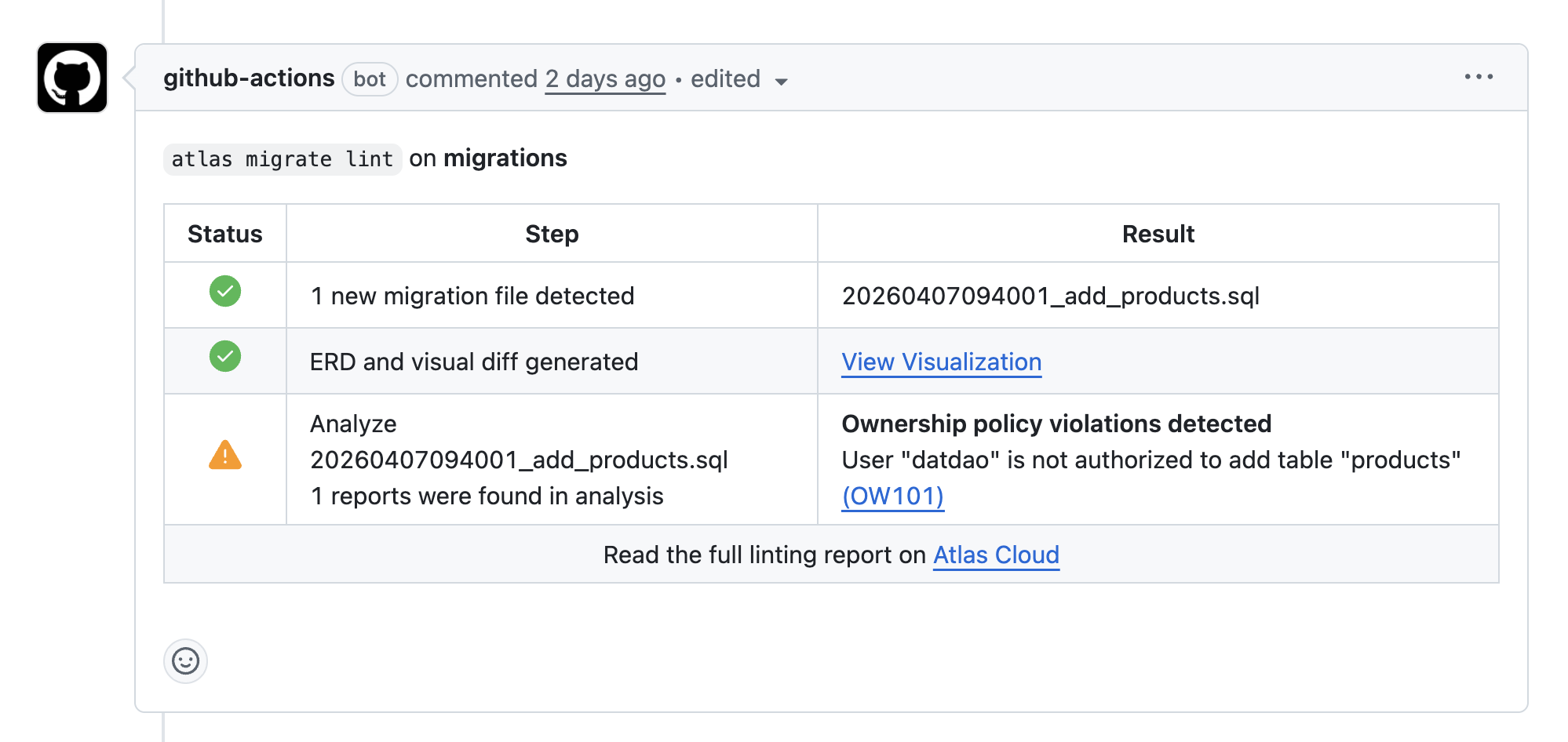
When a violation is detected, Atlas reports it with one of two codes: OW101 when the user is not in any allow list for the matched resource, and OW102 when the user is explicitly denied. Both link to the analyzers reference for details.
Next Steps
- Migration Analyzers: full list of built-in checks and codes
- Custom Schema Policy: write custom linting rules with predicates
- Setup CI/CD: configure CI for versioned migrations