Slack Notifications for Database CI/CD Pipelines
Atlas Cloud integrates with Slack, allowing you to receive notifications about important events directly in your Slack channels. Stay informed about CI runs, migration deployments, schema drift, and more without leaving Slack.
Overview
The Slack integration sends notifications for key Atlas Cloud events to your configured Slack channels. This helps teams stay informed about their database schema management workflow and respond quickly to issues like schema drift or failed CI runs.
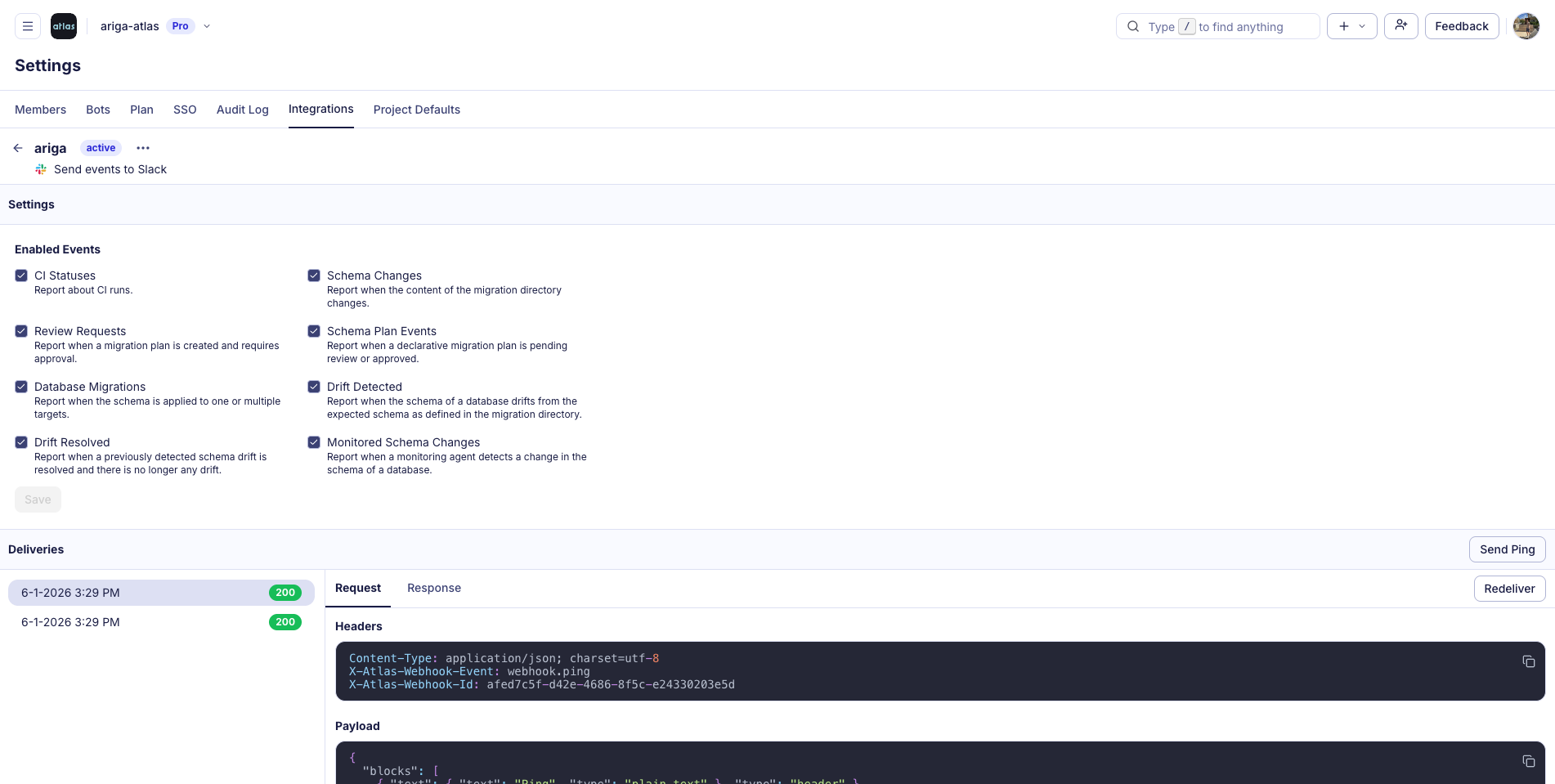
Supported Events
| Event | Description |
|---|---|
| CI Statuses | Get notified about CI run results |
| Review Requests | Receive alerts when a migration plan requires approval |
| Database Migrations | Track when schemas are applied to your databases |
| Drift Events | Get alerted when a database schema drifts from the expected state |
| Schema Changes | Stay updated when migration directory contents change |
| Migration Plan Events | Monitor declarative migration plans pending review or approval |
| Monitored Schema Changes | Receive alerts when a monitoring agent detects schema changes |
Setup Guide
Step 1: Navigate to Integrations
- Log in to Atlas Cloud
- Go to Settings from the menu
- Click on the Integrations tab
Step 2: Create a Slack Integration
- Select the "Slack" integration type and click on the "Add to Slack" button
- You will be redirected to Slack to authorize Atlas Cloud
- Select the Slack workspace and channel where you want to receive notifications
- Click Allow to complete the authorization
Step 3: Configure Events
Once the integration is created, you can configure which events trigger notifications:
- In the integration settings, you'll see a list of Enabled Events
- Check the events you want to receive notifications for
- Click Save to apply your changes
Step 4: Test the Integration
Use the Send Ping button to send a test notification to your Slack channel. This verifies that the integration is working correctly.
Configuring Channels per Project
For each project (migration directory, declarative schema, or monitor), you can configure a dedicated Slack channel to receive notifications specific to that project:
- Navigate to your project in Atlas Cloud
- Go to the project Settings
- Select the Slack channel where notifications for this project should be sent
This allows you to route notifications to different channels based on the project, keeping your teams organized and ensuring the right people see the right alerts.