Atlas Kubernetes Operator Versioned Quickstart
In this guide, we will manage a PostgreSQL database on Kubernetes using versioned migrations. This workflow is made up of a directory of SQL scripts, versioned in git, applied in order. The Operator reads the directory from the Schema Registry and applies whatever is pending on the target database.
For the declarative flow, where the desired schema is defined as a single state, see the Operator Quickstart.
Set Up the Cluster
You will need a local Kubernetes cluster, a database to manage, and the Operator installed. Follow Local Cluster Setup from the declarative quickstart, then create the database this guide manages:
apiVersion: apps/v1
kind: Deployment
metadata:
  name: postgres
spec:
  selector:
    matchLabels:
      app: postgres
  replicas: 1
  template:
    metadata:
      labels:
        app: postgres
    spec:
      containers:
        - name: postgres
          image: postgres:16
          env:
            - name: POSTGRES_PASSWORD
              value: pass
          ports:
            - containerPort: 5432
              name: postgres
          readinessProbe:
            exec:
              command: [ "pg_isready", "-U", "postgres" ]
            initialDelaySeconds: 5
            periodSeconds: 2
---
apiVersion: v1
kind: Service
metadata:
  name: postgres
spec:
  selector:
    app: postgres
  ports:
    - name: postgres
      port: 5432
      targetPort: postgres
---
apiVersion: v1
kind: Secret
metadata:
  name: postgres-credentials
type: Opaque
stringData:
  url: "postgres://postgres:pass@postgres.default:5432/postgres?sslmode=disable"
kubectl apply -f db.yaml
helm install atlas-operator oci://ghcr.io/ariga/charts/atlas-operator --wait
The Secret holds the URL the Operator connects with. It has no search_path, so the Operator works at database
scope and provisions its dev database at that scope too, thus allowing it to manage extensions. Verify both
deployments are available before continuing:
kubectl get deployments
NAME             READY   UP-TO-DATE   AVAILABLE   AGE
atlas-operator   1/1     1            1           23s
postgres         1/1     1            1           26s
Install the atlas-onboard and
atlas-operator skills: one
install command adds both, with the other Atlas skills.
atlas-onboard takes your repository from a first scan to production, and the agent loads
atlas-operator to install the operator, write its resources, and troubleshoot them.
Create a Migration Directory Atlas Pro
Migrations are authored on your machine and committed to git, not written into the cluster.
Start from the schema you want. This one keeps deleted rows around, so it uses a partial unique index and a view over
the live rows. It also enables pg_trgm for fuzzy lookups on email:
CREATE SCHEMA IF NOT EXISTS public;

CREATE EXTENSION IF NOT EXISTS pg_trgm;

CREATE TABLE public.users (
  id uuid PRIMARY KEY DEFAULT gen_random_uuid(),
  email text NOT NULL,
  created_at timestamptz NOT NULL DEFAULT now(),
  deleted_at timestamptz
);

CREATE UNIQUE INDEX users_email_idx ON public.users (email) WHERE deleted_at IS NULL;
CREATE INDEX users_email_trgm_idx ON public.users USING gin (email public.gin_trgm_ops);

CREATE VIEW public.active_users AS
  SELECT id, email, created_at FROM public.users WHERE deleted_at IS NULL;
Create a project file next to it. Atlas computes migrations against a dev database, a throwaway database it manages for itself:
env "local" {
  src = "file://schema.sql"
  dev = "docker://postgres/16/dev"
  migration {
    dir = "file://migrations"
  }
}
The dev URL has no search_path, so Atlas works at the database level rather than on a single schema. That is what
lets the file manage pg_trgm, as extensions belong to the database, not to any one schema. At schema scope the
CREATE EXTENSION line is ignored, and the generated migration would use the extension's operators without ever
creating it. At this scope, object names are schema-qualified and the schemas holding them are declared.
Extensions, views, functions, triggers, and other database features beyond tables and indexes are available to Atlas Pro users. Create an account, or log in to an existing one:
atlas login
Generate the first migration:
atlas migrate diff init --env local
Atlas writes the migration file and an atlas.sum checksum file that protects the directory from accidental edits:
-- Create extension "pg_trgm"
CREATE EXTENSION "pg_trgm" WITH SCHEMA "public" VERSION "1.6";
-- Create "users" table
CREATE TABLE "public"."users" (
  "id" uuid NOT NULL DEFAULT gen_random_uuid(),
  "email" text NOT NULL,
  "created_at" timestamptz NOT NULL DEFAULT now(),
  "deleted_at" timestamptz NULL,
  PRIMARY KEY ("id")
);
-- Create index "users_email_idx" to table: "users"
CREATE UNIQUE INDEX "users_email_idx" ON "public"."users" ("email") WHERE (deleted_at IS NULL);
-- Create index "users_email_trgm_idx" to table: "users"
CREATE INDEX "users_email_trgm_idx" ON "public"."users" USING GIN ("email" public.gin_trgm_ops);
-- Create "active_users" view
CREATE VIEW "public"."active_users" (
  "id",
  "email",
  "created_at"
) AS SELECT id,
    email,
    created_at
   FROM public.users
  WHERE deleted_at IS NULL;
Push the Directory to the Registry
The Operator can read migrations from a ConfigMap, but the recommended source is the
Schema Registry. Here, directories are not limited by the Kubernetes API server's size
constraints; rather, they are produced by CI as a build artifact and can be tagged with the commit that produced them.
Serving the directory from the registry is also what makes rollback protection possible.
atlas migrate push k8s-versioned --env local
atlas migrate push k8s-versioned:v1 --env local
https://<org>.atlasgo.cloud/dirs/4294967322
https://<org>.atlasgo.cloud/dirs/4294967322/tags/68719476923
The bare push updates the directory's latest, and the tagged push pins this exact state. In a real project the tag
is usually the commit SHA or release version, so a deployment names the migrations it ships.
Deploy the Migrations
The Operator runs in the cluster and authenticates with a bot token rather than your local session. Create one and store it in a secret:
How to create a bot token
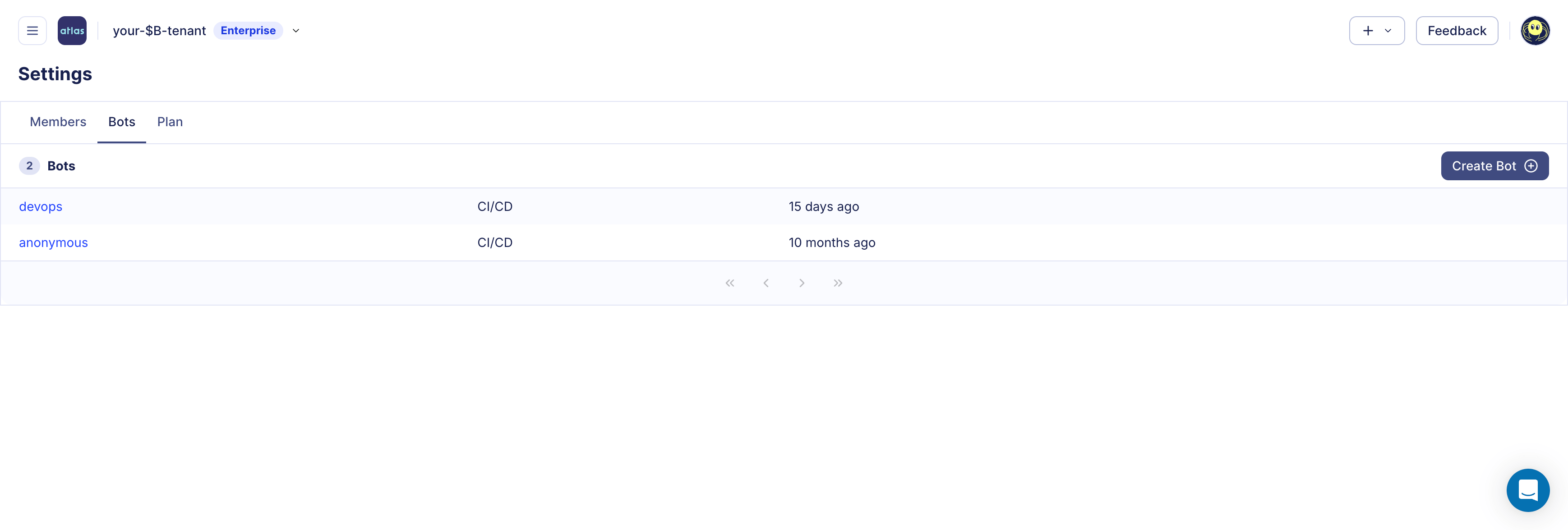
Logged in to Atlas Cloud as an administrator, click ☰ > Settings > Bots in the left navigation, then Create Bot:
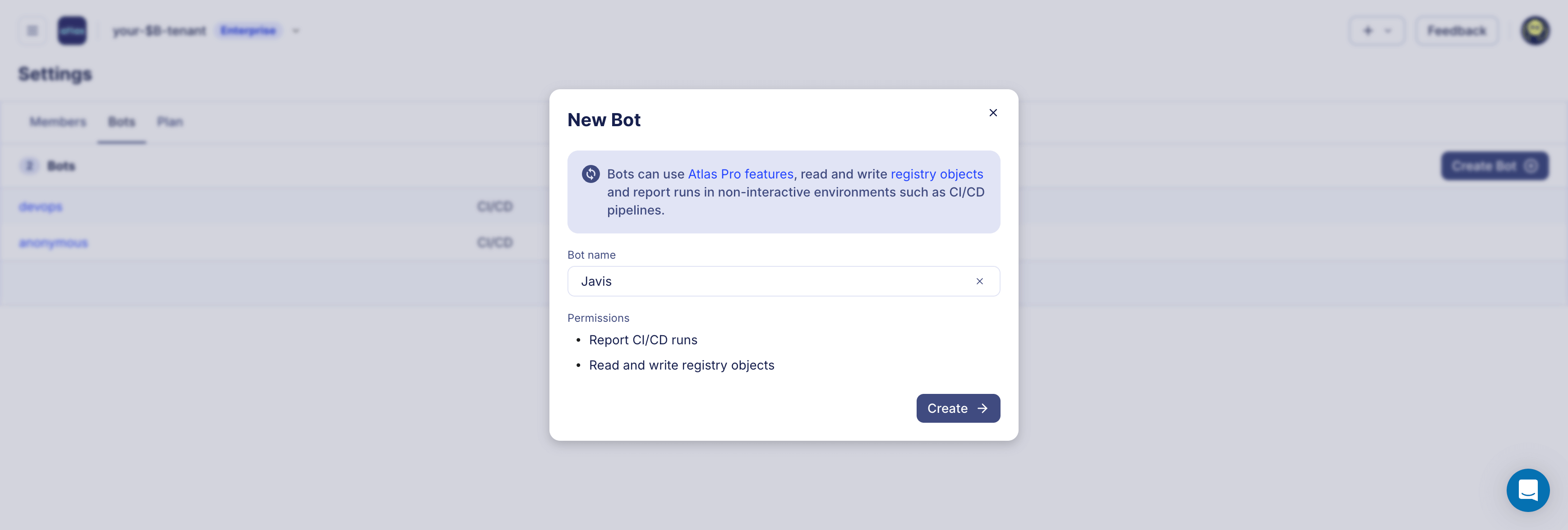
Give the bot a name and click Create:
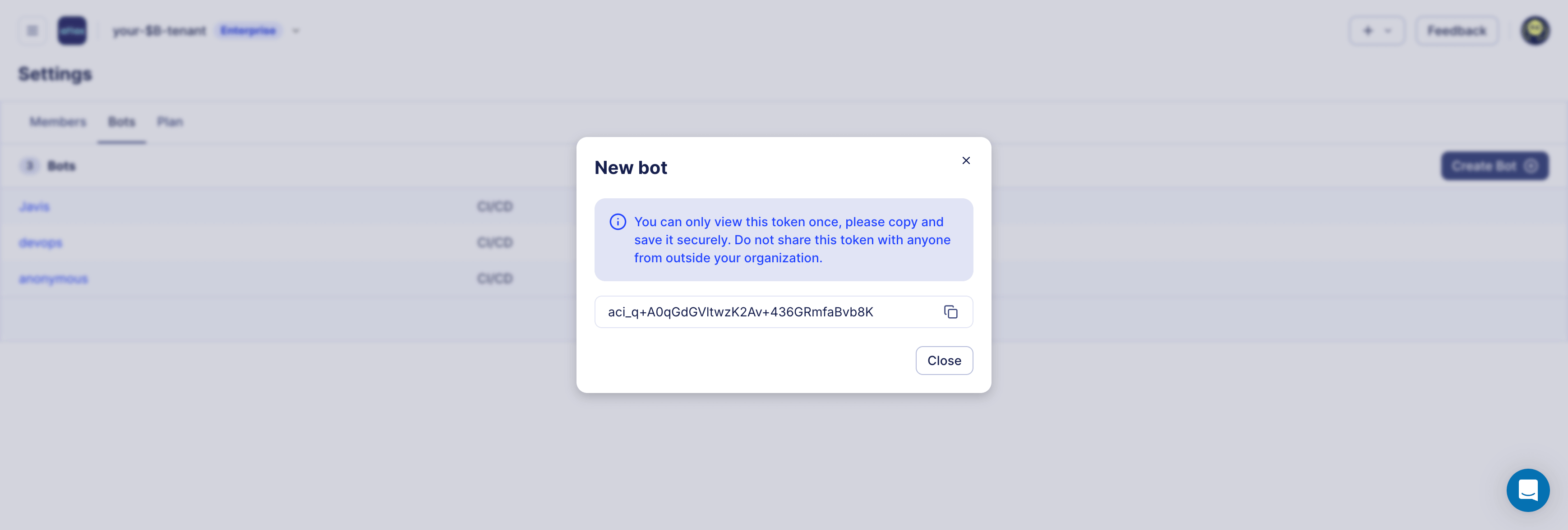
Copy the token and store it in a safe place. You will not be able to see it again:
kubectl create secret generic atlas-token --from-literal=token=<your token here>
Create atlas-migration.yaml, pointing the resource at the tag you pushed:
apiVersion: db.atlasgo.io/v1alpha1
kind: AtlasMigration
metadata:
  name: atlasmigration-pg
spec:
  urlFrom:
    secretKeyRef:
      key: url
      name: postgres-credentials
  cloud:
    tokenFrom:
      secretKeyRef:
        key: token
        name: atlas-token
  dir:
    remote:
      name: k8s-versioned
      tag: v1
To plan changes, the Operator provisions a dev database of its own, at the same scope as
the target URL. To point it at an existing database instead, set
devURL on the resource.
kubectl apply -f atlas-migration.yaml
kubectl wait --for=condition=Ready atlasmigration/atlasmigration-pg --timeout=2m
NAME                READY   REASON
atlasmigration-pg   True    Applied
The extension, the table with both of its indexes, and the view are all in place:
kubectl exec -it $(kubectl get pods -l app=postgres --field-selector=status.phase=Running -o jsonpath='{.items[0].metadata.name}')  -- \
  psql -U postgres -d postgres -c "\dx"
                                    List of installed extensions
  Name   | Version |   Schema   |                            Description
---------+---------+------------+-------------------------------------------------------------------
 pg_trgm | 1.6     | public     | text similarity measurement and index searching based on trigrams
 plpgsql | 1.0     | pg_catalog | PL/pgSQL procedural language
kubectl exec -it $(kubectl get pods -l app=postgres --field-selector=status.phase=Running -o jsonpath='{.items[0].metadata.name}')  -- \
  psql -U postgres -d postgres -c "\d users"
Indexes:
    "users_pkey" PRIMARY KEY, btree (id)
    "users_email_idx" UNIQUE, btree (email) WHERE deleted_at IS NULL
    "users_email_trgm_idx" gin (email gin_trgm_ops)
The Operator also created the history table, atlas_schema_revisions, in a schema of the same name. It records which
migrations ran, so each database gets only what is pending on it rather than a replay of the directory. The resource
reports where the database stands:
kubectl get atlasmigration atlasmigration-pg -o jsonpath='{.status.lastAppliedVersion}{"\n"}'
20260807125351
Evolve the Schema
Changes to the schema occur in schema.sql, never in the migration files. You describe the schema you want, and Atlas
works out the migration that gets there, saving it as a new migration file.
Let's track when a row was last modified using a trigger so the database maintains it:
CREATE SCHEMA IF NOT EXISTS public;

CREATE EXTENSION IF NOT EXISTS pg_trgm;

CREATE TABLE public.users (
  id uuid PRIMARY KEY DEFAULT gen_random_uuid(),
  email text NOT NULL,
  created_at timestamptz NOT NULL DEFAULT now(),
  updated_at timestamptz NOT NULL DEFAULT now(),
  deleted_at timestamptz
);

CREATE UNIQUE INDEX users_email_idx ON public.users (email) WHERE deleted_at IS NULL;
CREATE INDEX users_email_trgm_idx ON public.users USING gin (email public.gin_trgm_ops);

CREATE VIEW public.active_users AS
  SELECT id, email, created_at FROM public.users WHERE deleted_at IS NULL;

CREATE FUNCTION public.touch_updated_at() RETURNS trigger AS $$
BEGIN
  NEW.updated_at = now();
  RETURN NEW;
END;
$$ LANGUAGE plpgsql;

CREATE TRIGGER users_touch_updated_at
  BEFORE UPDATE ON public.users
  FOR EACH ROW EXECUTE FUNCTION public.touch_updated_at();
Atlas compares the file against the migrations already in the directory and writes only what is missing. Generate it and push it under a new tag:
atlas migrate diff add_audit --env local
atlas migrate push k8s-versioned --env local
atlas migrate push k8s-versioned:v2 --env local
-- Modify "users" table
ALTER TABLE "public"."users" ADD COLUMN "updated_at" timestamptz NOT NULL DEFAULT now();
-- Create "touch_updated_at" function
CREATE FUNCTION "public"."touch_updated_at" () RETURNS trigger LANGUAGE plpgsql AS $$
BEGIN
  NEW.updated_at = now();
  RETURN NEW;
END;
$$;
-- Create trigger "users_touch_updated_at"
CREATE TRIGGER "users_touch_updated_at" BEFORE UPDATE ON "public"."users" FOR EACH ROW EXECUTE FUNCTION "public"."touch_updated_at"();
Roll it out by updating the tag on the resource:
  dir:
    remote:
      name: k8s-versioned
      tag: v2
kubectl apply -f atlas-migration.yaml
kubectl wait --for=condition=Ready atlasmigration/atlasmigration-pg --timeout=2m
Only the new migration runs, and the reported version moves to it:
kubectl get atlasmigration atlasmigration-pg -o jsonpath='{.status.lastAppliedVersion}{"\n"}'
20260807125503
The Operator reconciles when the resource changes. Pushing a new tag to the registry does not wake it by itself, which is why the deployment step is a change to the manifest.
Protect Rollbacks
Rolling a deployment back means reverting the database, too. Point the resource back at v1 and apply it:
  dir:
    remote:
      name: k8s-versioned
      tag: v1
The Operator detects that the database is ahead of the directory, and refuses:
NAME                READY   REASON
atlasmigration-pg   False   ProtectedFlowError
migrate down is not allowed, set `migrateDown.allow` to true to allow downgrade
Down migrations are off by default. Enable them with
protectedFlows:
spec:
  protectedFlows:
    migrateDown:
      allow: true
That alone lets the Operator revert the database unattended, which is rarely what you want in production. To require human review, enable the migration approval policy on the directory in the registry.
How to enable protected flows
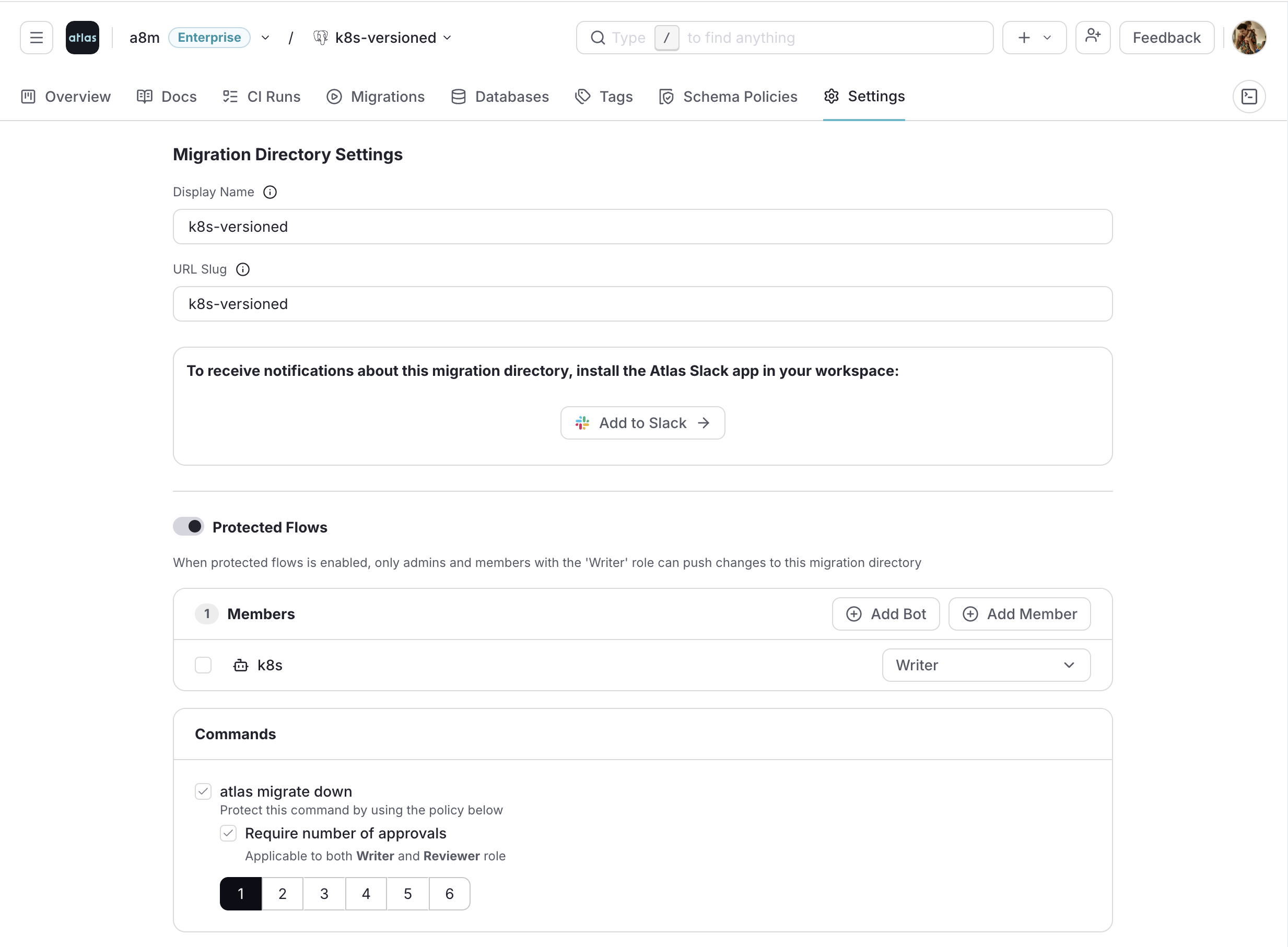
Open the directory's Settings in the registry, turn on Protected Flows, and require approvals for the
atlas migrate down command:
With the policy in place, the Operator plans the revert and waits:
kubectl get atlasmigration atlasmigration-pg \
  -o=jsonpath='{.status.conditions[?(@.type=="Ready")].reason}: {.status.conditions[?(@.type=="Ready")].message}{"\n"}'
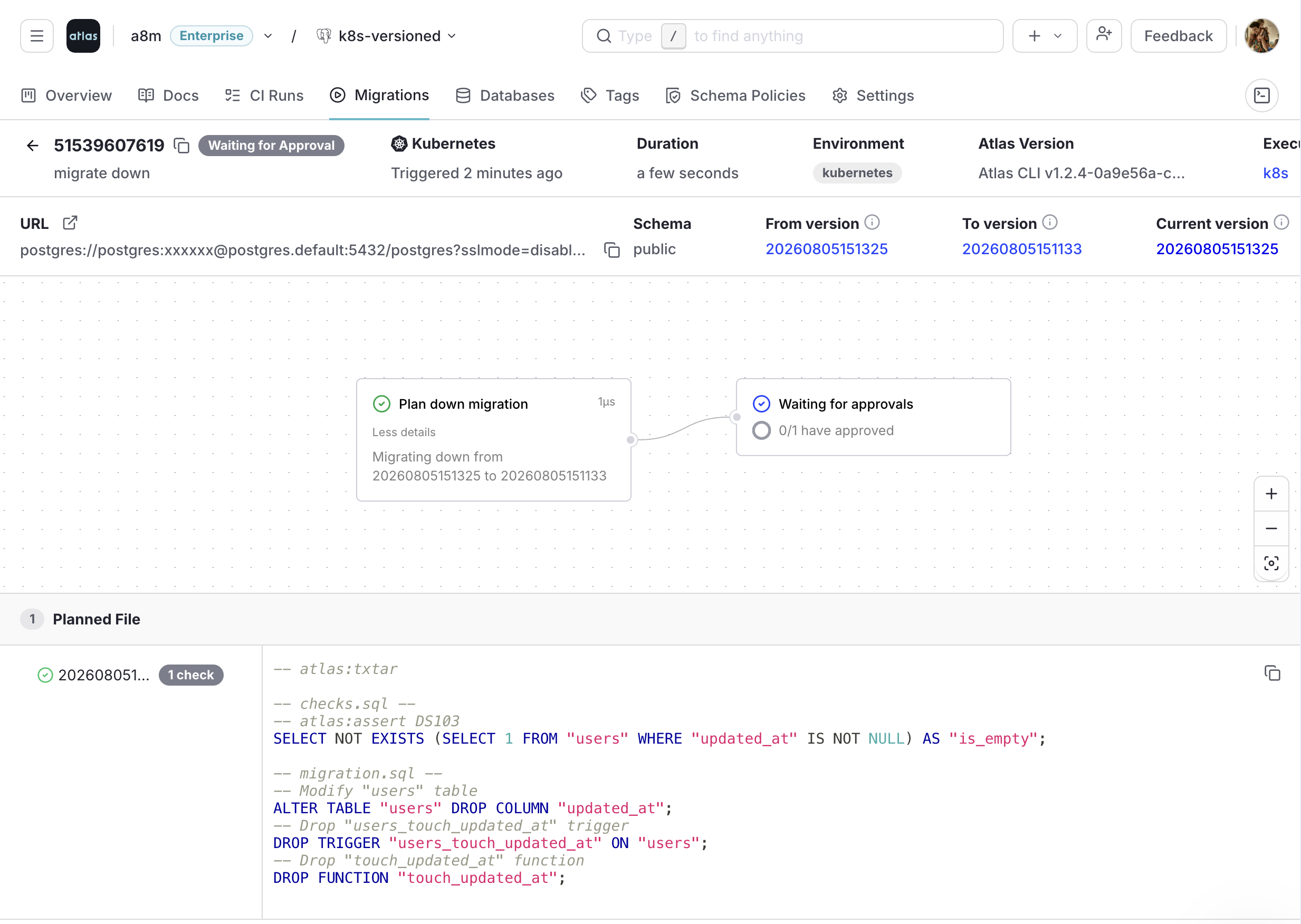
ApprovalPending: plan approval pending, review here: https://<org>.atlasgo.cloud/migrations/51539607619
The database is untouched while it waits. Open the link to review what the revert will run. Along with the DROP
statements, the plan carries a pre-migration check: Atlas asserts that updated_at holds no data before dropping it,
so a revert that would destroy values fails instead of running.
The plan waiting for approval
Approve it, and the Operator runs the check and applies the revert on its next reconciliation:
The revert after approval
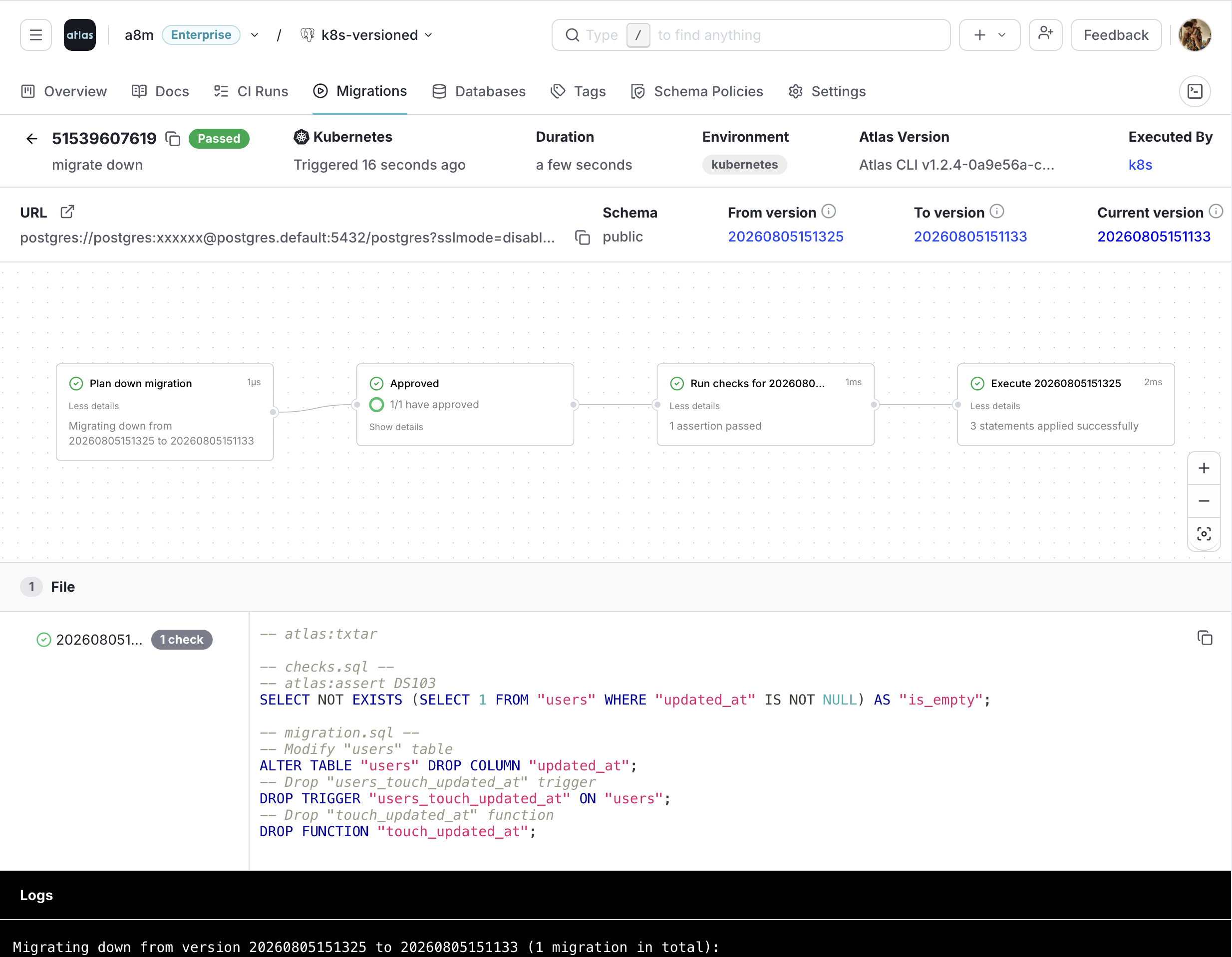
The resource reports the version it rolled back to:
kubectl get atlasmigration atlasmigration-pg -o jsonpath='{.status.lastAppliedVersion}{"\n"}'
20260807125351
The manifest decides whether reverting is possible at all, and the registry decides who signs off. autoApprove
cannot be used with a remote directory, so a cluster cannot opt itself out of an approval policy.
Next Steps
- Versioned flow: the full
AtlasMigrationreference, includingbaseline,execOrder, and providing migrations from aConfigMap. - Migration linting: catch destructive and backwards-incompatible migrations in CI, before the directory is ever tagged.
- Down migrations: how reverts are planned, and what happens to data changes.