Environment Promotion for Declarative Schema Migrations
Overview
Environment promotion ensures that schema changes are tested and validated in lower environments, such as development and staging, before being applied to production. The Environment Promotion and Compliance guide covers this workflow for versioned migrations. This guide shows how to implement the same workflow for declarative schema migrations, where Atlas plans and applies changes by diffing the desired schema state against the target database.
The promotion model is the same as in the versioned workflow: the desired state is stored in the Atlas Registry and read by every environment, and deployments report the state (migration metadata) of each database back to the registry. Promotion is then enforced by reading the database state of lower environments from the registry:
- Push once: As part of continuous delivery, every merge to the main branch pushes the schema to the Atlas
Registry with
atlas schema push, along with its pre-approved migration plans created withatlas schema plan, creating a new schema version in the registry. - Validate in staging: Staging reads the pushed version from the registry and applies it, with tests and validations running against it.
- Promote to production: Production reads the schema version currently deployed to the staging database from the
registry using the
cloud_databasesdata source, and applies the exact same version. Pre-execution checks reject any deployment that does not target it.
This guarantees that what reaches production is byte-for-byte the schema state that was validated in staging, satisfying the environment segregation and controlled change management requirements of compliance frameworks like SOC 2 and ISO/IEC 27002. For a detailed discussion of these frameworks, see the compliance context section of the versioned guide.
Implementing Environment Promotion in Atlas
This guide covers environment promotion for the declarative schema migrations workflow. If you manage your schema with versioned migrations, see Environment Promotion and Compliance.
Atlas supports enforcing environment promotion workflows using Data Sources, Pre-Execution Checks, and the Atlas Registry. These capabilities allow teams to define workflows where production deployments depend on the state of lower environments. For example, a production deployment can be configured to only proceed if the deployed schema version matches the one applied in the Staging or Development environment. Similarly, attempts to promote a version that was not deployed and verified in Staging can be automatically blocked.
The guide below demonstrates how to configure an environment promotion workflow using the cloud_databases data source
and pre-execution checks.
Setting Up Continuous Delivery
In the declarative workflow, the schema is synced to the Atlas Registry as part of continuous integration: every merge
to the main branch pushes the desired schema state with atlas schema push, along with pre-approved migration plans
created with atlas schema plan. Each push creates a new schema version, which can be set explicitly
with the --version flag. If not set, it defaults to the current timestamp in YYYYMMDDHHMMSS format (UTC) to match the
format used for versioned migrations.
Continuous delivery then deploys the pushed version to lower environments, such as Staging, where tests and validations run against it. To set up this pipeline, follow the CI/CD setup guide, or choose your CI platform to get started:
 GitHub Actions
Set up CI/CD pipelines using GitHub Actions with Atlas. Supports schema management with declarative migrations.
 GitLab CI
Integrate Atlas with GitLab CI/CD pipelines using GitLab CI components and declarative migrations.
 Bitbucket Pipelines
Set up CI/CD using Bitbucket Pipes. Full support for declarative migrations and schema management.
 Azure DevOps
Use Azure DevOps Pipelines with Atlas. Supports GitHub repositories with declarative migrations.
Example: Promotion from Staging to Prod
The following example assumes deployments to the staging database have been reported to the Atlas Registry. Note that this reporting is disabled by default. To enable it, follow the instructions here.
The following configuration defines an environment promotion workflow from staging to production, ensuring
production only advances to a version verified in staging. The cloud_databases data source retrieves the schema
version currently deployed to the staging database from the Atlas Registry, and sets it as the desired state of
production. This ensures that production can only be promoted to the version currently deployed in staging.
Why is this necessary? By default, an unpinned atlas://myapp URL resolves to the latest version in the registry.
If a newer version was pushed but not yet validated in staging, this could lead to untested schema changes being
applied directly to production.
data "cloud_databases" "staging" {
  repo = "myapp"
  env  = "staging"
}

env "production" {
  url = getenv("PROD_URL")
  schema {
    # Promote the schema version from the `staging` environment.
    src = "atlas://myapp?version=${data.cloud_databases.staging.targets[0].current_version}"
  }
}
- The
cloud_databasesdata source retrieves the current schema version of the staging database from the Atlas Registry. - The desired state of
productionis pinned to that version, so the planned migration always targets the version validated in staging. - This prevents direct production changes and enforces a progressive deployment workflow.
Example: Pre-Execution Check for Promotion
Another option to ensure controlled promotion is to use a pre-execution check that verifies the target version before
applying the planned migration to production. Checks have access to self.planned_migration.target_version, the
registry-resolved version of the desired state: the pinned version for atlas://myapp?version= (or ?tag=) URLs, the
version that latest resolves to for unpinned URLs, and an empty string for non-registry states. If the planned version
differs from the one deployed in staging, the deployment is blocked with an informative error message.
data "cloud_databases" "staging" {
  repo = "myapp"
  env  = "staging"
}

locals {
  # `try` guards against the case where no staging deployment was reported to the registry yet.
  staging_version = try(data.cloud_databases.staging.targets[0].current_version, null)
}

env "production" {
  url = getenv("PROD_URL")
  schema {
    src = "atlas://myapp"
  }
  check "schema_apply" {
    deny "version_mismatch" {
      condition = self.planned_migration.target_version != local.staging_version
      message   = <<-MSG
  Production can only be promoted to the version validated in staging.
  Current staging version: ${local.staging_version}, planned production version: ${self.planned_migration.target_version}
  MSG
    }
  }
}
Running atlas schema apply --env production will fail if the planned version differs from the one deployed in staging:
Executing pre-execution check (1 check in total):
-- check at atlas.hcl:16 (1 rule):
-------------------------------------------
https://<your-tenant>.atlasgo.cloud/migrations/304942681163
- The pre-execution check retrieves the current schema version of the staging database from the Atlas Registry.
- After the migration plan is computed, but before any statement is executed, it compares the registry-resolved target version of the desired state with the staging version.
- If the versions differ, the deployment is blocked with a clear error message. Checks also run on
--dry-run, so the gate can be verified without touching the database.
Auditing and Migration History
Atlas automatically maintains a detailed audit trail of all database migrations, ensuring full visibility and accountability across environments. This audit log is essential for meeting compliance requirements in frameworks like SOC 2, ISO/IEC 27002, PCI DSS, and HIPAA. It provides complete traceability, from migration planning, where pre-approved plans are linked to their source pull requests, through review, approval, and execution, so every change can be verified and audited with confidence.
In the declarative workflow, each reported schema apply records the registry version it deployed as the deployment's
target version, allowing auditors to verify that production only ever received versions that were previously validated
in lower environments.
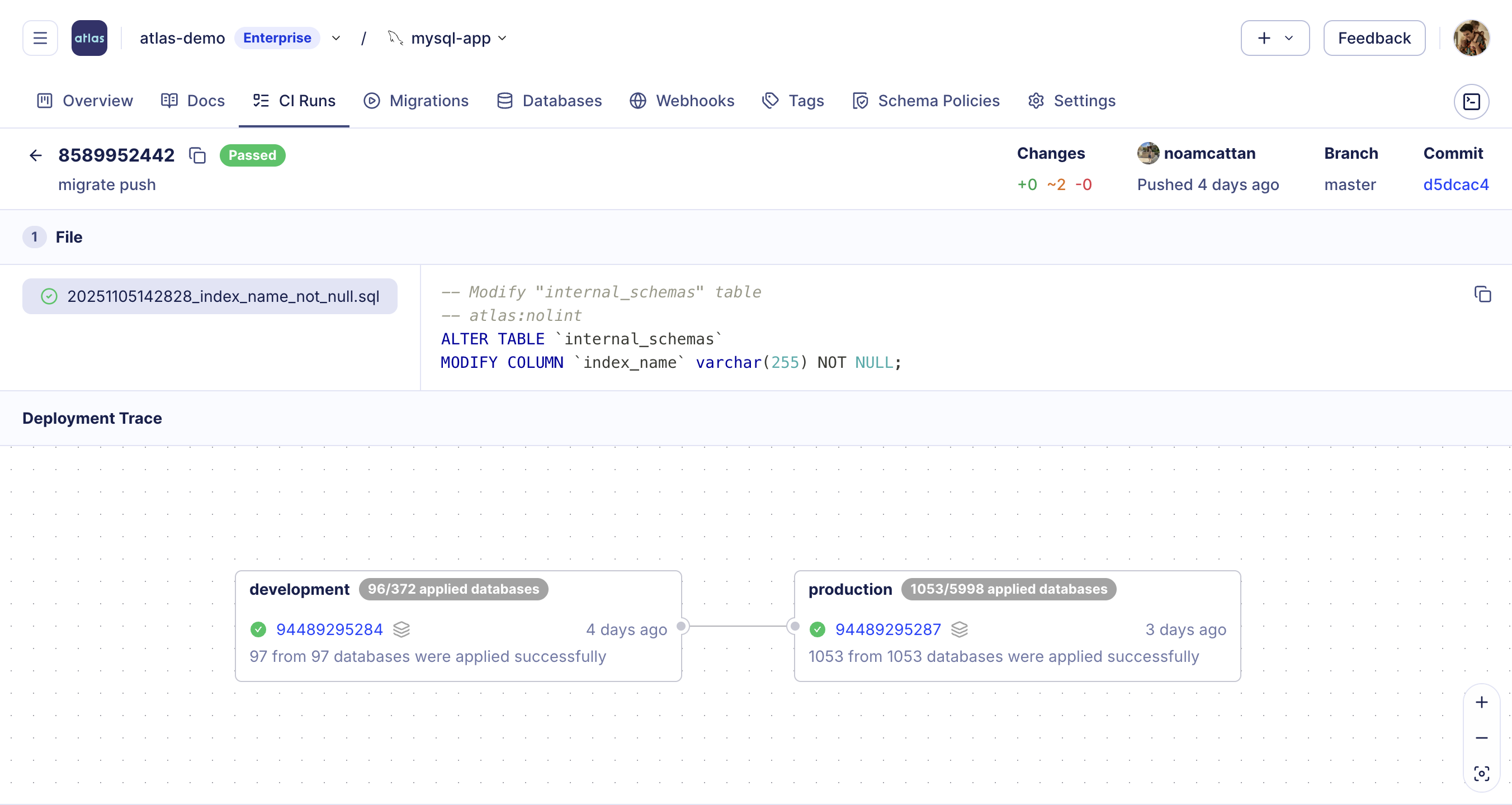
The Deployment Trace view offers a clear, end-to-end record of how each migration was deployed across environments. You can track when and where each version was applied, which databases were affected, and whether all executions completed successfully. Every action is linked to its source pull request and CI run, allowing teams to easily trace who approved, merged, and deployed every change.
Querying Deployments from the CLI
The same deployment data is available from the CLI, which is convenient for scripted audits, CI checks, or ad-hoc inspection by your AI agent. Two commands are most useful for promotion workflows:
-
atlas cloud migration listreturns theschema applyevents for a repository, with their target environment, deployed version, and status - for example, the schema versions that reached production:atlas cloud migration list --repo myapp --env-name production --status PASSED -
atlas cloud database listreturns the databases and the version each one is currently on:atlas cloud database list --env-name production
Both commands accept --format (Go templates, including {{ json . }}) for machine-readable output. See
Inspecting Deployments from the CLI for working examples, and the
CLI reference for the full set of flags.
Best Practices
-
Push once, promote everywhere: Push the schema to the registry exactly once per change (typically on merge to the main branch) and deploy it to staging. Avoid re-pushing per environment, as this creates distinct versions and defeats the promotion model.
-
Read the promoted version from the registry: Use the
cloud_databasesdata source to pin production's desired state to the version currently deployed in staging, rather than an unpinnedatlas://myappthat silently trackslatest. -
Gate production with pre-execution checks: Deny deployments whose
target_versionis empty or differs from the version deployed in staging. Keep the checks even whensrcis pinned - they protect against future configuration changes. -
Pre-plan production changes: Use
atlas schema planin CI to review and approve the migration for the pinned schema transition. Because the desired state is pinned to a version, the pre-approved plan resolves deterministically, ensuring production executes exactly the reviewed SQL. -
Report deployments to Atlas Registry: Enable deployment reporting so every apply, including its target version and outcome, is recorded. This is what allows the
cloud_databasesdata source to read the database state of lower environments, and provides audit evidence for compliance frameworks.
Summary
Environment promotion for declarative schema migrations works like the versioned workflow: the desired state is read
from the Atlas Registry, and the registry tracks the schema version deployed to each database. A schema version is
pushed once, validated in staging, and production reads the staging state from the registry to deploy the exact same
version. By combining atlas schema push, the cloud_databases data source, and check "schema_apply"
pre-execution checks, teams can:
- Guarantee that production only receives schema versions validated in lower environments.
- Block unpinned or mismatched deployments before any SQL is executed.
- Maintain a complete, auditable history of which version was deployed where.
For the versioned migrations variant of this workflow, see Environment Promotion and Compliance.