Detecting and Preventing Database Schema Drift
Overview
Database schema drift happens when the target database diverges from its source of truth: your version-controlled schema and migration files. The desired state (what your migrations describe) and the actual state (what the database actually contains) no longer match.
Drift is consistently cited as one of the most common root causes of database-related production incidents. It also represents a direct compliance risk: every drifted object is an undocumented, unreviewed, and unapproved change to a production system. For teams operating under frameworks like SOC 2, ISO/IEC 27002, PCI DSS, or HIPAA, that is a control failure, not just an operational nuisance.
This guide walks through how Atlas detects and prevents schema drift in versioned migration workflows, using two complementary strategies that together provide defense in depth for production databases.
Causes and Costs
Drift is almost always introduced out-of-band, or outside the standard migration pipeline.
Common sources include emergency hotfixes and manual ALTER statements run directly against
production with psql, mysql, or a GUI client; a second tool writing to the same database,
such as an ORM auto-migrator or a separate team's migration runner; and undocumented patches
that were never folded back into the migration directory.
The cost compounds quickly. Migrations fail mid-flight on unexpected schema, application code writes invalid data when a constraint or column it relies on differs in production, and bugs that pass staging still hit prod once the two diverge. Additionally, since drift covers everything from columns to GRANTs, roles, and RLS policies, compliance audits fail when no one can prove who changed what.
Compliance Context
Multiple compliance frameworks treat undocumented database changes as control failures and require organizations to detect and prevent them:
- SOC 2 requires documented change management procedures, including peer review and formal approval before production deployment. An undetected drifted object is, by definition, a change that bypassed those controls. Auditors expect evidence that unauthorized changes are detected and investigated.
- ISO/IEC 27002:2022 (Control 8.32) mandates formal change management, including authorization, testing, and detailed records of all changes. Drift represents changes that were never authorized or recorded.
- PCI DSS (Requirements 6.4 and 6.5) require change authorization and documented testing before production deployment. Direct production changes that introduce drift violate this.
- HIPAA Security Rule requires information system activity review and integrity controls. Detecting drift is part of demonstrating that integrity controls are in place.
In each framework, the underlying expectation is the same: the schema in production must match what the change-management process produced, and any deviation must be detected, investigated, and remediated.
Why Versioned Migrations Are Uniquely Vulnerable
Drift is dangerous in any workflow, but versioned migration pipelines are uniquely exposed to it. To see why, it helps to contrast how the two main schema-as-code workflows execute:
-
Declarative apply is self-correcting. Every
atlas schema applyre-inspects the target database, computes the diff against your desired schema, and only then executes the resulting plan. If the database has drifted, the plan reflects reality. Drift is absorbed at plan time. -
Versioned apply is intentionally simpler.
atlas migrate applytrusts the revisions table as the source of truth for what has already been applied and executes the next pending migration files in order. There is no re-inspection, no re-diff, no re-plan. That simplicity is what makes versioned deployments fast, predictable, and deterministic.
The downside: a migration written against an expected state can fail mid-flight, partially
apply, or silently produce a different result on a target database that has drifted out from
under it. The revisions table will say version N was applied, but the schema no longer
matches what version N was supposed to produce. The next deployment then runs on top of an
unknown state, which is exactly the situation compliance frameworks ask you to prevent.
This is why detecting drift in versioned workflows requires explicit tooling, not just a careful process.
Defense in Depth: Two Complementary Strategies
Atlas offers two strategies for handling drift in versioned workflows. They solve different problems and are designed to be used together.
| Pre-apply Drift Check | Schema Monitoring Drift Detection | |
|---|---|---|
| When it runs | Synchronously, at the start of atlas migrate apply | Continuously, in the background |
| Where it runs | Your deployment pipeline (CI/CD, Atlas Operator) | Atlas Agent |
| What it does | Compares the target database to the expected state at the latest applied revision, and blocks the apply if they differ | Periodically inspects the database and alerts when drift appears (Slack, webhook, UI) |
| What it protects against | Running a new migration on top of an already-drifted database | A teammate or external process making an undocumented change |
| Compliance role | Preventive control: stops a non-compliant deployment | Detective control: surfaces unauthorized changes for investigation |
Use both. The pre-apply check is your safety belt at deploy time: it stops a deployment before
it compounds an existing drift. Background monitoring is your radar between deploys: it tells
you that something changed in the window between two migrate apply runs, so you can
investigate before the next deployment.
Strategy 1: Pre-apply Drift Detection
The pre-apply drift check runs synchronously at the start of every atlas migrate apply run.
Before any pending migration file executes, Atlas compares the target database against the
expected state at the latest applied revision pulled from the
Atlas Registry. If they do not match, the apply is aborted
with a clear diff in the output and no migration file runs.
This pattern turns drift detection into a preventative control: a non-compliant database state physically cannot receive a new migration until the drift is investigated and resolved.
How It Works
- Read the latest applied revision from the database's revisions table.
- Fetch the expected state for this revision from the Atlas Registry.
- Inspect the target database.
- Diff the expected state against the actual state.
If there is a difference, the migration is blocked by default. For non-production environments
where you want visibility but not a hard stop, you can set on_error = CONTINUE to log the
diff and proceed.
Configuration
The check is configured inside a check "migrate_apply" block in atlas.hcl, alongside any
other pre-execution checks:
env "prod" {
  url = getenv("DATABASE_URL")
  migration {
    dir = "atlas://my-app"
  }
  check "migrate_apply" {
    drift {
      on_error = FAIL
    }
  }
}
With this configuration, every production deployment first runs the drift check. If the
target database differs from what the registry says version N should look like, the apply
aborts before any DDL runs.
For non-production environments where you want visibility but not a hard stop, use
atlas.env to switch behavior per environment:
check "migrate_apply" {
  drift {
    on_error = atlas.env == "prod" ? FAIL : CONTINUE
  }
}
What a Blocked Deployment Looks Like
When drift is detected and on_error = FAIL, the apply transcript shows the exact diff and the
deployment exits non-zero, failing the CI/CD pipeline:
Executing pre-execution check (1 check in total):

  -- check at atlas.hcl:10 (drift):
    -> check drift against version 20260423120000

        --- expected state
        +++ actual state
        @@ -0,0 +1,3 @@
        +CREATE TABLE "audit_log" (
        +  "id" integer NULL
        +);

    Error: database state does not match expected state at version 20260423120000

-------------------------------------------

Error: database state does not match expected state at version 20260423120000
The same failure also surfaces in Atlas Cloud, where the deployment is recorded as Failed alongside the full drift report and the diff that caused it:
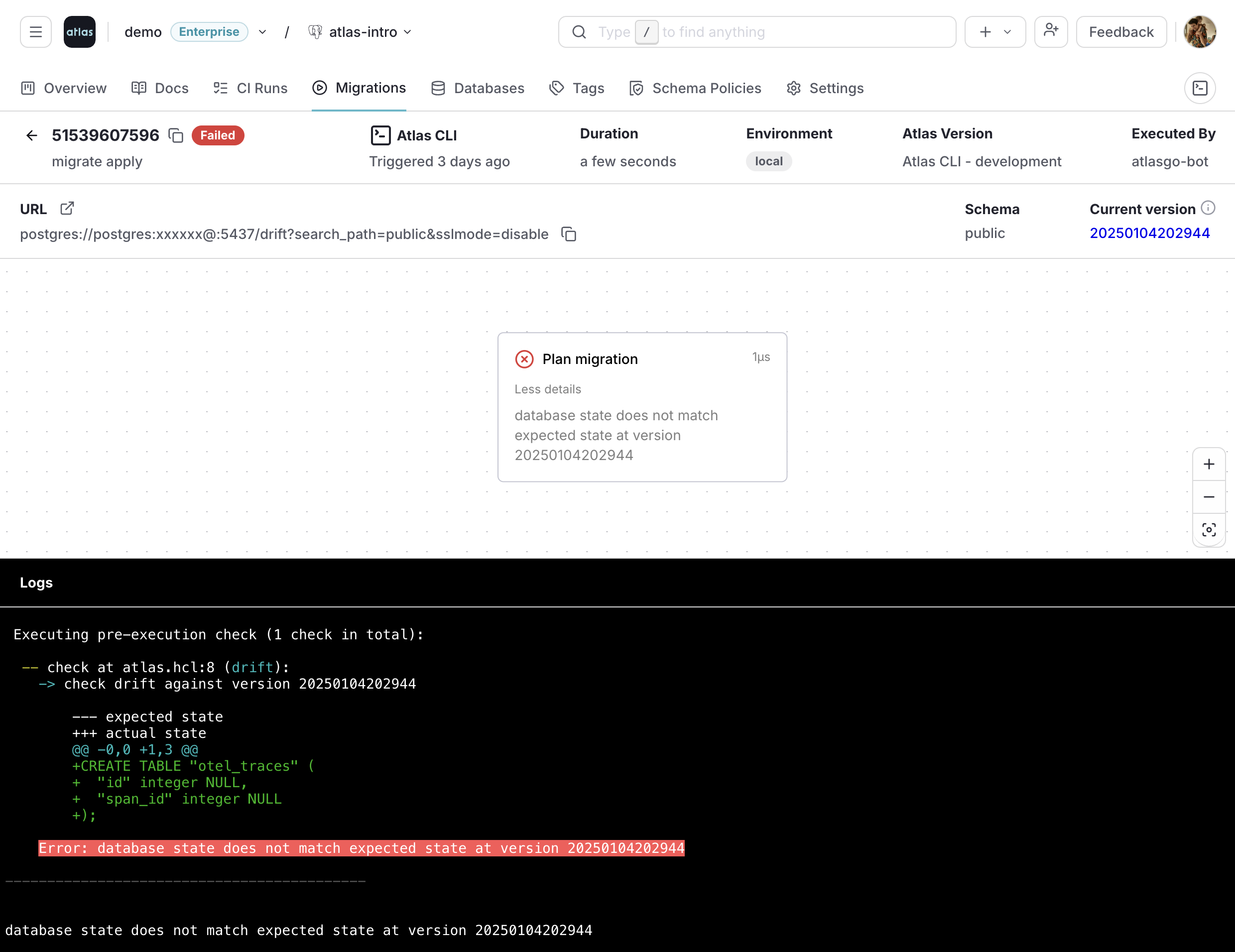
The diff itself is the audit evidence: it shows precisely what was changed out-of-band, which is what an investigator or auditor needs to start a remediation conversation.
For the full configuration reference, including exclude patterns for objects intentionally
maintained outside the migration scope and the recommended rollout flow on existing
environments, see Drift Detection in Versioned Migrations.
Strategy 2: Continuous Schema Monitoring
The pre-apply check protects the next migration. It does not tell you when drift was introduced, or that drift exists in databases you are not actively deploying to. For compliance, knowing about an unauthorized change as soon as it happens (not weeks later when the next migration tries to run) is a separate and equally important requirement.
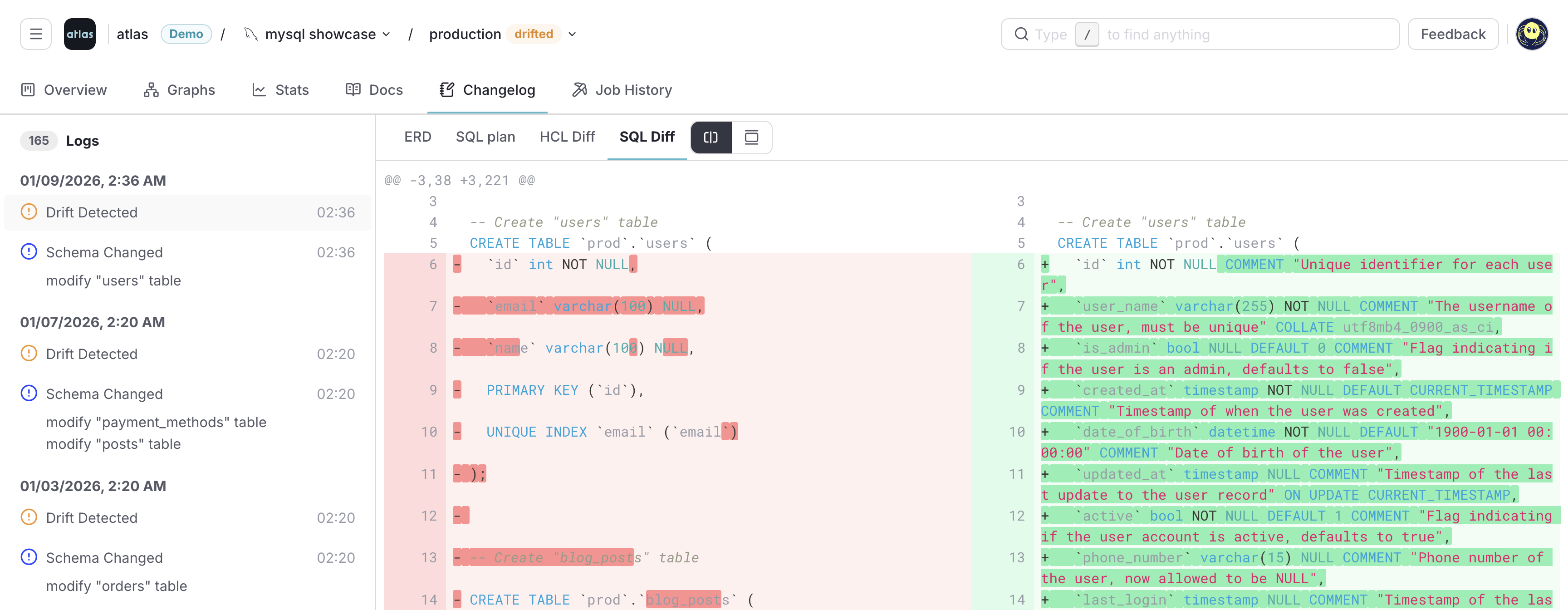
Atlas Cloud Schema Monitoring closes that gap. It periodically inspects your databases and compares them against the expected state, which can be another database or the last reported migration. Each detected drift opens a detailed view with an ERD and a SQL or HCL diff, giving auditors and engineers everything they need to identify the unauthorized change, attribute it, and remediate:
A Slack webhook (or any HTTP webhook) notifies on-call engineers the moment drift is detected, so investigation can start before the next deployment cycle:

To enable continuous drift detection on your databases, follow the Schema Monitoring Getting Started Guide.
Putting It Together: A Compliance-Ready Workflow
Drift detection is most effective when it is part of an end-to-end change-management workflow. A typical Atlas-based pipeline looks like this:
- Pull request triggers Atlas linting and validation. No drift can enter the migration directory itself: Atlas checks that ORM models match migrations and that no two migrations conflict. See Reviewed and Approved Migrations.
- Merge to main pushes the approved migration directory to the Atlas Registry, creating an immutable artifact that becomes the source of truth for the expected state at each version.
- Deployment runs
atlas migrate applyagainst the verified registry artifact. The pre-apply drift check runs first; if the target database has drifted, the deployment is blocked and the diff is recorded. Otherwise, only the approved pending migrations run. - Between deployments, schema monitoring continuously compares each production database against the registry. Any change that did not come from the deployment pipeline triggers a Slack/webhook alert and is recorded in the monitoring history.
- Audit trail: every applied migration is recorded with full deployment trace, and every detected drift is recorded with its diff, timestamp, and resolution.
This is the loop that satisfies the underlying compliance ask: schema in production matches what the change-management process produced, and any deviation is detected, investigated, and remediated.
Summary
Schema drift in versioned migrations is dangerous because atlas migrate apply trusts the
revisions table and does not re-inspect the target database. Atlas covers this with two
strategies: a synchronous pre-apply check that blocks deployments on a drifted schema, and
continuous schema monitoring that alerts on out-of-band changes between deployments. Use
both: every change in production is either authorized by review, or flagged within minutes.
Next Steps
- Read the technical reference: Drift Detection in Versioned Migrations.
- Set up continuous monitoring: Schema Monitoring: Drift Detection.
- Enforce environment segregation: Environment Promotion and Compliance.