PostgreSQL Database Security as Code (Declarative)
Managing database security through ad-hoc GRANT and REVOKE commands leads to drift, and permissions
scattered across migration files make it hard to answer "who can access what?" Atlas lets you define
roles, users, permissions, and row-level security policies as code - and automatically plans the changes
needed to bring any database in line with the desired state.
This guide covers the declarative workflow. For versioned migrations, see the versioned security guide.
Roles, users, and permissions are available only to Atlas Pro users. To use this feature, run:
atlas login
Prerequisites
- Docker
- Atlas installed on your machine (installation guide)
- An Atlas Pro account (run
atlas loginto authenticate)
Configuring Atlas
Start by spinning up a local PostgreSQL database using atlas tool docker:
export DATABASE_URL=$(atlas tool docker --url "docker://postgres/16/demo" --name my-db)
When you're done, stop the container with atlas tool docker kill --name my-db.
Roles and permissions are excluded from inspection and schema management by default. To enable them, add a
schema.mode block to your project configuration:
- Atlas DDL (HCL)
- SQL
env "local" {
  url = getenv("DATABASE_URL")
  dev = "docker://postgres/16/dev"
  schema {
    src = "file://schema.pg.hcl"
    mode {
      roles       = true   // Inspect and manage roles and users
      permissions = true   // Inspect and manage GRANT / REVOKE
      sensitive   = ALLOW  // Allow password handling in declarative mode
    }
  }
}
env "local" {
  url = getenv("DATABASE_URL")
  dev = "docker://postgres/16/dev"
  schema {
    src = "file://schema.sql"
    mode {
      roles       = true
      permissions = true
      sensitive   = ALLOW
    }
  }
}
roles = true- include roles and users in inspection and planning.permissions = true- includeGRANT/REVOKEstatements.sensitive = ALLOW- let Atlas manage passwords declaratively (they are always masked as<sensitive>in output).
Roles and users are scoped to the instance rather than to a database, so with roles = true the desired state
is authoritative over every role and user Atlas inspects there. PostgreSQL's predefined pg_* roles are
excluded; anything else that exists on the target and is absent from your schema file is one Atlas plans to
drop. Declare each with external = true: the role Atlas connects with, the admin, replication roles,
provider roles such as rds_superuser, and roles owned by other teams. See
Defining Roles and Users.
Dev Database for Cloud Environments
When targeting cloud-managed databases (Amazon RDS, Cloud SQL, etc.), the dev database must know about
provider-specific roles that exist on the target but not in a vanilla PostgreSQL image. Use a docker
block with a baseline script to pre-create them:
docker "postgres" "rds" {
  image = "postgres:16"
  baseline = <<-SQL
   CREATE ROLE rds_superuser;
   CREATE ROLE rds_replication;
   CREATE ROLE rds_iam;
   CREATE ROLE rdsadmin;
   GRANT rds_superuser TO postgres;
  SQL
}

env "rds" {
  url = getenv("DATABASE_URL")
  dev = docker.postgres.rds.url
  schema {
    src = "file://schema.pg.hcl"
    mode {
      roles       = true
      permissions = true
      sensitive   = ALLOW
    }
  }
}
If you prefer to use your own dev database instead of Docker, use a dev block:
dev "postgres" "rds" {
  url = getenv("DEV_URL")
  baseline = <<-SQL
   CREATE ROLE rds_superuser;
   CREATE ROLE rds_replication;
   CREATE ROLE rds_iam;
   CREATE ROLE rdsadmin;
   GRANT rds_superuser TO postgres;
  SQL
}
A dev database on the same instance as the target shares that instance's roles and users, so planning role
changes there collides with the live ones. Use a container, as in the docker block above, or point dev at
an instance of its own.
Managed Admin Users Such as postgres on Cloud SQL
On managed services, the admin user is not a real superuser, so Atlas reports its grants where a local dev
database hides them: postgres on Cloud SQL, the master user on RDS and Aurora (a member of
rds_superuser), the admin on Azure Flexible Server (azure_pg_admin), and the admin on AlloyDB
(alloydbsuperuser).
Why this happens and how to exclude the admin user
On Cloud SQL for PostgreSQL, the bootstrap superuser is Google's cloudsqladmin. The postgres user is
created afterwards as an ordinary role: it is not a superuser, it gets CREATEROLE and CREATEDB through
membership in cloudsqlsuperuser, and its OID is above the system range. On a local container, the same
postgres is the bootstrap superuser.
Atlas skips the superuser's implicit grants on a local dev database, but on Cloud SQL postgres is a regular
role, so its grants show up in inspection and in every diff. To skip its management and drop it from
inspection, add:
env "staging" {
  url = getenv("DATABASE_URL")
  dev = "docker://postgres/16/dev"
  exclude = [
    "postgres[type=role|user]",
    "postgres[type=role|user].permission",
  ]
}
The first pattern removes only the role object, since many projects exclude roles but still manage grants
to them. The second removes the grants. Declaring the role with external = true covers the role in the
same way and still needs the second pattern for its grants.
Grants to postgres cannot be planned through a local dev database, because PostgreSQL makes them
implicit for a superuser. To manage them, use a dev database where postgres is an ordinary role, such as
a second Cloud SQL instance. The other providers behave the same: use the two patterns with that admin's
name.
Defining Roles and Users
Let's model a SaaS order management application with three tiers of access:
| Role | Purpose |
|---|---|
app_readonly | Read-only access for reporting dashboards |
app_writer | Read-write access for the application backend, inherits from app_readonly |
app_admin | Full administrative access, inherits from app_writer |
Two login users connect to the database at runtime:
| User | Role membership |
|---|---|
dashboard_user | app_readonly |
api_user | app_writer |
- Atlas DDL (HCL)
- SQL
variable "api_password" {
  type = string
}

variable "dashboard_password" {
  type = string
}

role "app_readonly" {
  comment = "Read-only access for reporting"
}

role "app_writer" {
  comment   = "Read-write access for the application"
  member_of = [role.app_readonly]
}

role "app_admin" {
  create_role = true
  comment     = "Administrative access"
  member_of   = [role.app_writer]
}

user "dashboard_user" {
  password   = var.dashboard_password
  conn_limit = 5
  comment    = "Reporting dashboard service account"
  member_of  = [role.app_readonly]
}

user "api_user" {
  password   = var.api_password
  conn_limit = 20
  comment    = "Application API service account"
  member_of  = [role.app_writer]
}
-- Create roles
CREATE ROLE "app_readonly";
COMMENT ON ROLE "app_readonly" IS 'Read-only access for reporting';

CREATE ROLE "app_writer" IN ROLE "app_readonly";
COMMENT ON ROLE "app_writer" IS 'Read-write access for the application';

CREATE ROLE "app_admin" CREATEROLE IN ROLE "app_writer";
COMMENT ON ROLE "app_admin" IS 'Administrative access';

-- Create users
CREATE USER "dashboard_user" PASSWORD '<sensitive>' CONNECTION LIMIT 5 IN ROLE "app_readonly";
COMMENT ON ROLE "dashboard_user" IS 'Reporting dashboard service account';

CREATE USER "api_user" PASSWORD '<sensitive>' CONNECTION LIMIT 20 IN ROLE "app_writer";
COMMENT ON ROLE "api_user" IS 'Application API service account';
-
Roles vs users - a
userblock implicitly haslogin = true. Roles cannot log in by default. -
Inheritance -
member_ofcreates a role hierarchy.app_writerinherits all privileges ofapp_readonly, andapp_admininherits everything fromapp_writer. -
Passwords - defined through input variables, never hardcoded. Inject real values at runtime via environment variables, or use the
runtimevardata source to read passwords directly from AWS Secrets Manager, GCP Secret Manager, HashiCorp Vault, AWS KMS, or any other supported secret store:atlas.hcldata "runtimevar" "api_pass" {
url = "awssecretsmanager://api-db-password?region=us-east-1"
}To assume an IAM role when reading the secret, use AWS SDK v2 mode and append
&awssdk=v2&role=arn:aws:iam::<account-id>:role/<role-name>.Then reference it in your schema:
password = data.runtimevar.api_pass. -
External roles - cloud-managed databases (Amazon RDS, Google Cloud SQL, Azure) include provider-specific roles like
rds_superuserorcloudsqlsuperuser. PostgreSQL also ships with predefined roles likepg_read_all_dataandpg_monitor. Mark these roles asexternal = trueso Atlas knows they already exist and will only generate theGRANT, never aCREATE ROLE:
- Atlas DDL (HCL)
- SQL
// PostgreSQL predefined role
role "pg_read_all_data" {
  external = true
}

// Cloud provider role (e.g., Amazon RDS)
role "rds_superuser" {
  external = true
}

role "app_readonly" {
  comment   = "Read-only access for reporting"
  member_of = [role.pg_read_all_data]
}
CREATE ROLE "app_readonly" IN ROLE "pg_read_all_data";
COMMENT ON ROLE "app_readonly" IS 'Read-only access for reporting';
Defining Permissions
With roles in place, grant privileges at the schema, table, and column level. First, define the tables, functions, procedures, and materialized views that permissions will reference:
- Atlas DDL (HCL)
- SQL
table "users" {
  schema = schema.public
  column "id" {
    type = serial
    null = false
  }
  column "name" {
    type = character_varying
    null = false
  }
  column "email" {
    type = character_varying
    null = false
  }
  primary_key {
    columns = [column.id]
  }
}

table "products" {
  schema = schema.public
  column "id" {
    type = serial
    null = false
  }
  column "name" {
    type = character_varying
    null = false
  }
  column "price" {
    type = numeric
    null = false
  }
  primary_key {
    columns = [column.id]
  }
}

table "orders" {
  schema = schema.public
  column "id" {
    type = serial
    null = false
  }
  column "user_id" {
    type = integer
    null = false
  }
  column "product_id" {
    type = integer
    null = false
  }
  column "tenant_id" {
    type = integer
    null = false
  }
  column "total" {
    type = numeric
    null = false
  }
  primary_key {
    columns = [column.id]
  }
  foreign_key "fk_order_user" {
    columns     = [column.user_id]
    ref_columns = [table.users.column.id]
  }
  foreign_key "fk_order_product" {
    columns     = [column.product_id]
    ref_columns = [table.products.column.id]
  }
}

function "get_order_total" {
  schema = schema.public
  lang   = PLpgSQL
  arg "order_id" {
    type = integer
  }
  return = numeric
  as     = <<-SQL
  DECLARE
    result numeric;
  BEGIN
    SELECT total INTO result FROM orders WHERE id = order_id;
    RETURN result;
  END;
  SQL
}

procedure "archive_old_orders" {
  schema = schema.public
  lang   = PLpgSQL
  arg "cutoff_days" {
    type = integer
  }
  as = <<-SQL
  BEGIN
    DELETE FROM orders WHERE id IN (
      SELECT id FROM orders LIMIT cutoff_days
    );
  END;
  SQL
}

materialized "order_summary" {
  schema = schema.public
  column "product_id" {
    null = false
    type = integer
  }
  column "product_name" {
    null = false
    type = character_varying
  }
  column "total_orders" {
    type = bigint
  }
  column "total_revenue" {
    type = numeric
  }
  as = "SELECT p.id AS product_id, p.name AS product_name, count(*) AS total_orders, sum(o.total) AS total_revenue FROM orders o JOIN products p ON o.product_id = p.id GROUP BY p.id, p.name"
}

schema "public" {
  comment = "standard public schema"
}
CREATE TABLE "users" (
  "id" serial NOT NULL,
  "name" character varying NOT NULL,
  "email" character varying NOT NULL,
  PRIMARY KEY ("id")
);

CREATE TABLE "products" (
  "id" serial NOT NULL,
  "name" character varying NOT NULL,
  "price" numeric NOT NULL,
  PRIMARY KEY ("id")
);

CREATE TABLE "orders" (
  "id" serial NOT NULL,
  "user_id" integer NOT NULL,
  "product_id" integer NOT NULL,
  "tenant_id" integer NOT NULL,
  "total" numeric NOT NULL,
  PRIMARY KEY ("id"),
  FOREIGN KEY ("user_id") REFERENCES "users" ("id"),
  FOREIGN KEY ("product_id") REFERENCES "products" ("id")
);

CREATE FUNCTION "get_order_total" ("order_id" integer) RETURNS numeric LANGUAGE plpgsql AS $$
DECLARE
  result numeric;
BEGIN
  SELECT total INTO result FROM orders WHERE id = order_id;
  RETURN result;
END;
$$;

CREATE PROCEDURE "archive_old_orders" ("cutoff_days" integer) LANGUAGE plpgsql AS $$
BEGIN
  DELETE FROM orders WHERE id IN (
    SELECT id FROM orders LIMIT cutoff_days
  );
END;
$$;

CREATE MATERIALIZED VIEW "order_summary" AS
  SELECT p.id AS product_id, p.name AS product_name, count(*) AS total_orders, sum(o.total) AS total_revenue
  FROM orders o JOIN products p ON o.product_id = p.id
  GROUP BY p.id, p.name;
Next, add the permissions:
- Atlas DDL (HCL)
- SQL
// Admin gets ALL on the schema with grant option
permission {
  to         = role.app_admin
  for        = schema.public
  privileges = [ALL]
  grantable  = true
}

// Read-only: SELECT on all tables
permission {
  for_each   = [table.orders, table.products, table.users]
  for        = each.value
  to         = role.app_readonly
  privileges = [SELECT]
}

// Writer: SELECT, INSERT, UPDATE on orders and products
permission {
  for_each   = [table.orders, table.products]
  for        = each.value
  to         = role.app_writer
  privileges = [SELECT, INSERT, UPDATE]
}

// Column-level: api_user can only UPDATE the email column
permission {
  to         = user.api_user
  for        = table.users.column.email
  privileges = [UPDATE]
}

// Function-level: app_readonly can call get_order_total
permission {
  to         = role.app_readonly
  for        = function.get_order_total
  privileges = [EXECUTE]
}

// Procedure-level: only app_admin can call archive_old_orders
permission {
  to         = role.app_admin
  for        = procedure.archive_old_orders
  privileges = [EXECUTE]
}

// Materialized view: app_readonly can SELECT from the summary
permission {
  to         = role.app_readonly
  for        = materialized.order_summary
  privileges = [SELECT]
}
-- Admin: full access with grant option
GRANT ALL ON SCHEMA "public" TO "app_admin" WITH GRANT OPTION;

-- Read-only: SELECT on all tables
GRANT SELECT ON TABLE "orders" TO "app_readonly";
GRANT SELECT ON TABLE "products" TO "app_readonly";
GRANT SELECT ON TABLE "users" TO "app_readonly";

-- Writer: read-write on orders and products
GRANT SELECT, INSERT, UPDATE ON TABLE "orders" TO "app_writer";
GRANT SELECT, INSERT, UPDATE ON TABLE "products" TO "app_writer";

-- Column-level: api_user can only update email
GRANT UPDATE ("email") ON TABLE "users" TO "api_user";

-- Function and procedure grants
GRANT EXECUTE ON FUNCTION "get_order_total" TO "app_readonly";
GRANT EXECUTE ON PROCEDURE "archive_old_orders" TO "app_admin";

-- Materialized view grants
GRANT SELECT ON "order_summary" TO "app_readonly";
for_each keeps permissions DRY - define the grant once, and Atlas expands it for every table at plan time.
grantable = true maps to SQL's WITH GRANT OPTION, allowing the grantee to re-grant the same privileges.
PostgreSQL grants EXECUTE on functions and procedures to PUBLIC by default
(Section 5.7). If you want tighter control, revoke the
default first and grant only to specific roles as shown above. For materialized views, the only applicable
privilege is SELECT, since they are read-only by nature (refreshed with REFRESH MATERIALIZED VIEW).
Overloaded Routines
PostgreSQL functions and procedures can share a name across different argument types. When overloads exist,
use ref() with the full argument-type signature so Atlas knows which one to target:
function "add" {
  schema = schema.public
  lang   = SQL
  arg "a" { type = integer }
  arg "b" { type = integer }
  return = integer
  as     = "SELECT a + b"
}

function "add" {
  schema = schema.public
  lang   = SQL
  arg "a" { type = numeric }
  arg "b" { type = numeric }
  return = numeric
  as     = "SELECT a + b"
}

permission {
  to         = role.analyst
  for        = ref("function.add(integer,integer)")
  privileges = [EXECUTE]
}
Atlas generates a signature-qualified GRANT for only that overload:
  -- grant on function "add" to "analyst":
    -> GRANT EXECUTE ON FUNCTION "public"."add" (integer, integer) TO "analyst";
The same syntax applies to procedures: ref("procedure.archive(integer)").
Row-Level Security
Row-level security (RLS) restricts which rows a role can see or modify. In a multi-tenant application this is critical - each tenant must only access its own data. Enable RLS on the table and define a policy:
- Atlas DDL (HCL)
- SQL
table "orders" {
  schema = schema.public
  // ... columns and keys from above ...
  row_security {
    enabled  = true  // ENABLE ROW LEVEL SECURITY
    enforced = true  // FORCE ROW LEVEL SECURITY
  }
}

policy "tenant_isolation" {
  on    = table.orders
  for   = ALL
  to    = ["app_writer"]
  using = "(tenant_id = current_setting('app.current_tenant')::integer)"
  check = "(tenant_id = current_setting('app.current_tenant')::integer)"
}
ALTER TABLE "orders" ENABLE ROW LEVEL SECURITY;
ALTER TABLE "orders" FORCE ROW LEVEL SECURITY;

CREATE POLICY "tenant_isolation" ON "orders"
  FOR ALL
  TO "app_writer"
  USING (tenant_id = current_setting('app.current_tenant')::integer)
  WITH CHECK (tenant_id = current_setting('app.current_tenant')::integer);
enabled = trueactivates RLS on the table. Without it, policies are defined but not enforced.enforced = trueapplies RLS even to the table owner (maps toFORCE ROW LEVEL SECURITY).usingfilters existing rows (reads).checkvalidates new or updated rows (writes).
For using RLS with ORMs, see the dedicated guides for GORM, Prisma, SQLAlchemy, and Sequelize.
Applying Changes
Run atlas schema apply to diff the desired state against the live database and execute the changes:
atlas schema apply --env local \
 --var "api_password=s3cret" \
 --var "dashboard_password=r3port"
Atlas produces a plan showing every role, grant, table, function, procedure, materialized view, and policy it will create:
Planning migration statements (29 in total):

 -- create role "app_readonly":
   -> CREATE ROLE "app_readonly";
 -- create role "app_writer":
   -> CREATE ROLE "app_writer";
 -- grant role "app_readonly" to "app_writer":
   -> GRANT "app_readonly" TO "app_writer";
 -- create role "app_admin":
   -> CREATE ROLE "app_admin" WITH CREATEROLE;
 -- grant role "app_writer" to "app_admin":
   -> GRANT "app_writer" TO "app_admin";
 -- grant on schema "public" to "app_admin":
   -> GRANT CREATE, USAGE ON SCHEMA "public" TO "app_admin" WITH GRANT OPTION;
 -- create user "api_user":
 -- atlas:sensitive:
   -> CREATE ROLE "api_user" WITH LOGIN CONNECTION LIMIT 20 PASSWORD (sensitive);
 -- grant role "app_writer" to "api_user":
   -> GRANT "app_writer" TO "api_user";
 -- create user "dashboard_user":
 -- atlas:sensitive:
   -> CREATE ROLE "dashboard_user" WITH LOGIN CONNECTION LIMIT 5 PASSWORD (sensitive);
 -- grant role "app_readonly" to "dashboard_user":
   -> GRANT "app_readonly" TO "dashboard_user";
 -- create "products" table:
   -> CREATE TABLE "public"."products" ( ... );
 -- grant on table "products" to "app_readonly":
   -> GRANT SELECT ON TABLE "public"."products" TO "app_readonly";
 -- grant on table "products" to "app_writer":
   -> GRANT INSERT, SELECT, UPDATE ON TABLE "public"."products" TO "app_writer";
 -- create "users" table:
   -> CREATE TABLE "public"."users" ( ... );
 -- grant on table "users" to "app_readonly":
   -> GRANT SELECT ON TABLE "public"."users" TO "app_readonly";
 -- grant on column "email" of table "users" to "api_user":
   -> GRANT UPDATE ("email") ON TABLE "public"."users" TO "api_user";
 -- create "orders" table:
   -> CREATE TABLE "public"."orders" ( ... );
 -- enable and enforce row-level security for "orders" table:
   -> ALTER TABLE "public"."orders" ENABLE ROW LEVEL SECURITY, FORCE ROW LEVEL SECURITY;
 -- grant on table "orders" to "app_readonly":
   -> GRANT SELECT ON TABLE "public"."orders" TO "app_readonly";
 -- grant on table "orders" to "app_writer":
   -> GRANT INSERT, SELECT, UPDATE ON TABLE "public"."orders" TO "app_writer";
 -- create policy "tenant_isolation":
   -> CREATE POLICY "tenant_isolation" ON "public"."orders" AS PERMISSIVE FOR ALL TO "app_writer"
       USING (...) WITH CHECK (...);
 -- create "get_order_total" function:
   -> CREATE FUNCTION "public"."get_order_total" ("order_id" integer) RETURNS numeric
       LANGUAGE plpgsql AS $$ ... $$;
 -- grant on function "get_order_total" to "public":
   -> GRANT EXECUTE ON FUNCTION "public"."get_order_total" TO PUBLIC;
 -- grant on function "get_order_total" to "app_readonly":
   -> GRANT EXECUTE ON FUNCTION "public"."get_order_total" TO "app_readonly";
 -- create "archive_old_orders" procedure:
   -> CREATE PROCEDURE "public"."archive_old_orders" ("cutoff_days" integer)
       LANGUAGE plpgsql AS $$ ... $$;
 -- grant on procedure "archive_old_orders" to "public":
   -> GRANT EXECUTE ON PROCEDURE "public"."archive_old_orders" TO PUBLIC;
 -- grant on procedure "archive_old_orders" to "app_admin":
   -> GRANT EXECUTE ON PROCEDURE "public"."archive_old_orders" TO "app_admin";
 -- create "order_summary" view:
   -> CREATE MATERIALIZED VIEW "public"."order_summary" ( ... ) AS SELECT ...;
 -- grant on view "order_summary" to "app_readonly":
   -> GRANT SELECT ON "public"."order_summary" TO "app_readonly";

-------------------------------------------

? Approve or abort the plan:
  ▸ Approve and apply
    Abort
After approving, verify with atlas schema inspect:
atlas schema inspect --env local
The output reflects every role, user, permission, function, procedure, materialized view, and policy. Run this on any environment to confirm it matches the desired state.
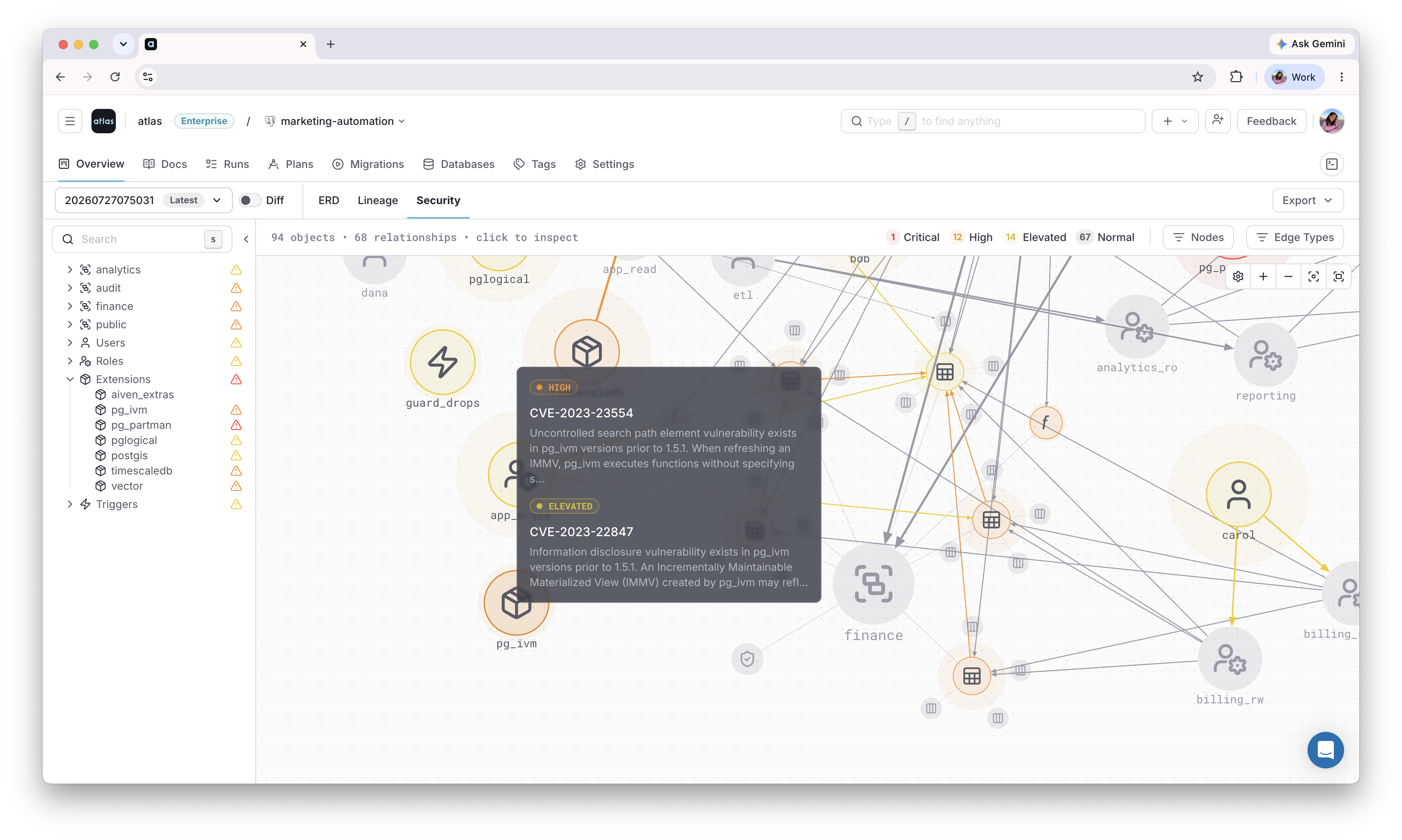
Visualize on Atlas Registry
Once these roles, grants, and policies are applied, use the Security Graph to see how they connect across the repository, and flag any risky access patterns automatically.
Next Steps
- Versioned workflow - manage security changes as versioned migration files
- Template directories - inject passwords at deploy time without exposing them in source control
- HCL reference - all role and permission attributes
- CI/CD setup - deploy declarative schemas to production
Have questions? Feedback? Find our team on our Discord server or schedule a demo.