ClickHouse Database Security as Code (Declarative)
Managing database security through ad-hoc GRANT and REVOKE commands leads to drift, and permissions
scattered across migration files make it hard to answer "who can access what?" Atlas lets you define
roles, users, and permissions as code, and automatically plans the changes needed to bring any ClickHouse
database in line with the desired state.
This guide covers the declarative workflow. For versioned migrations, see the versioned security guide.
Roles, users, and permissions are available only to Atlas Pro users. To use this feature, run:
atlas login
Prerequisites
- Docker
- Atlas installed on your machine (installation guide)
- An Atlas Pro account (run
atlas loginto authenticate)
Configuring Atlas
Start by spinning up a local ClickHouse instance using atlas tool docker:
export DATABASE_URL=$(atlas tool docker --url "docker://clickhouse/23.11" --name my-db)
When you're done, stop the container with atlas tool docker kill --name my-db.
ClickHouse roles are server-level objects, so the connection URL should not include a database path.
Atlas will manage both the demo database and the server-level roles through the same connection.
Roles and permissions are excluded from inspection and schema management by default. To enable them, add a
schema.mode block to your project configuration:
- Atlas DDL (HCL)
- SQL
env "local" {
  url = getenv("DATABASE_URL")
  dev = "docker://clickhouse/23.11"
  schema {
    src = "file://schema.ch.hcl"
    mode {
      roles       = true   // Inspect and manage roles and users
      permissions = true   // Inspect and manage GRANT / REVOKE
    }
  }
}
env "local" {
  url = getenv("DATABASE_URL")
  dev = "docker://clickhouse/23.11"
  schema {
    src = "file://schema.sql"
    mode {
      roles       = true
      permissions = true
    }
  }
}
roles = true- include roles and users in inspection and planning.permissions = true- includeGRANT/REVOKEstatements.
Defining Roles
Let's model a SaaS order management application with three tiers of access:
| Role | Purpose |
|---|---|
app_readonly | Read-only access for reporting dashboards |
app_writer | Read-write access for the application backend, inherits from app_readonly |
app_admin | Full administrative access, inherits from app_writer |
- Atlas DDL (HCL)
- SQL
role "app_readonly" {
}

role "app_writer" {
  member_of = [role.app_readonly]
}

role "app_admin" {
  member_of = [role.app_writer]
}
-- Create roles
CREATE ROLE `app_readonly`;

CREATE ROLE `app_writer`;
GRANT `app_readonly` TO `app_writer`;

CREATE ROLE `app_admin`;
GRANT `app_writer` TO `app_admin`;
Inheritance - member_of creates a role hierarchy:
app_writerinherits all privileges ofapp_readonlyapp_admininherits everything fromapp_writer
Defining Permissions
With roles in place, grant privileges at the table level. First, define the tables that permissions will reference:
- Atlas DDL (HCL)
- SQL
table "users" {
  schema = schema.demo
  engine = MergeTree
  column "id" {
    type = UInt64
  }
  column "name" {
    type = String
    null = false
  }
  column "email" {
    type = String
    null = false
  }
  primary_key {
    columns = [column.id]
  }
}

table "products" {
  schema = schema.demo
  engine = MergeTree
  column "id" {
    type = UInt64
  }
  column "name" {
    type = String
    null = false
  }
  column "price" {
    type = Decimal(10,2)
    null = false
  }
  primary_key {
    columns = [column.id]
  }
}

table "orders" {
  schema = schema.demo
  engine = MergeTree
  column "id" {
    type = UInt64
  }
  column "user_id" {
    type = UInt64
    null = false
  }
  column "product_id" {
    type = UInt64
    null = false
  }
  column "total" {
    type = Decimal(10,2)
    null = false
  }
  primary_key {
    columns = [column.id]
  }
}

schema "default" {
}

schema "demo" {
}
CREATE DATABASE `demo` ENGINE Atomic;

CREATE TABLE `demo`.`users` (
  `id` UInt64,
  `name` String,
  `email` String
) ENGINE = MergeTree
PRIMARY KEY (`id`) ORDER BY (`id`) SETTINGS index_granularity = 8192;

CREATE TABLE `demo`.`products` (
  `id` UInt64,
  `name` String,
  `price` Decimal(10, 2)
) ENGINE = MergeTree
PRIMARY KEY (`id`) ORDER BY (`id`) SETTINGS index_granularity = 8192;

CREATE TABLE `demo`.`orders` (
  `id` UInt64,
  `user_id` UInt64,
  `product_id` UInt64,
  `total` Decimal(10, 2)
) ENGINE = MergeTree
PRIMARY KEY (`id`) ORDER BY (`id`) SETTINGS index_granularity = 8192;
Next, add the permissions:
- Atlas DDL (HCL)
- SQL
// Read-only: SELECT on all tables
permission {
  for_each   = [table.orders, table.products, table.users]
  for        = each.value
  to         = role.app_readonly
  privileges = [SELECT]
}

// Writer: SELECT, INSERT on orders and products
permission {
  for_each   = [table.orders, table.products]
  for        = each.value
  to         = role.app_writer
  privileges = [SELECT, INSERT]
}
-- Read-only: SELECT on all tables
GRANT SELECT ON `demo`.`orders` TO `app_readonly`;
GRANT SELECT ON `demo`.`products` TO `app_readonly`;
GRANT SELECT ON `demo`.`users` TO `app_readonly`;

-- Writer: read-write on orders and products
GRANT INSERT, SELECT ON `demo`.`orders` TO `app_writer`;
GRANT INSERT, SELECT ON `demo`.`products` TO `app_writer`;
for_each keeps permissions DRY: Define the grant once, and Atlas expands it for every table at plan time.
Applying Changes
Run atlas schema apply to diff the desired state against the live database and execute the changes:
atlas schema apply --env local
Atlas produces a plan showing every role, grant, and table it will create:
Planning migration statements (14 in total):

  -- create role "app_readonly":
    -> CREATE ROLE `app_readonly`
  -- create role "app_writer":
    -> CREATE ROLE `app_writer`
  -- grant role "app_readonly" to "app_writer":
    -> GRANT `app_readonly` TO `app_writer`
  -- create role "app_admin":
    -> CREATE ROLE `app_admin`
  -- grant role "app_writer" to "app_admin":
    -> GRANT `app_writer` TO `app_admin`
  -- add new schema named "demo":
    -> CREATE DATABASE `demo` ENGINE Atomic
  -- create "orders" table:
    -> CREATE TABLE `demo`.`orders` ( ... )
  -- grant on table "orders" to "app_readonly":
    -> GRANT SELECT ON `demo`.`orders` TO `app_readonly`
  -- grant on table "orders" to "app_writer":
    -> GRANT INSERT, SELECT ON `demo`.`orders` TO `app_writer`
  -- create "products" table:
    -> CREATE TABLE `demo`.`products` ( ... )
  -- grant on table "products" to "app_readonly":
    -> GRANT SELECT ON `demo`.`products` TO `app_readonly`
  -- grant on table "products" to "app_writer":
    -> GRANT INSERT, SELECT ON `demo`.`products` TO `app_writer`
  -- create "users" table:
    -> CREATE TABLE `demo`.`users` ( ... )
  -- grant on table "users" to "app_readonly":
    -> GRANT SELECT ON `demo`.`users` TO `app_readonly`

-------------------------------------------

? Approve or abort the plan:
  ▸ Approve and apply
    Abort
After approving, verify with atlas schema inspect:
atlas schema inspect --env local
The output reflects every role and permission - a single, readable snapshot of your entire security posture. Run this on any environment to confirm it matches the desired state.
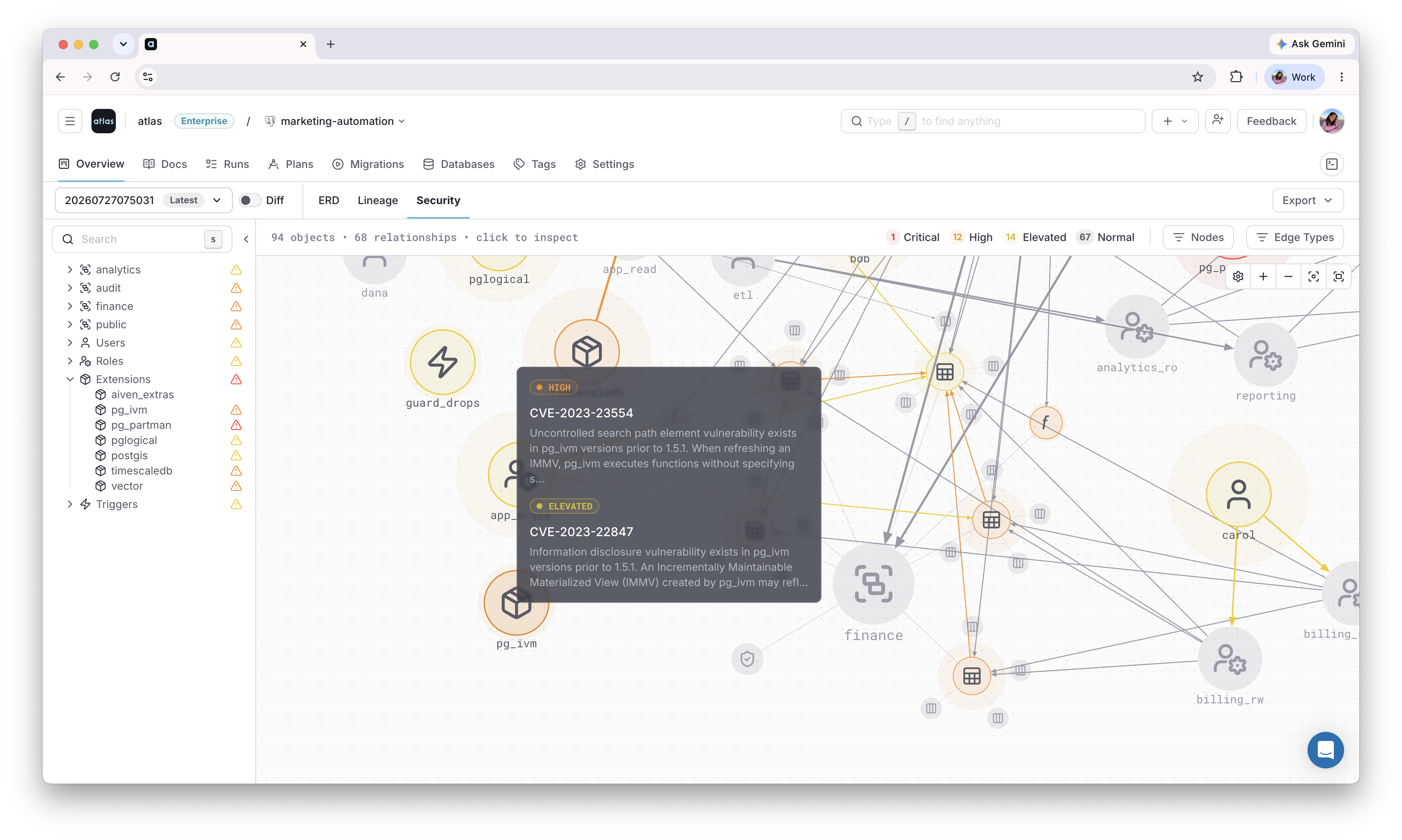
Visualize on Atlas Registry
Once these roles, grants, and policies are applied, use the Security Graph to see how they connect across the repository, and flag any risky access patterns automatically.
Next Steps
- Versioned workflow - manage security changes as versioned migration files
- HCL reference - all role and permission attributes
- CI/CD setup - deploy declarative schemas to production
Have questions? Feedback? Find our team on our Discord server or schedule a demo.