Managing ClickHouse Cloud via Atlas
This guide walks you through managing ClickHouse Cloud databases using Atlas, covering connection setup, development database considerations, and best practices for cloud environments.
Prerequisites
Before starting, ensure you have:
- Atlas CLI installed
- A ClickHouse Cloud account and service
- Docker installed (for local development database)
Getting ClickHouse Cloud Connection URL
Step 1: Access Your ClickHouse Cloud Service
Navigate to your ClickHouse Cloud console and locate your service. You'll need to gather the following information: Navigate to the sidebar click "Connect" then a popup will appear with your service endpoint and connection parameters.
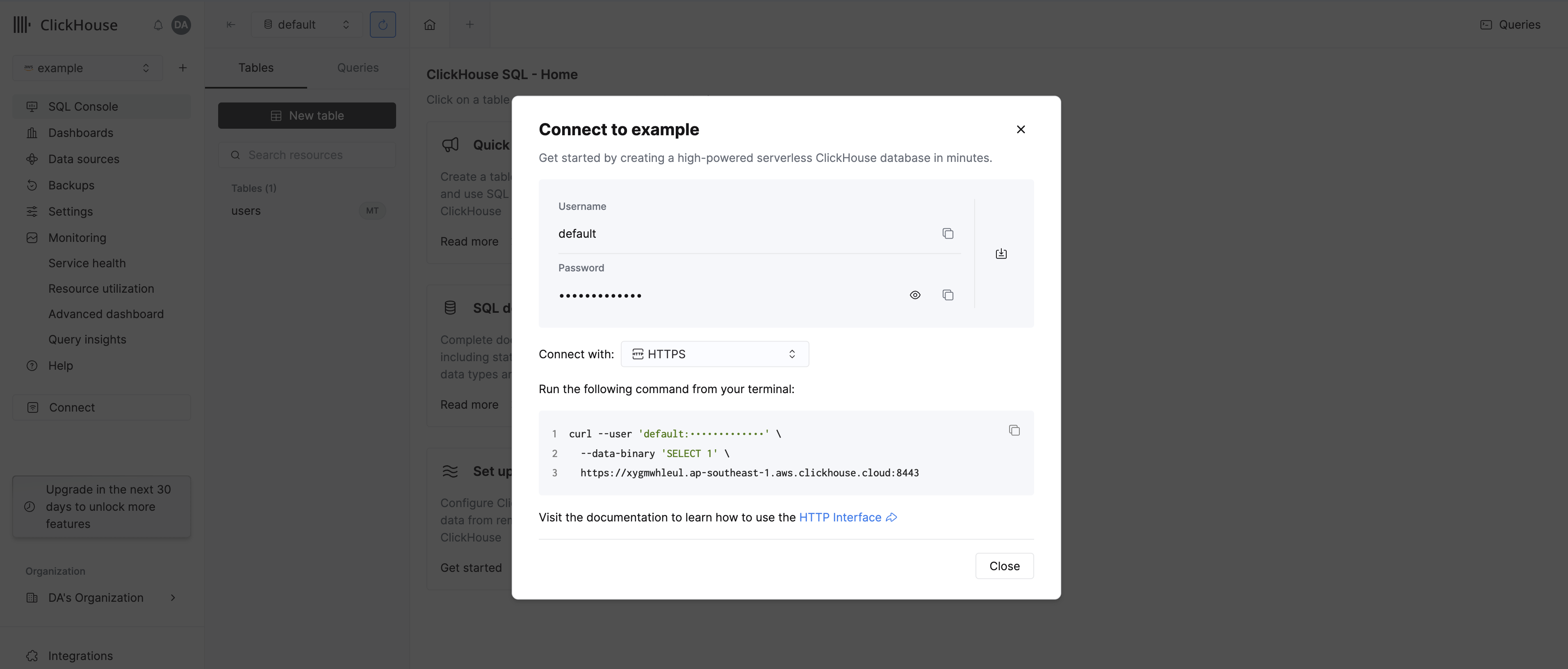
Step 2: Retrieve Connection Details
From your ClickHouse Cloud service page, copy the connection details:
- Host: Your service endpoint (e.g.,
abc123.clickhouse.cloud) - Port: Usually
9440for native protocol - Database: Your database name (default is often
default) - Username: Your ClickHouse Cloud username
- Password: Your ClickHouse Cloud password
Step 3: Construct the Atlas Connection URL
To connect to ClickHouse Cloud, we need to use native protocol port 9440 with SSL enabled:
For example:
clickhouse://myuser:mypassword@abc123.clickhouse.cloud:9440/default?secure=true
Always use secure=true for ClickHouse Cloud connections as they require SSL/TLS encryption.
Step 4: Verify Connection with Atlas
Once you have your connection URL, verify that Atlas can connect to your ClickHouse Cloud service by inspecting the schema:
atlas schema inspect \
  --url "clickhouse://myuser:mypassword@abc123.clickhouse.cloud:9440/default?secure=true"
The output should look like this:
schema "default" {
  engine = sql("Shared")
}
Development Database Setup
Option 1: Use a Separate ClickHouse Cloud Instance (Recommended)
When working with ClickHouse Cloud, the recommended approach is to use a separate ClickHouse Cloud instance/database as your development database. This ensures full compatibility between your development and production environments, eliminating potential differences in engines, features, and behaviors.
Benefits of this approach include:
- Full Compatibility: Dev and production environments are completely identical
- Zero Configuration Differences: Same engines, features, and settings across environments
- Complete Feature Parity: Access to all ClickHouse Cloud features in development
ClickHouse Cloud services automatically idle when not in use:
ClickHouse Cloud's idle feature means your development database won't incur costs when not actively being used, making it economical to maintain a separate dev service.
Option 2: Use a Local ClickHouse Docker Instance
You can also use a local ClickHouse Docker container as your development database. This is a viable option, but requires your schema to be written using OSS-compatible engines.
Why You Should Always Write Schemas in OSS Format
The key insight is: always define your schema using OSS (open-source) engines. This single practice ensures your schema works correctly across both ClickHouse Cloud and local ClickHouse OSS instances.
Here's why this works:
-
ClickHouse Cloud automatically converts OSS engines to their cloud equivalents. When you deploy a schema that uses
MergeTreeto ClickHouse Cloud, it is automatically converted toSharedMergeTreeunder the hood. Similarly, theAtomicdatabase engine is converted toShared. No manual intervention is needed. -
ClickHouse OSS only understands OSS engines. If your schema contains cloud-specific engines like
SharedMergeTreeorShared, the local OSS Docker instance will reject them with an error because these engines simply don't exist in the open-source build.
Schemas inspected from ClickHouse Cloud (via atlas schema inspect) will contain cloud-specific engines (e.g., SharedMergeTree, Shared).
Convert them to their OSS equivalents (e.g., MergeTree, Atomic) before diffing or applying against a local OSS instance.
Engine Reference: Cloud vs OSS
Below is a reference of cloud-specific engines and their OSS equivalents. Use the OSS version in your schema definitions:
| Cloud Engine | OSS Equivalent (use this) |
|---|---|
SharedMergeTree | MergeTree |
SharedReplacingMergeTree | ReplacingMergeTree |
SharedSummingMergeTree | SummingMergeTree |
SharedAggregatingMergeTree | AggregatingMergeTree |
SharedCollapsingMergeTree | CollapsingMergeTree |
SharedVersionedCollapsingMergeTree | VersionedCollapsingMergeTree |
SharedGraphiteMergeTree | GraphiteMergeTree |
SharedCoalescingMergeTree | CoalescingMergeTree |
Shared (database engine) | Atomic (database engine) |
For more details on engine compatibility between OSS and Cloud, refer to the ClickHouse Cloud Compatibility documentation.