Amazon Redshift Database Security as Code (Versioned)
Managing warehouse access through ad-hoc GRANT and REVOKE commands leads to drift, and privileges
scattered across migration files make it hard to answer "who can read this column?" Atlas lets you define
Redshift roles, groups, users, and permissions as code. With the versioned workflow, each change is captured
in a migration file, reviewed by your team, and applied through CI/CD.
This guide covers the versioned workflow. For the declarative approach, see the declarative security guide.
Redshift support, including roles, groups, users, and permissions, is available only to Atlas Pro users. To use this feature, run:
atlas login
Prerequisites
- Atlas installed on your machine (installation guide)
- An Atlas Pro account (run
atlas loginto authenticate) - An Amazon Redshift provisioned cluster or Serverless workgroup, and a second one to use as a dev database
Project Setup
Atlas connects to Redshift over the PostgreSQL wire protocol. Point it at the cluster endpoint, and leave
search_path out of the URL: roles, groups, and users are cluster-wide, so the connection has to be scoped to
the database rather than to a single schema.
export REDSHIFT_URL="redshift://admin:$PROD_PASSWORD@atlas-prod.abc123.us-east-1.redshift.amazonaws.com:5439/analytics"
export REDSHIFT_DEV_URL="redshift://admin:$DEV_PASSWORD@atlas-dev.abc123.us-east-1.redshift.amazonaws.com:5439/analytics"
Roles and permissions are excluded from inspection and schema management by default. Enable them
per-environment with a schema.mode block, and point the environment at a migration directory:
- Atlas DDL (HCL)
- SQL
env "redshift" {
  url = getenv("REDSHIFT_URL")
  dev = getenv("REDSHIFT_DEV_URL")

  schema {
    src = "file://schema.rs.hcl"
    mode {
      roles       = true   // Inspect and manage roles, groups, and users
      permissions = true   // Inspect and manage GRANT / REVOKE
    }
  }

  migration {
    dir = "file://migrations"
  }
}
env "redshift" {
  url = getenv("REDSHIFT_URL")
  dev = getenv("REDSHIFT_DEV_URL")

  schema {
    src = "file://schema.sql"
    mode {
      roles       = true
      permissions = true
    }
  }

  migration {
    dir = "file://migrations"
  }
}
Note that sensitive = ALLOW is not set here. In the versioned workflow, passwords are not written into
migration files, so there is nothing to allow. See Passwords below.
Isolating the Dev Database
Redshift roles, groups, and users are cluster-wide rather than scoped to a database, and migrate diff
replays your migration directory and desired state on the dev database, creating and
dropping roles and users as it goes. A second database on the production cluster shares that cluster's roles
and users, so its teardown would collide with the live ones.
Give the dev environment a cluster of its own instead. A dedicated Serverless workgroup is the cheapest option, since it bills per query and can sit idle between diffs:
aws redshift-serverless create-namespace --namespace-name atlas-dev
aws redshift-serverless create-workgroup \
  --workgroup-name atlas-dev --namespace-name atlas-dev --base-capacity 8
A Serverless workgroup exposes an endpoint just like a provisioned cluster, so the URL keeps the same shape:
export REDSHIFT_DEV_URL="redshift://admin:$DEV_PASSWORD@atlas-dev.123456789012.us-east-1.redshift-serverless.amazonaws.com:5439/analytics"
Either way, keep the dev environment out of your production account's access paths.
The user Atlas connects with is one of them, as are the admin account, IAM and IdP federated identities, and
other teams' roles. A role or user that exists on the cluster but is absent from your desired state is one
migrate diff plans to drop, including the caller's own access. Declare each one with external = true (see
External Roles and Users).
Defining the Desired State
The schema file is the target state Atlas diffs against the migration directory. Let's model a reporting warehouse:
| Name | Kind | Purpose |
|---|---|---|
rpt_readonly | RBAC role | Read-only access to the reporting schema |
rpt_writer | RBAC role | Read-write access for the ELT job, inherits from rpt_readonly |
rpt_analysts | Group | Human analysts, granted a narrower slice of the data |
rpt_etl | User | The ELT service account, a member of rpt_writer |
- Atlas DDL (HCL)
- SQL
schema "reporting" {
}

role "rpt_readonly" {
}

role "rpt_writer" {
  member_of = [role.rpt_readonly]
}

// A group is a role carrying the group marker: Redshift keeps
// CREATE GROUP apart from CREATE ROLE, and only users can be
// members of a group.
role "rpt_analysts" {
  group = true
}

user "rpt_etl" {
  conn_limit = 10
  member_of  = [role.rpt_writer]
}

table "customers" {
  schema = schema.reporting
  column "id" {
    type = int
    null = false
  }
  column "email" {
    type = varchar(255)
    null = false
  }
  column "region" {
    type = varchar(64)
    null = false
  }
}

table "orders" {
  schema = schema.reporting
  column "id" {
    type = int
    null = false
  }
  column "customer_id" {
    type = int
    null = false
  }
  column "total" {
    type = int
    null = false
  }
}

// Reporting reads need access to the schema itself.
permission {
  to         = role.rpt_readonly
  for        = schema.reporting
  privileges = [USAGE]
}

// Read-only: SELECT on every table.
permission {
  for_each   = [table.customers, table.orders]
  for        = each.value
  to         = role.rpt_readonly
  privileges = [SELECT]
}

// The ELT job writes orders.
permission {
  to         = role.rpt_writer
  for        = table.orders
  privileges = [INSERT, UPDATE]
}

// Analysts see only one column of customers, so the PII stays hidden.
permission {
  to         = role.rpt_analysts
  for        = table.customers.column.region
  privileges = [SELECT]
}
CREATE SCHEMA "reporting";

CREATE ROLE "rpt_readonly";

CREATE ROLE "rpt_writer";
GRANT ROLE "rpt_readonly" TO ROLE "rpt_writer";

CREATE GROUP "rpt_analysts";

CREATE USER "rpt_etl" PASSWORD DISABLE CONNECTION LIMIT 10;
GRANT ROLE "rpt_writer" TO "rpt_etl";

CREATE TABLE "reporting"."customers" (
  "id" integer NOT NULL,
  "email" character varying(255) NOT NULL,
  "region" character varying(64) NOT NULL
);

CREATE TABLE "reporting"."orders" (
  "id" integer NOT NULL,
  "customer_id" integer NOT NULL,
  "total" integer NOT NULL
);

-- Reporting reads need access to the schema itself.
GRANT USAGE ON SCHEMA "reporting" TO ROLE "rpt_readonly";

-- Read-only: SELECT on every table.
GRANT SELECT ON TABLE "reporting"."customers" TO ROLE "rpt_readonly";
GRANT SELECT ON TABLE "reporting"."orders" TO ROLE "rpt_readonly";

-- The ELT job writes orders.
GRANT INSERT, UPDATE ON TABLE "reporting"."orders" TO ROLE "rpt_writer";

-- Analysts see only one column of customers.
GRANT SELECT ("region") ON TABLE "reporting"."customers" TO GROUP "rpt_analysts";
- Roles, groups, and users - A
roleblock is an RBAC role, the same block withgroup = trueis a group, and auserblock is a login user.member_ofbuilds the hierarchy across all three. - Grantees -
totakes a reference to arole(RBAC role or group), auser, or thePUBLICkeyword. - Targets -
fortakes a schema, table, view, materialized view, function, procedure, or a single column. - Grant option -
grantable = trueaddsWITH GRANT OPTION, which Redshift accepts only for a user grantee. for_eachkeeps permissions DRY: define the grant once, and Atlas expands it for every table at plan time.
Generating the Initial Migration
Run atlas migrate diff to generate the first migration file:
atlas migrate diff add_security --env redshift
Atlas creates a migration directory with the generated SQL and a checksum file:
migrations/
├── 20260803120000_add_security.sql
└── atlas.sum
A role, a group, and a user each get the statement Redshift requires, and each grant names its grantee the way the kind requires: a role and a group need their keyword, a user takes a bare name.
-- Create group "rpt_analysts"
CREATE GROUP "rpt_analysts";
-- Create role "rpt_readonly"
CREATE ROLE "rpt_readonly";
-- Create role "rpt_writer"
CREATE ROLE "rpt_writer";
-- Add "rpt_writer" to "rpt_readonly"
GRANT ROLE "rpt_readonly" TO ROLE "rpt_writer";
-- Create user "rpt_etl"
CREATE USER "rpt_etl" PASSWORD DISABLE CONNECTION LIMIT 10;
-- Add "rpt_etl" to "rpt_writer"
GRANT ROLE "rpt_writer" TO "rpt_etl";
-- Add new schema named "reporting"
CREATE SCHEMA "reporting";
-- Grant on schema "reporting" to "rpt_readonly"
GRANT USAGE ON SCHEMA "reporting" TO ROLE "rpt_readonly";
-- Create "customers" table
CREATE TABLE "reporting"."customers" ("id" integer NOT NULL ENCODE AZ64, "email" character varying(255) NOT NULL ENCODE LZO, "region" character varying(64) NOT NULL ENCODE LZO) DISTSTYLE AUTO SORTKEY AUTO;
-- Grant on table "customers" to "rpt_readonly"
GRANT SELECT ON TABLE "reporting"."customers" TO ROLE "rpt_readonly";
-- Grant on column "region" on table "customers" to "rpt_analysts"
GRANT SELECT ("region") ON TABLE "reporting"."customers" TO GROUP "rpt_analysts";
-- Create "orders" table
CREATE TABLE "reporting"."orders" ("id" integer NOT NULL ENCODE AZ64, "customer_id" integer NOT NULL ENCODE AZ64, "total" integer NOT NULL ENCODE AZ64) DISTSTYLE AUTO SORTKEY AUTO;
-- Grant on table "orders" to "rpt_readonly"
GRANT SELECT ON TABLE "reporting"."orders" TO ROLE "rpt_readonly";
-- Grant on table "orders" to "rpt_writer"
GRANT INSERT, UPDATE ON TABLE "reporting"."orders" TO ROLE "rpt_writer";
Because the file is plain SQL, the security change is reviewable in a pull request: a reviewer sees exactly which role or user gains which privilege, on which column, before anything runs against the cluster.
Applying Migrations
Apply the directory to the target cluster:
atlas migrate apply --env redshift
Migrating to version 20260803120000 (1 migration in total):

  -- migrating version 20260803120000
    -> CREATE GROUP "rpt_analysts"
    -> CREATE ROLE "rpt_readonly"
    -> CREATE ROLE "rpt_writer"
    -> GRANT ROLE "rpt_readonly" TO ROLE "rpt_writer"
    -> CREATE USER "rpt_etl" PASSWORD DISABLE CONNECTION LIMIT 10
    -> GRANT ROLE "rpt_writer" TO "rpt_etl"
    -> CREATE SCHEMA "reporting"
    -> GRANT USAGE ON SCHEMA "reporting" TO ROLE "rpt_readonly"
    -> CREATE TABLE "reporting"."customers" ( ... )
    -> GRANT SELECT ON TABLE "reporting"."customers" TO ROLE "rpt_readonly"
    -> GRANT SELECT ("region") ON TABLE "reporting"."customers" TO GROUP "rpt_analysts"
    -> CREATE TABLE "reporting"."orders" ( ... )
    -> GRANT SELECT ON TABLE "reporting"."orders" TO ROLE "rpt_readonly"
    -> GRANT INSERT, UPDATE ON TABLE "reporting"."orders" TO ROLE "rpt_writer"
  -- ok

  -------------------------
  -- 1 migration
  -- 14 sql statements
With Atlas Cloud, push the migration directory and deploy it from any CI/CD platform:
atlas migrate push app --env redshift
Making Incremental Changes
When requirements change, update the schema file and generate a new migration. Atlas computes only the diff.
Say the analysts now need whole rows from customers instead of a single column, and the ELT account no
longer needs a connection cap:
- Atlas DDL (HCL)
- SQL
user "rpt_etl" {
  member_of = [role.rpt_writer]
}

permission {
  to         = role.rpt_analysts
  for        = table.customers
  privileges = [SELECT]
}
CREATE USER "rpt_etl" PASSWORD DISABLE;
GRANT ROLE "rpt_writer" TO "rpt_etl";

GRANT SELECT ON TABLE "reporting"."customers" TO GROUP "rpt_analysts";
Generate the incremental migration:
atlas migrate diff widen_analyst_access --env redshift
Atlas generates only what changed, in the order Redshift accepts. Unsetting an attribute plans its negative form, and the revoke is planned before the grant, since a grantee holding column privileges cannot be granted the table-level ones:
-- Modify user "rpt_etl"
ALTER USER "rpt_etl" CONNECTION LIMIT UNLIMITED;
-- Revoke on column "region" on table "customers" from "rpt_analysts"
REVOKE SELECT ("region") ON TABLE "reporting"."customers" FROM GROUP "rpt_analysts";
-- Grant on table "customers" to "rpt_analysts"
GRANT SELECT ON TABLE "reporting"."customers" TO GROUP "rpt_analysts";
The migration directory now holds both files. The sum of all migrations is the current security state:
migrations/
├── 20260803120000_add_security.sql
├── 20260803130000_widen_analyst_access.sql
└── atlas.sum
Removing Access
Deleting a role or user from the schema file plans its teardown in the order the cluster enforces: its privileges are revoked first, and a member is dropped before the roles it belongs to, since Redshift refuses to drop a role or user that still holds a privilege or is still granted to another one.
-- Revoke on table "customers" from "rpt_analysts"
REVOKE SELECT ON TABLE "reporting"."customers" FROM GROUP "rpt_analysts";
-- Drop group "rpt_analysts"
DROP GROUP "rpt_analysts";
Passwords
Atlas writes a real password only when applying in place, so a secret never lands in a versioned migration
file. CREATE USER requires the clause either way, so a user planned into a migration file is created with
PASSWORD DISABLE:
-- Create user "rpt_etl"
CREATE USER "rpt_etl" PASSWORD DISABLE CONNECTION LIMIT 10;
A change to a password alone therefore produces no statement in the versioned workflow. Set the credential
out of band, or manage it in the declarative workflow with
sensitive = ALLOW and a runtimevar secret. Federated access avoids the
question entirely: create the user with external = true and let IAM or your IdP authenticate it.
Redshift rejects a superuser whose password is disabled, so a user with superuser = true cannot be planned
into a migration file without one. For the same reason, dropping a superuser has no reverse statement, because
the password needed to re-create it cannot be inspected.
External Roles and Users
A cluster carries identities Atlas did not create: the admin account, IAM and IdP federated identities, and
roles owned by other teams. Mark them external = true and Atlas will reference them in grants and
memberships without ever planning a CREATE, ALTER, or DROP for them:
// The cluster admin, and the identity Atlas connects with.
user "admin" {
  external = true
}

// A role owned by another team.
role "corp_analysts" {
  external = true
}

role "rpt_readonly" {
  member_of = [role.corp_analysts]
}
The resulting migration contains only the membership, never a CREATE ROLE for corp_analysts:
-- Create role "rpt_readonly"
CREATE ROLE "rpt_readonly";
-- Add "rpt_readonly" to "corp_analysts"
GRANT ROLE "corp_analysts" TO ROLE "rpt_readonly";
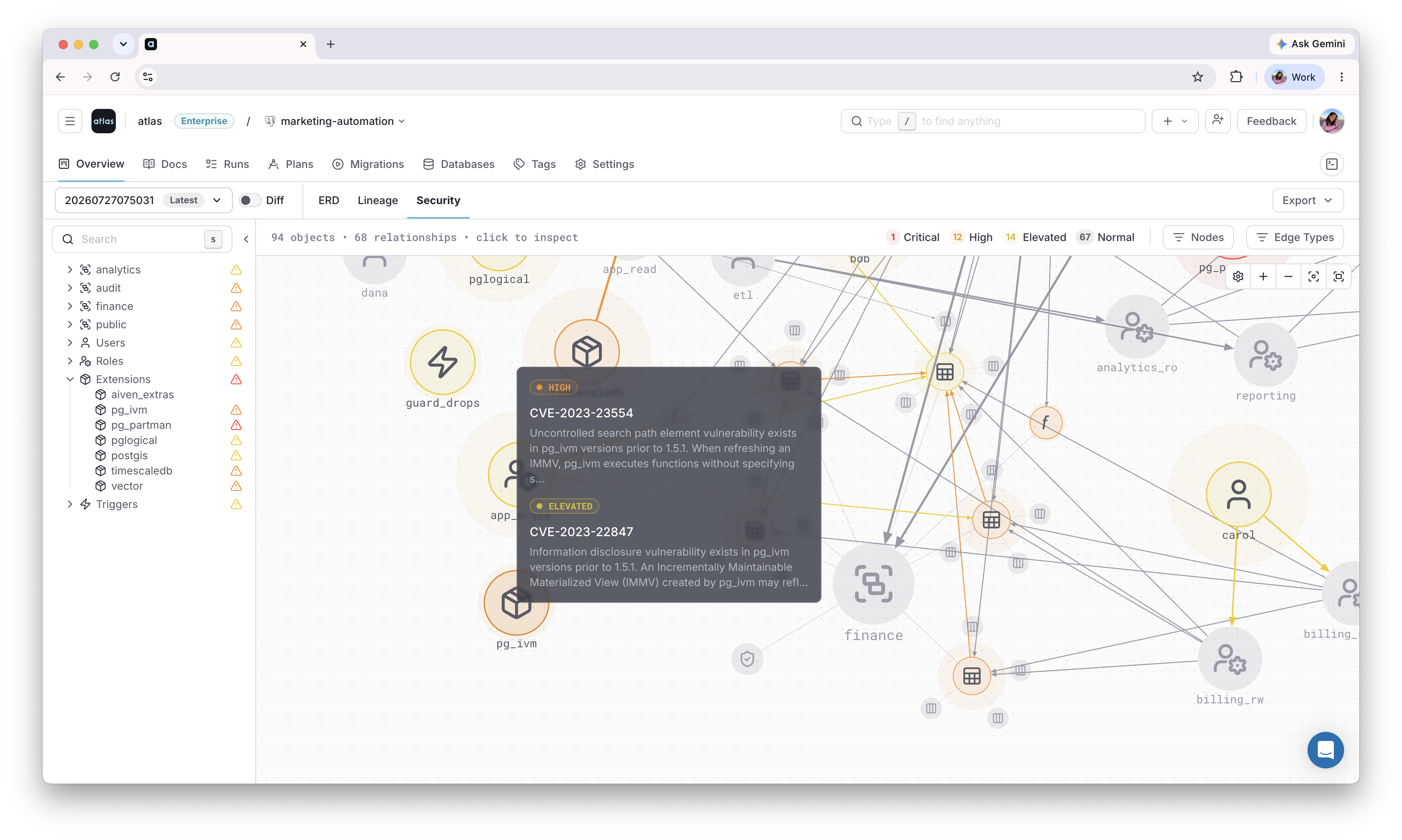
Visualize on Atlas Registry
Once these roles, groups, and grants are applied, use the Security Graph to see how they connect across the repository, and flag any risky access patterns automatically.
Next Steps
- Declarative workflow - describe the desired state and let Atlas figure out the diff
- Redshift schema migrations - inspect, diff, and apply Redshift schemas
- HCL reference - all role, user, and permission attributes
- CI/CD setup - deploy versioned migrations to production
Have questions? Feedback? Find our team on our Discord server or schedule a demo.