Oracle Database Security as Code (Declarative)
Oracle is a trademark of Oracle Corporation. Atlas is not affiliated with or endorsed by Oracle.
Managing Oracle access control through ad-hoc GRANT and REVOKE statements often leads to drift. Privileges
accumulate across scripts and sessions, making it difficult to know with certainty who can touch what. Atlas lets you
define roles and privileges alongside your tables as code, then plans the exact GRANT/REVOKE statements
needed to bring the database in line with that desired state.
This guide covers the declarative workflow: you describe the desired state and run atlas schema apply. For
migration files reviewed in CI/CD, see the versioned workflow.
The Oracle driver and role/permission management are available only to Atlas Pro users. To use this feature, run:
atlas login
Prerequisites
- Docker
- Atlas installed with the Oracle driver:
- macOS + Linux
- Docker
- Windows
To download and install the custom release of the Atlas CLI, simply run the following in your terminal:
curl -sSf https://atlasgo.sh | ATLAS_FLAVOR="oracle" shTo pull the Atlas image and run it as a Docker container:
docker pull arigaio/atlas:latest-extended
docker run --rm arigaio/atlas:latest-extended --help
If the container needs access to the host network or a local directory, use the
--net=hostflag and mount the desired directory:docker run --rm --net=host \
-v $(pwd)/migrations:/migrations \
arigaio/atlas:latest-extended migrate apply \
--url "oracle://PDBADMIN:Pssw0rd0995@localhost:1521/FREEPDB1"Download the custom release and move the atlas binary to a file location on your system PATH.
- An Atlas Pro account (run
atlas loginto authenticate)
Setting Up the Database
Start a local Oracle instance. The free:latest-lite image is the smallest and fastest to boot:
docker run --rm \
  -e ORACLE_PWD=Pssw0rd0995 \
  -p 1521:1521 \
  --name atlas-oracle \
  -d container-registry.oracle.com/database/free:latest-lite
Oracle images are larger than most and take longer to initialize. Wait until the database is ready before continuing:
docker logs -f atlas-oracle 2>&1 | grep -m1 "DATABASE IS READY TO USE"
Following Oracle's principle of least privilege,
connect Atlas as a dedicated deploy user that owns the application schema rather than as a DBA. Since
a user can create objects and grant privileges on its own schema
with no special privilege, it needs only a handful of grants rather than granting ANY privileges or the
DBA role.
Create it once (a one-time privileged step):
docker exec -i atlas-oracle sqlplus \
  -S 'sys/Pssw0rd0995@localhost:1521/FREEPDB1' AS SYSDBA <<SQL
CREATE USER "APP" IDENTIFIED BY Pssw0rd0995;
GRANT CREATE SESSION, CREATE TABLE, CREATE ROLE TO "APP";  -- add CREATE VIEW / CREATE SEQUENCE if your schema uses them
GRANT SELECT_CATALOG_ROLE TO "APP";                        -- read the data dictionary for inspection
GRANT EXECUTE ON SYS.DBMS_LOCK TO "APP";                   -- advisory lock during apply
ALTER USER "APP" QUOTA UNLIMITED ON USERS;                 -- your data tablespace
SQL
CREATE TABLE/CREATE ROLEletAPPmanage tables in its own schema and create roles (which are database-global in Oracle). Creating a role usingWITH ADMIN OPTIONallows you to then drop the role later without needing extra privileges.SELECT_CATALOG_ROLElets Atlas read the data dictionary to inspect roles and grants.EXECUTE ON SYS.DBMS_LOCKbacks the advisory lock Atlas takes during apply. Without it you'll seePLS-00201: identifier 'DBMS_LOCK' must be declared.
The runtime/application accounts stay separate and connect using the roles defined below with Oracle's recommended separation of duties.
Inject the deploy user's password from a secret manager rather than a file; see Atlas's guide on managing database credentials.
Configuring Atlas
Roles and permissions are excluded from inspection and planning by default. Enable them with a schema.mode
block in your project configuration:
env "local" {
  schemas = ["APP"]
  url     = "oracle://APP:Pssw0rd0995@localhost:1521/FREEPDB1?mode=database"
  dev     = "docker://oracle/free:latest-lite?t=10m&mode=database"
  schema {
    src = "file://schema.hcl"
    mode {
      roles       = true   // Inspect and manage roles
      permissions = true   // Inspect and manage GRANT / REVOKE
    }
  }
}
roles = true/permissions = trueinclude roles andGRANT/REVOKEstatements in planning.?mode=databaseon both URLs is required. Roles are database-global objects, not schema-scoped; Atlas can only inspect and plan them when connected in database mode. Omit it and Atlas won't see existing roles, so every apply would try to re-create them.- The
devdatabase is a temporary, throwaway instance Atlas uses to compute the diff.
Defining Roles
Let's model an HR application with four roles:
| Role | Purpose |
|---|---|
APP_READONLY | Read-only access for reporting |
APP_WRITER | Read-write access, inherits APP_READONLY |
APP_PAYROLL | May update salaries only |
APP_ADMIN | Structural changes, inherits APP_WRITER |
schema "APP" {
}

role "APP_READONLY" {
}

role "APP_WRITER" {
  member_of = [role.APP_READONLY]
}

role "APP_PAYROLL" {
}

role "APP_ADMIN" {
  member_of = [role.APP_WRITER]
}
- Roles, not users - Oracle roles group privileges and are granted to users or other roles. Atlas creates
them with
NOT IDENTIFIED(no password), the standard form for application roles. - Inheritance -
member_ofmaps toGRANT role TO role.APP_WRITERinherits everything granted toAPP_READONLY, andAPP_ADMINinherits fromAPP_WRITER. - Identifiers - Oracle folds unquoted names to uppercase; Atlas always quotes them, so
APP_READONLYstaysAPP_READONLY.
Defining Permissions
Permissions reference the tables they apply to, so define the tables first, then attach the grants.
table "EMPLOYEES" {
  schema = schema.APP
  column "ID" {
    null = false
    type = NUMBER
  }
  column "NAME" {
    null = false
    type = VARCHAR2(100)
  }
  column "EMAIL" {
    null = false
    type = VARCHAR2(200)
  }
  column "SALARY" {
    null = true
    type = NUMBER
  }
  primary_key "PK_EMPLOYEES" {
    columns = [column.ID]
  }
}

table "DEPARTMENTS" {
  schema = schema.APP
  column "ID" {
    null = false
    type = NUMBER
  }
  column "NAME" {
    null = false
    type = VARCHAR2(100)
  }
  primary_key "PK_DEPARTMENTS" {
    columns = [column.ID]
  }
}

// Read-only: SELECT on all tables
permission {
  for_each   = [table.EMPLOYEES, table.DEPARTMENTS]
  for        = each.value
  to         = role.APP_READONLY
  privileges = ["SELECT"]
}

// Writer: full DML on EMPLOYEES
permission {
  to         = role.APP_WRITER
  for        = table.EMPLOYEES
  privileges = ["INSERT", "UPDATE", "DELETE"]
}

// Payroll: may update ONLY the SALARY column
permission {
  to         = role.APP_PAYROLL
  for        = table.EMPLOYEES.column.SALARY
  privileges = ["UPDATE"]
}

// Admin: may ALTER the table structure
permission {
  to         = role.APP_ADMIN
  for        = table.EMPLOYEES
  privileges = ["ALTER"]
}
for_each implements DRY permissions: define the grant once, and Atlas expands it for every table at plan time.
Note the primary_key block requires a name (Oracle constraints are named).
Oracle accepts a column list only for the INSERT, UPDATE, and REFERENCES privileges. SELECT and
DELETE always apply to the whole table and cannot be scoped to columns. The APP_PAYROLL grant above is
column-level UPDATE, which is exactly the case Oracle allows.
WITH GRANT OPTION and rolesAtlas exposes grantable = true (Oracle's WITH GRANT OPTION) on permission blocks, but Oracle rejects it
when the grantee is a role (ORA-01926). Use it only when granting to a user.
Applying Changes
Run atlas schema apply to diff the desired state against the live database and execute the changes:
atlas schema apply --env local
Atlas produces a plan with every role, membership, table, and grant it will create - ordered so roles and tables come before the grants that depend on them:
Planning migration statements (13 in total):

  -- create role "app_readonly":
    -> CREATE ROLE "APP_READONLY" NOT IDENTIFIED
  -- create role "app_writer":
    -> CREATE ROLE "APP_WRITER" NOT IDENTIFIED
  -- grant role "app_readonly" to "app_writer":
    -> GRANT "APP_READONLY" TO "APP_WRITER"
  -- create role "app_admin":
    -> CREATE ROLE "APP_ADMIN" NOT IDENTIFIED
  -- grant role "app_writer" to "app_admin":
    -> GRANT "APP_WRITER" TO "APP_ADMIN"
  -- create role "app_payroll":
    -> CREATE ROLE "APP_PAYROLL" NOT IDENTIFIED
  -- add new table named "departments":
    -> CREATE TABLE "APP"."DEPARTMENTS" ( ... )
  -- grant on table "departments" to "app_readonly":
    -> GRANT SELECT ON "APP"."DEPARTMENTS" TO "APP_READONLY"
  -- add new table named "employees":
    -> CREATE TABLE "APP"."EMPLOYEES" ( ... )
  -- grant on table "employees" to "app_admin":
    -> GRANT ALTER ON "APP"."EMPLOYEES" TO "APP_ADMIN"
  -- grant on table "employees" to "app_readonly":
    -> GRANT SELECT ON "APP"."EMPLOYEES" TO "APP_READONLY"
  -- grant on table "employees" to "app_writer":
    -> GRANT DELETE, INSERT, UPDATE ON "APP"."EMPLOYEES" TO "APP_WRITER"
  -- grant on column "salary" of table "employees" to "app_payroll":
    -> GRANT UPDATE ("SALARY") ON "APP"."EMPLOYEES" TO "APP_PAYROLL"

-------------------------------------------

? Approve or abort the plan:
  ▸ Approve and apply
    Abort
After approving, running it again is a no-op. Atlas reports Schema is synced, no changes to be made.
Changing Permissions
Suppose security requirements change and now writers should no longer be able to delete employees.
Remove DELETE from the APP_WRITER grant in schema.hcl:
  permission {
    to         = role.APP_WRITER
    for        = table.EMPLOYEES
-   privileges = ["INSERT", "UPDATE", "DELETE"]
+   privileges = ["INSERT", "UPDATE"]
  }
Re-run atlas schema apply. Atlas plans exactly the REVOKE needed - nothing else:
Planning migration statements (1 in total):

  -- revoke on table "employees" from "app_writer":
    -> REVOKE DELETE ON "APP"."EMPLOYEES" FROM "APP_WRITER"
Oracle cannot revoke a single column from a multi-column grant, as REVOKE drops the whole privilege on the
table. If APP_PAYROLL held UPDATE on both NAME and SALARY and you removed SALARY, Atlas plans a
REVOKE UPDATE followed by a fresh GRANT UPDATE ("NAME") to land the remaining column. Atlas handles the
re-grant for you.
Inspecting the Result
Confirm the live state at any time with atlas schema inspect:
atlas schema inspect --env local
The output reflects every role, membership, table, and grant. Run it on any environment to confirm it matches the desired state.
Visualize on Atlas Registry
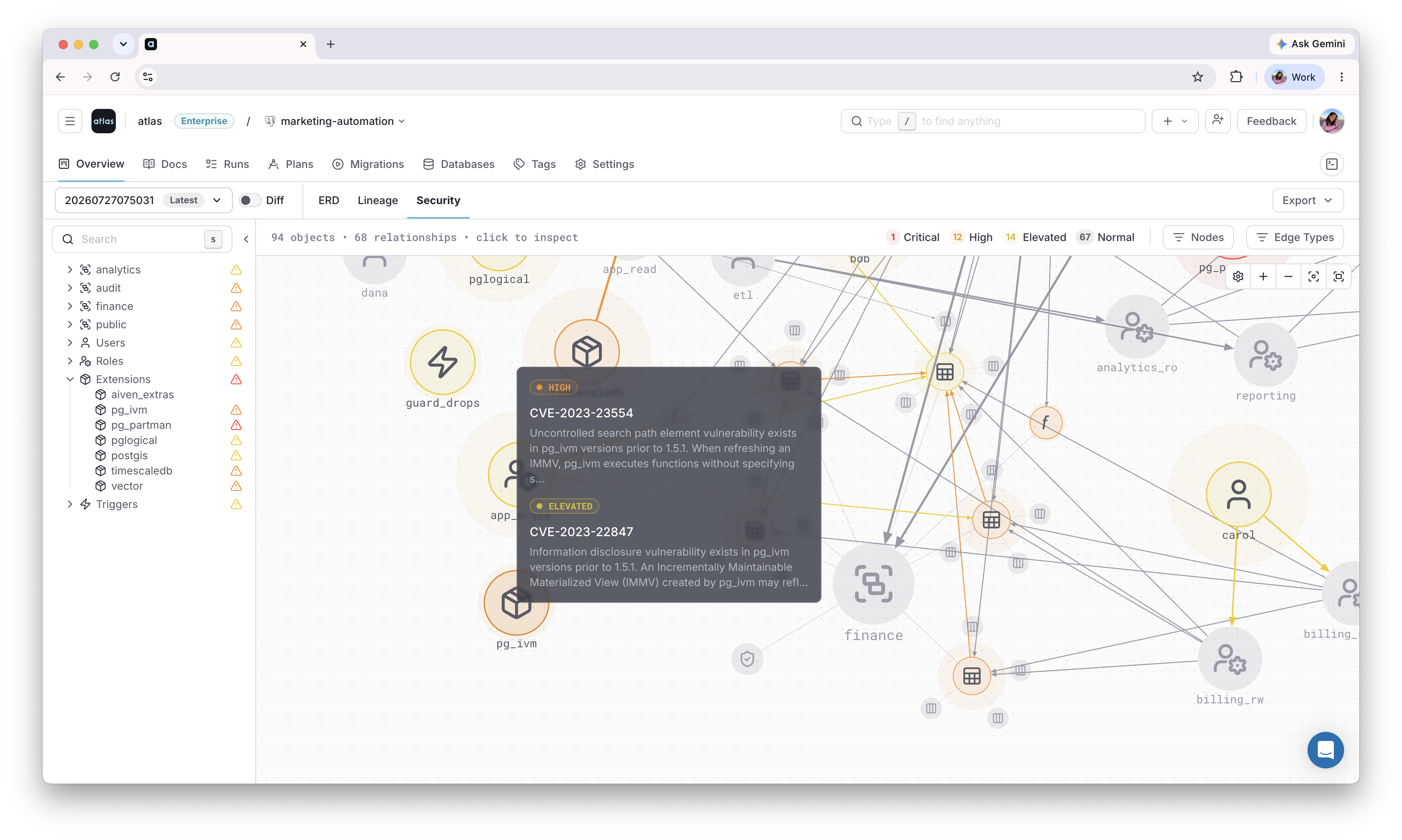
Once these roles, privileges, and grants are applied, use the Security Graph to see how they connect across the repository, and flag any risky access patterns automatically.
Next Steps
- Automatic migrations for Oracle - manage the rest of your Oracle schema as code
- CI/CD setup - deploy declarative schemas to production
- HCL reference - all role and permission attributes
Have questions? Feedback? Find our team on our Discord server or schedule a demo.