SQL Server Database Security as Code (Versioned)
Managing database security through ad-hoc GRANT and REVOKE commands leads to drift, and permissions
scattered across migration files make it hard to answer "who can access what?" Atlas lets you define
roles, users, and permissions as code. With the versioned workflow, each change is captured in a migration
file, reviewed by your team, and applied through CI/CD.
This guide covers the versioned workflow. For the declarative approach, see the declarative security guide.
Roles, users, and permissions are available only to Atlas Pro users. To use this feature, run:
atlas login
Prerequisites
- Docker
- Atlas installed on your machine (installation guide)
- An Atlas Pro account (run
atlas loginto authenticate)
Project Setup
Start by spinning up a local SQL Server database using atlas tool docker:
export DATABASE_URL=$(atlas tool docker --url "docker://sqlserver/2022-latest/demo?mode=database" --name my-db)
When you're done, stop the container with atlas tool docker kill --name my-db.
Create an atlas.hcl configuration file with roles and permissions enabled:
- Atlas DDL (HCL)
- SQL
env "local" {
  url = getenv("DATABASE_URL")
  dev = "docker://sqlserver/2022-latest/dev?mode=database"
  schema {
    src = "file://schema.ms.hcl"
    mode {
      roles       = true   // Inspect and manage roles and users
      permissions = true   // Inspect and manage GRANT / REVOKE
    }
  }
  migration {
    dir = "file://migrations"
  }
}
env "local" {
  url = getenv("DATABASE_URL")
  dev = "docker://sqlserver/2022-latest/dev?mode=database"
  schema {
    src = "file://schema.sql"
    mode {
      roles       = true
      permissions = true
    }
  }
  migration {
    dir = "file://migrations"
  }
}
Defining the Desired State
The schema file is the target state Atlas diffs against the migration directory. Let's model a SaaS order management application with tiered access:
| Role | Purpose |
|---|---|
app_readonly | Read-only access for reporting dashboards |
app_writer | Read-write access for the application backend, inherits from app_readonly |
app_admin | Full administrative access, inherits from app_writer |
- Atlas DDL (HCL)
- SQL
role "app_readonly" {
}

role "app_writer" {
  member_of = [role.app_readonly]
}

role "app_admin" {
  member_of = [role.app_writer]
}

table "users" {
  schema = schema.dbo
  column "id" {
    type = int
    identity {
      seed      = 1
      increment = 1
    }
  }
  column "name" {
    type = nvarchar(255)
    null = false
  }
  column "email" {
    type = nvarchar(255)
    null = false
  }
  primary_key {
    columns = [column.id]
  }
}

table "products" {
  schema = schema.dbo
  column "id" {
    type = int
    identity {
      seed      = 1
      increment = 1
    }
  }
  column "name" {
    type = nvarchar(255)
    null = false
  }
  column "price" {
    type = decimal(10,2)
    null = false
  }
  primary_key {
    columns = [column.id]
  }
}

table "orders" {
  schema = schema.dbo
  column "id" {
    type = int
    identity {
      seed      = 1
      increment = 1
    }
  }
  column "user_id" {
    type = int
    null = false
  }
  column "product_id" {
    type = int
    null = false
  }
  column "total" {
    type = decimal(10,2)
    null = false
  }
  primary_key {
    columns = [column.id]
  }
  foreign_key "fk_order_user" {
    columns     = [column.user_id]
    ref_columns = [table.users.column.id]
  }
  foreign_key "fk_order_product" {
    columns     = [column.product_id]
    ref_columns = [table.products.column.id]
  }
}

schema "dbo" {
}

// Read-only: SELECT on all tables
permission {
  for_each   = [table.orders, table.products, table.users]
  for        = each.value
  to         = role.app_readonly
  privileges = [SELECT]
}

// Writer: SELECT, INSERT, UPDATE on orders and products
permission {
  for_each   = [table.orders, table.products]
  for        = each.value
  to         = role.app_writer
  privileges = [SELECT, INSERT, UPDATE]
}
-- Create roles
CREATE ROLE [app_readonly];

CREATE ROLE [app_writer];
ALTER ROLE [app_readonly] ADD MEMBER [app_writer];

CREATE ROLE [app_admin];
ALTER ROLE [app_writer] ADD MEMBER [app_admin];

-- Create tables
CREATE TABLE [dbo].[users] (
  [id] int IDENTITY (1, 1) NOT NULL,
  [name] nvarchar(255) NOT NULL,
  [email] nvarchar(255) NOT NULL,
  CONSTRAINT [PK_users] PRIMARY KEY CLUSTERED ([id] ASC)
);

CREATE TABLE [dbo].[products] (
  [id] int IDENTITY (1, 1) NOT NULL,
  [name] nvarchar(255) NOT NULL,
  [price] decimal(10,2) NOT NULL,
  CONSTRAINT [PK_products] PRIMARY KEY CLUSTERED ([id] ASC)
);

CREATE TABLE [dbo].[orders] (
  [id] int IDENTITY (1, 1) NOT NULL,
  [user_id] int NOT NULL,
  [product_id] int NOT NULL,
  [total] decimal(10,2) NOT NULL,
  CONSTRAINT [PK_orders] PRIMARY KEY CLUSTERED ([id] ASC),
  CONSTRAINT [fk_order_user] FOREIGN KEY ([user_id]) REFERENCES [dbo].[users] ([id]) ON UPDATE NO ACTION ON DELETE NO ACTION,
  CONSTRAINT [fk_order_product] FOREIGN KEY ([product_id]) REFERENCES [dbo].[products] ([id]) ON UPDATE NO ACTION ON DELETE NO ACTION
);

-- Read-only: SELECT on all tables
GRANT SELECT ON [dbo].[orders] TO [app_readonly];
GRANT SELECT ON [dbo].[products] TO [app_readonly];
GRANT SELECT ON [dbo].[users] TO [app_readonly];

-- Writer: read-write on orders and products
GRANT INSERT, SELECT, UPDATE ON [dbo].[orders] TO [app_writer];
GRANT INSERT, SELECT, UPDATE ON [dbo].[products] TO [app_writer];
SQL Server database users can be mapped to roles using the user block with login_name to reference
a server-level Login, and member_of to assign role membership. When using login_name, configure a
dev block with a baseline script to pre-create the Logins on the dev database. See the
HCL reference for details.
Generating the Initial Migration
Run atlas migrate diff to generate the first migration file:
atlas migrate diff add_security --env local
Atlas creates a migration directory with the generated T-SQL and a checksum file:
migrations/
├── 20260311120000_add_security.sql
└── atlas.sum
The generated migration contains every role, grant, and table:
-- Create role "app_readonly"
CREATE ROLE [app_readonly];
-- Create role "app_writer"
CREATE ROLE [app_writer];
-- Add role "app_writer" as member of "app_readonly"
ALTER ROLE [app_readonly] ADD MEMBER [app_writer];
-- Create role "app_admin"
CREATE ROLE [app_admin];
-- Add role "app_admin" as member of "app_writer"
ALTER ROLE [app_writer] ADD MEMBER [app_admin];
-- Create "products" table
CREATE TABLE [dbo].[products] (
  [id] int IDENTITY (1, 1) NOT NULL,
  [name] nvarchar(255) NOT NULL,
  [price] decimal(10,2) NOT NULL,
  CONSTRAINT [PK_products] PRIMARY KEY CLUSTERED ([id] ASC)
);
-- Grant on table "products" to "app_readonly"
GRANT SELECT ON [dbo].[products] TO [app_readonly];
-- Grant on table "products" to "app_writer"
GRANT INSERT, SELECT, UPDATE ON [dbo].[products] TO [app_writer];
-- Create "users" table
CREATE TABLE [dbo].[users] (
  [id] int IDENTITY (1, 1) NOT NULL,
  [name] nvarchar(255) NOT NULL,
  [email] nvarchar(255) NOT NULL,
  CONSTRAINT [PK_users] PRIMARY KEY CLUSTERED ([id] ASC)
);
-- Grant on table "users" to "app_readonly"
GRANT SELECT ON [dbo].[users] TO [app_readonly];
-- Create "orders" table
CREATE TABLE [dbo].[orders] (
  [id] int IDENTITY (1, 1) NOT NULL,
  [user_id] int NOT NULL,
  [product_id] int NOT NULL,
  [total] decimal(10,2) NOT NULL,
  CONSTRAINT [PK_orders] PRIMARY KEY CLUSTERED ([id] ASC),
  CONSTRAINT [fk_order_product] FOREIGN KEY ([product_id]) REFERENCES [dbo].[products] ([id]) ON UPDATE NO ACTION ON DELETE NO ACTION,
  CONSTRAINT [fk_order_user] FOREIGN KEY ([user_id]) REFERENCES [dbo].[users] ([id]) ON UPDATE NO ACTION ON DELETE NO ACTION
);
-- Grant on table "orders" to "app_readonly"
GRANT SELECT ON [dbo].[orders] TO [app_readonly];
-- Grant on table "orders" to "app_writer"
GRANT INSERT, SELECT, UPDATE ON [dbo].[orders] TO [app_writer];
Applying Migrations
Apply to the target database:
atlas migrate apply --env local
Migrating to version 20260311120000 (1 migration in total):

  -- migrating version 20260311120000
    -> CREATE ROLE [app_readonly]
    -> CREATE ROLE [app_writer]
    -> ALTER ROLE [app_readonly] ADD MEMBER [app_writer]
    -> CREATE ROLE [app_admin]
    -> ALTER ROLE [app_writer] ADD MEMBER [app_admin]
    -> CREATE TABLE [dbo].[products] ( ... )
    -> GRANT SELECT ON [dbo].[products] TO [app_readonly]
    -> GRANT INSERT, SELECT, UPDATE ON [dbo].[products] TO [app_writer]
    -> CREATE TABLE [dbo].[users] ( ... )
    -> GRANT SELECT ON [dbo].[users] TO [app_readonly]
    -> CREATE TABLE [dbo].[orders] ( ... )
    -> GRANT SELECT ON [dbo].[orders] TO [app_readonly]
    -> GRANT INSERT, SELECT, UPDATE ON [dbo].[orders] TO [app_writer]
  -- ok

  -------------------------
  -- 1 migration
  -- 13 sql statements
With Atlas Cloud, push your migration directory and deploy from any CI/CD platform:
atlas migrate push app --env local
Making Incremental Changes
When requirements change, update the schema file and generate a new migration. Atlas computes only the
diff. For example, adding an app_support role for the support team:
Update the schema file:
- Atlas DDL (HCL)
- SQL
role "app_support" {
  member_of = [role.app_readonly]
}

// Support can view and update orders
permission {
  to         = role.app_support
  for        = table.orders
  privileges = [SELECT, UPDATE]
}
CREATE ROLE [app_support];
ALTER ROLE [app_readonly] ADD MEMBER [app_support];

-- Support can view and update orders
GRANT SELECT, UPDATE ON [dbo].[orders] TO [app_support];
Generate the incremental migration:
atlas migrate diff add_support_role --env local
Atlas generates only what changed - the new role and its grants:
-- Create role "app_support"
CREATE ROLE [app_support];
-- Add role "app_support" as member of "app_readonly"
ALTER ROLE [app_readonly] ADD MEMBER [app_support];
-- Grant on table "orders" to "app_support"
GRANT SELECT, UPDATE ON [dbo].[orders] TO [app_support];
The migration directory now holds both files. The sum of all migrations represents the current security state:
migrations/
├── 20260311120000_add_security.sql
├── 20260311130000_add_support_role.sql
└── atlas.sum
Adding Functions and Procedures
Functions and stored procedures can be managed alongside their permissions. When the application needs a helper function or a maintenance procedure, add them to the schema file and generate a new migration. Atlas computes only the diff.
Update the schema file:
- Atlas DDL (HCL)
- SQL
function "get_order_total" {
  schema = schema.dbo
  lang   = SQL
  arg "@order_id" {
    type = int
  }
  return = decimal(10,2)
  as     = <<-SQL
  BEGIN
    DECLARE @result decimal(10,2);
    SELECT @result = [total] FROM [dbo].[orders] WHERE [id] = @order_id;
    RETURN @result;
  END
  SQL
}

procedure "archive_old_orders" {
  schema = schema.dbo
  lang   = SQL
  arg "@cutoff_days" {
    type = int
  }
  as = <<-SQL
  BEGIN
    DELETE FROM [dbo].[orders] WHERE [id] IN (
      SELECT TOP(@cutoff_days) [id] FROM [dbo].[orders] ORDER BY [id] ASC
    );
  END
  SQL
}

// Function-level: app_readonly can call get_order_total
permission {
  to         = role.app_readonly
  for        = function.get_order_total
  privileges = [EXECUTE]
}

// Procedure-level: only app_admin can call archive_old_orders
permission {
  to         = role.app_admin
  for        = procedure.archive_old_orders
  privileges = [EXECUTE]
}
CREATE FUNCTION [dbo].[get_order_total] (
  @order_id int
) RETURNS decimal(10,2)
AS
BEGIN
  DECLARE @result decimal(10,2);
  SELECT @result = [total] FROM [dbo].[orders] WHERE [id] = @order_id;
  RETURN @result;
END;

CREATE PROCEDURE [dbo].[archive_old_orders] (
  @cutoff_days int
)
AS
BEGIN
  DELETE FROM [dbo].[orders] WHERE [id] IN (
    SELECT TOP(@cutoff_days) [id] FROM [dbo].[orders] ORDER BY [id] ASC
  );
END;

-- Function and procedure grants
GRANT EXECUTE ON OBJECT :: [dbo].[get_order_total] TO [app_readonly];
GRANT EXECUTE ON OBJECT :: [dbo].[archive_old_orders] TO [app_admin];
Generate the incremental migration:
atlas migrate diff add_functions_and_procedures --env local
Atlas generates only what changed, including the GO batch separator that T-SQL requires between
CREATE FUNCTION / CREATE PROCEDURE statements:
-- atlas:delimiter \nGO

-- Create "get_order_total" function
CREATE FUNCTION [dbo].[get_order_total] (
  @order_id int
) RETURNS decimal(10,2)
WITH INLINE = ON, CALLED ON NULL INPUT
AS
BEGIN
  DECLARE @result decimal(10,2);
  SELECT @result = [total] FROM [dbo].[orders] WHERE [id] = @order_id;
  RETURN @result;
END
GO
-- Grant on function "get_order_total" to "app_readonly"
GRANT EXECUTE ON OBJECT :: [dbo].[get_order_total] TO [app_readonly]
GO
-- Create "archive_old_orders" procedure
CREATE PROCEDURE [dbo].[archive_old_orders] (
  @cutoff_days int
)
AS
BEGIN
  DELETE FROM [dbo].[orders] WHERE [id] IN (
    SELECT TOP(@cutoff_days) [id] FROM [dbo].[orders] ORDER BY [id] ASC
  );
END
GO
-- Grant on procedure "archive_old_orders" to "app_admin"
GRANT EXECUTE ON OBJECT :: [dbo].[archive_old_orders] TO [app_admin]
GO
Apply the migration:
atlas migrate apply --env local
Migrating to version 20260311140000 from 20260311130000 (1 migrations in total):

  -- migrating version 20260311140000
    -> CREATE FUNCTION [dbo].[get_order_total] (...) RETURNS decimal(10,2) AS ...
    -> GRANT EXECUTE ON OBJECT :: [dbo].[get_order_total] TO [app_readonly]
    -> CREATE PROCEDURE [dbo].[archive_old_orders] (...) AS ...
    -> GRANT EXECUTE ON OBJECT :: [dbo].[archive_old_orders] TO [app_admin]
  -- ok

  -------------------------
  -- 1 migration
  -- 4 sql statements
SQL Server uses GRANT EXECUTE ON OBJECT :: [schema].[name] for both functions and procedures
(GRANT Object Permissions).
Unlike PostgreSQL, SQL Server does not grant EXECUTE to PUBLIC by default, so you only need
to grant access to the roles that should have it.
Adding User-Defined Types
SQL Server supports
user-defined alias types
that give domain-specific names to base types, improving readability and enforcing consistency across
columns and function signatures. Atlas manages these with type_alias.
Add the alias and update columns and function return types to reference it:
- Atlas DDL (HCL)
- SQL
type_alias "price_type" {
  schema = schema.dbo
  type   = decimal(10,2)
  null   = false
}

table "products" {
  schema = schema.dbo
  // ...
  column "price" {
    type = type_alias.price_type
    null = false
  }
  // ...
}

table "orders" {
  schema = schema.dbo
  // ...
  column "total" {
    type = type_alias.price_type
    null = false
  }
  // ...
}

function "get_order_total" {
  schema = schema.dbo
  lang   = SQL
  // ...
  return = type_alias.price_type
  // ...
}
CREATE TYPE [dbo].[price_type] FROM decimal(10,2) NOT NULL;

CREATE TABLE [dbo].[products] (
  -- ...
  [price] [dbo].[price_type] NOT NULL,
  -- ...
);

CREATE TABLE [dbo].[orders] (
  -- ...
  [total] [dbo].[price_type] NOT NULL,
  -- ...
);
Generate the incremental migration:
atlas migrate diff add_price_type --env local
Atlas creates the alias type and alters existing columns. Because the function return type changed, Atlas drops and recreates the function (along with its grants):
-- atlas:delimiter \nGO

-- Create alias type "price_type"
CREATE TYPE [dbo].[price_type] FROM decimal(10,2) NOT NULL
GO
-- Modify column "total"
ALTER TABLE [dbo].[orders] ALTER COLUMN [total] [dbo].[price_type] NOT NULL
GO
-- Modify column "price"
ALTER TABLE [dbo].[products] ALTER COLUMN [price] [dbo].[price_type] NOT NULL
GO
-- Drop "get_order_total" function
DROP FUNCTION [dbo].[get_order_total]
GO
-- Create "get_order_total" function
CREATE FUNCTION [dbo].[get_order_total] (
  @order_id int
) RETURNS [dbo].[price_type]
WITH INLINE = ON, CALLED ON NULL INPUT
AS
BEGIN
  DECLARE @result decimal(10,2);
  SELECT @result = [total] FROM [dbo].[orders] WHERE [id] = @order_id;
  RETURN @result;
END
GO
-- Grant on function "get_order_total" to "app_readonly"
GRANT EXECUTE ON OBJECT :: [dbo].[get_order_total] TO [app_readonly]
GO
Apply the migration:
atlas migrate apply --env local
Migrating to version 20260311150000 from 20260311140000 (1 migrations in total):

  -- migrating version 20260311150000
    -> CREATE TYPE [dbo].[price_type] FROM decimal(10,2) NOT NULL
    -> ALTER TABLE [dbo].[orders] ALTER COLUMN [total] [dbo].[price_type] NOT NULL
    -> ALTER TABLE [dbo].[products] ALTER COLUMN [price] [dbo].[price_type] NOT NULL
    -> DROP FUNCTION [dbo].[get_order_total]
    -> CREATE FUNCTION [dbo].[get_order_total] (...) RETURNS [dbo].[price_type] AS ...
    -> GRANT EXECUTE ON OBJECT :: [dbo].[get_order_total] TO [app_readonly]
  -- ok

  -------------------------
  -- 1 migration
  -- 6 sql statements
When a column type changes from a base type to an alias type, Atlas generates ALTER TABLE ... ALTER COLUMN statements. If a function return type changes, Atlas drops and recreates the function along
with its permission grants.
Granting Permissions on Types
SQL Server supports GRANT ... ON TYPE
to control who can reference a user-defined type. The REFERENCES permission allows a role to use
the type in its own table or function definitions.
Add a type-level permission to the schema file:
- Atlas DDL (HCL)
- SQL
permission {
  to         = role.app_writer
  for        = type_alias.price_type
  privileges = [REFERENCES]
}
GRANT REFERENCES ON TYPE :: [dbo].[price_type] TO [app_writer];
Generate the incremental migration:
atlas migrate diff add_type_permission --env local
Atlas generates a single grant statement:
-- Grant on type "price_type" to "app_writer"
GRANT REFERENCES ON TYPE :: [dbo].[price_type] TO [app_writer];
Apply the migration:
atlas migrate apply --env local
Migrating to version 20260311160000 from 20260311150000 (1 migrations in total):

  -- migrating version 20260311160000
    -> GRANT REFERENCES ON TYPE :: [dbo].[price_type] TO [app_writer]
  -- ok

  -------------------------
  -- 1 migration
  -- 1 sql statement
The migrations directory now contains five files:
migrations/
├── 20260311120000_add_security.sql
├── 20260311130000_add_support_role.sql
├── 20260311140000_add_functions_and_procedures.sql
├── 20260311150000_add_price_type.sql
├── 20260311160000_add_type_permission.sql
└── atlas.sum
Visualize on Atlas Registry
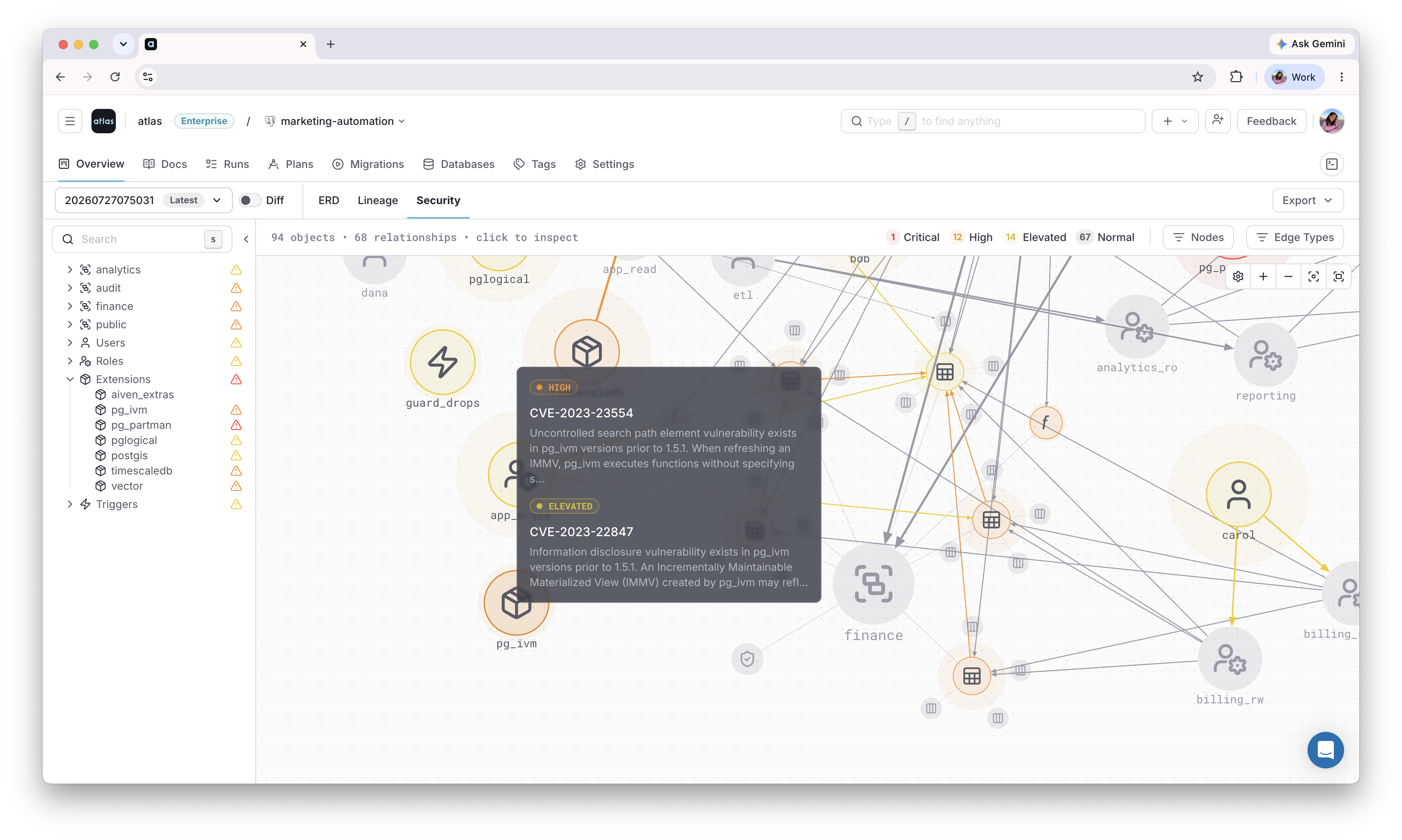
Once these roles, grants, and policies are applied, use the Security Graph to see how they connect across the repository, and flag any risky access patterns automatically.
Next Steps
- Declarative workflow - describe the desired state and let Atlas figure out the diff
- HCL reference - all role and permission attributes
- CI/CD setup - deploy versioned migrations to production
Have questions? Feedback? Find our team on our Discord server or schedule a demo.